

Scano3D — AI Model & Scanner
Maddisys Limited Utilities iPhoneiPad
Scano3D — AI Model & Scanner is a free Utilities app for iPhone and iPad by Maddisys Limited. Requires iOS 26.0. Updated October 24, 2026.
- Price
- Free
- on the App Store
- Size
- 8 MB
- Age 4+
- Updated
- Oct 24
- 2026 · v1.5.4
Screenshots



About Scano3D — AI Model & Scanner
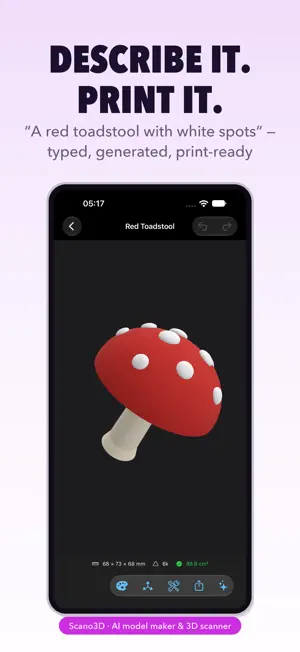
Describe a model and print it. Or scan a real object and make it printable. Scano3D is an AI model maker and 3D scanner for your iPhone. Type what you want and get a watertight, print-ready mesh back — or capture something real with LiDAR and turn it into a model you can slice. CREATE WITH AI • Text to model: "a red toadstool with white spots" becomes a real mesh, not a placeholder • Attach a reference photo and the model is built to match it • Refine by conversation: "make it 80 mm tall", "give it a smiling face" — each turn edits the existing design instead of starting over • The design chat travels with the model, so a refinement weeks later still knows the original brief • Dictate your idea instead of typing it • Generation keeps running while the app is in the background • Typically 20–60 seconds; complex prompts can take up to two minutes SCAN WITH LiDAR • Quick, Detailed and Turntable capture modes • Object isolation: tap an object and the table, floor and background are discarded rather than welded into the model • Crop the capture before it becomes a model • Live mesh overlay so you can see coverage as you go MESH TOOLS • Make Print-Ready in one tap: floaters, holes, welding and simplification, in the right order • Remove floaters — debris is deleted, but large detached parts are snapped back on rather than thrown away • Fill holes, weld vertices, smooth, simplify, clean up • Scale to an exact size in millimetres • Delete individual parts of a multi-body model • Undo and redo survive quitting the app IMPORT & EXPORT • Import STL, 3MF, OBJ, GLB and USDZ • Export STL for printing, 3MF with colour (one object per colour, Bambu-compatible), OBJ, GLB and USDZ • Live readout of triangle count and whether the mesh is watertight AI PROVIDERS • Cloud AI by default — no key, no account, no setup FREE & PRO • Free: 3 exports to start, then 1 more each month, plus 3 Cloud AI actions a month • Scanning, mesh tools, the viewer and import are unrestricted on the free plan • Pro, monthly or yearly with a 7-day free trial: unlimited exports, 40 Cloud AI actions a month, and bring-your-own-key providers • Top-ups: 20 or 50 extra Cloud AI actions as a one-time purchase, never expiring • A failed generation is refunded automatically — you are never charged for a model you didn't receive • Cancel anytime in Settings; you keep Pro until the end of the billing period PRIVACY • Your scans and models stay on the device — nothing is uploaded to be stored • Cloud AI sends your prompt, and your reference image if you attach one, to generate the model. Nothing else leaves the phone • Dictation is transcribed on-device where your locale supports it Scanning needs an iPhone with a LiDAR scanner. Creating with AI, editing, importing and exporting work on any supported iPhone. Terms of Use: https://app.maddisys.co.uk/terms Privacy Policy: https://app.maddisys.co.uk/privacy
What’s new
Version 1.5.4 · Updated October 24, 2026
• Camera access is now requested up front, with a clear explanation, before you start a scan • Fixes a crash some users hit on launch • Fresh App Store screenshots showing the new gallery models
App privacy
The developer, Maddisys Limited, reported these privacy practices to Apple.
Data Not Collected
The developer does not collect any data from this app.