

Remote TV - Remote Control
Khanh Thong Le Utilities iPhoneiPadiPod touch
Remote TV - Remote Control is a free Utilities app for iPhone and iPad by Khanh Thong Le. Requires iOS 15.0. Updated October 6, 2026.
- Price
- Free
- on the App Store
- Size
- 60 MB
- Age 4+
- Updated
- Oct 6
- 2026 · v1.4
Screenshots



About Remote TV - Remote Control
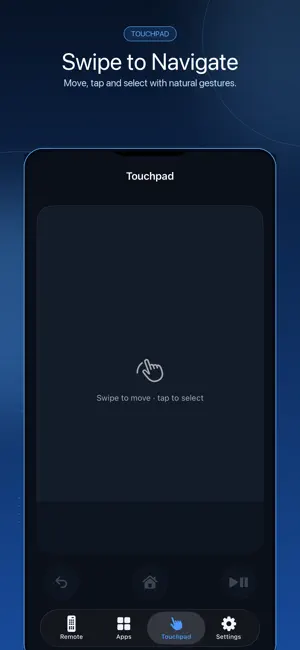
Turn your iPhone into a smart TV remote for Samsung Tizen, LG webOS and Roku TVs on the same Wi-Fi network. REMOTE CONTROLS IN YOUR POCKET Control power, volume, channels, playback, navigation, home, back, mute and more from a clear remote designed for everyday use. NAVIGATE WITH A TOUCHPAD Swipe through menus and tap to select with natural gestures from your iPhone. TYPE FASTER Use your phone keyboard for TV search fields instead of entering text one letter at a time with an on-screen remote. LAUNCH TV APPS Open apps listed by compatible TVs with a single tap. Available apps and controls depend on your TV model and platform. QUICK WI-FI SETUP Remote TV searches for compatible TVs on your local network. Keep your iPhone and TV connected to the same Wi-Fi, then select your TV to begin. You can also add a TV by IP address when needed. TRY DEMO MODE No TV nearby? Explore the remote, touchpad, keyboard and app launcher using the built-in Demo TV. PRIVACY AND ACCESS - No account or sign-up required - No extra remote hardware required - Commands travel from your iPhone to your TV over your local Wi-Fi - Some TVs may ask you to approve the first connection on screen COMPATIBILITY Supports compatible Samsung Tizen, LG webOS and Roku TVs. Feature availability varies by model, firmware and TV settings. Roku devices may need to be added by IP if they are not discovered automatically. Remote TV is an independent app and is not affiliated with, endorsed by or sponsored by Samsung, LG, Roku or any other TV manufacturer. All trademarks belong to their respective owners. Terms of Use (EULA): https://www.apple.com/legal/internet-services/itunes/dev/stdeula/ Privacy Policy: https://exo-pages.web.app/remotetv/privacy
What’s new
Version 1.4 · Updated October 6, 2026
fix bugs
App privacy
The developer, Khanh Thong Le, reported these privacy practices to Apple.
Data Used to Track You
The following data may be used to track you across apps and websites owned by other companies:
- Location: Coarse Location
- Identifiers: Device ID
- Usage Data: Product Interaction, Advertising Data
Data Not Linked to You
The following data, which may be collected but is not linked to your identity, may be used for the following purposes:
- Location: Coarse Location
- Identifiers: Device ID
- Usage Data: Product Interaction, Advertising Data
- Diagnostics: Crash Data, Performance Data
Used for: Third-Party Advertising, Analytics, App Functionality
Alternatives to Remote TV - Remote Control
Looking for apps like Remote TV - Remote Control? Here are 6 similar apps on the App Store. The highest rated is ScreenMate: TV Remote & Mirror (5.0/5), and all 6 are free to download.
-
 Smart TV - Universal Remote
3.3
Smart TV - Universal Remote
3.3
-
 Remote Control for All TV
4.6
Remote Control for All TV
4.6
-
 TV Remote For All TV Brands
3.9
TV Remote For All TV Brands
3.9
-
 ScreenMate: TV Remote & Mirror
5.0
ScreenMate: TV Remote & Mirror
5.0
-
 TV Remote Universal Control *
4.3
TV Remote Universal Control *
4.3
-
 Universal TV Remote - All TVs
4.5
Universal TV Remote - All TVs
4.5
| App | Rating | Price | Last updated | Compare |
|---|---|---|---|---|
| Remote TV - Remote Control | – | Free | October 6, 2026 | |
| Smart TV - Universal Remote | 3.3 / 5 (3) | Free | Sep 15, 2026 | Compare |
| Remote Control for All TV | 4.6 / 5 (81) | Free | Sep 5, 2026 | Compare |
| TV Remote For All TV Brands | 3.9 / 5 (16) | Free | Sep 16, 2026 | Compare |
| ScreenMate: TV Remote & Mirror | 5.0 / 5 (1) | Free | Aug 25, 2026 | Compare |
| TV Remote Universal Control * | 4.3 / 5 (17) | Free | Sep 21, 2026 | Compare |
| Universal TV Remote - All TVs | 4.5 / 5 (236) | Free | Sep 17, 2026 | Compare |