

Frames - Device Mockups
Immanuel Sabwami Developer Tools iPhoneiPadiPod touchMac
Frames - Device Mockups is a free Developer Tools app for iPhone and iPad by Immanuel Sabwami. Rated 5.0/5 from 1 ratings. Requires iOS 26.0.
- Rating
- 5.0
- 1 ratings
- Price
- Free
- on the App Store
- Size
- 194 MB
- Age 4+
- Updated
- Sep 13
- 2026 · v1.1
Screenshots



About Frames - Device Mockups
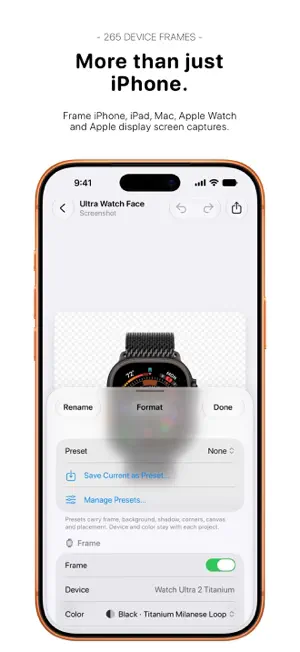
Your screenshots deserve a frame. Frames turns screenshots and screen recordings into device mockups, ready for the App Store, social media, presentations, websites and more. Drop in a screenshot and Frames matches it to the right device. Then make it yours with real device finishes, backgrounds, shadows, custom layouts and more. FRAME EVERY SCREEN Choose from 265 device frames across 51 models, including iPhone, iPad, MacBook, iMac, Apple Watch and Studio Display. Pick from real hardware finishes, Watch sizes, materials, bands and colors. MAKE IT YOURS Go beyond putting a bezel around a screenshot. Choose solid colors, built-in gradients, macOS wallpapers or your own images for the background. Blur your screenshot behind itself, add and fine-tune shadows, adjust corner radius, reposition your device, change its scale or create a transparent canvas. BUILT FOR FULL RESOLUTION Frames sizes the canvas around the device instead of squeezing every project into the same fixed resolution. With Frames Pro, export at each device frame’s full native resolution, up to 3450px for iPhone 17 Pro Max. FRAME SCREEN RECORDINGS Screen recordings work just like screenshots. Play them back inside the device frame, then export with Frames Pro as video, an animated GIF or even HEVC video with a real alpha channel for transparent backgrounds. SAVE YOUR FAVORITE LOOKS Turn your setup into a preset and reuse it whenever you want. Presets remember your frame, background, shadow, corners, canvas and placement. Quick Frame makes things even faster. Frame your latest screenshot from Frames, Control Center or your Lock Screen without going through the editor. You can also frame images from the Share Sheet or build Frames into your own workflows with Shortcuts. MADE FOR APP STORE SCREENSHOTS Choose canvas presets matching Apple’s accepted App Store sizes for iPhone, iPad, Mac and Apple Watch. App Store canvas sizes always export at their exact pixels, even without Frames Pro. KEEP PROJECTS TOGETHER Organize related projects into Groups, carry a style across the entire set and, with Frames Pro, import or export them in batches. Need more than one device? Frames Pro can put two, three or four devices side by side on a single canvas. IPHONE, IPAD AND MAC Frames is built for all three. Projects, Groups and presets sync through your iCloud account, so you can start on iPhone and pick up on iPad or Mac. And the Mac version is a real native Mac app, complete with its own windows, menu bar, file panels, sharing and undo and redo. A LOT OF FRAMES IS FREE All 265 device frames and finishes are free, along with backgrounds, shadows, presets, Groups, App Store canvas sizes, Quick Frame, iCloud sync, the Share extension and Shortcuts actions. Frames Pro is a one-time purchase that unlocks: • Full-resolution exports • Video and GIF exports • Batch importing and Group exports • Multi-device layouts You also get 3 free Pro exports before you buy. They never expire. PRIVATE BY DESIGN No accounts. No third-party analytics. No advertising or tracking. Your screenshots are processed on your device, and iCloud sync uses your own iCloud account.
What’s new
Version 1.1 · Updated September 13, 2026
- New device frames: iPhone 18 Pro and iPhone 18 Pro Max, in Black, Silver, Glacier, and Burgundy. - New device frames: iPhone Duo, in Night Sky and Star White, with inner-display, outer-closed, and outer-open layouts.
App privacy
The developer, Immanuel Sabwami, reported these privacy practices to Apple.
Data Not Collected
The developer does not collect any data from this app.
Alternatives to Frames - Device Mockups
Looking for apps like Frames - Device Mockups? Here are 6 similar apps on the App Store. The highest rated is Protato: 3D Mockup Generator (5.0/5), and all 6 are free to download.
-
 AI Agent Pager - Notifex
-
 Appodium – Showcase Your App
-
 Ultimate SF Symbols finder
-
 Protato: 3D Mockup Generator
5.0
Protato: 3D Mockup Generator
5.0
-
 Screenshot Bro: Mockup Maker
-
 SkillPilot: AI Tool Radar
| App | Rating | Price | Last updated | Compare |
|---|---|---|---|---|
| Frames - Device Mockups | 5.0 / 5 (1 rating) | Free | September 13, 2026 | |
| AI Agent Pager - Notifex | – | Free | Oct 10, 2026 | Compare |
| Appodium – Showcase Your App | – | Free | Sep 15, 2026 | Compare |
| Ultimate SF Symbols finder | – | Free | May 19, 2026 | Compare |
| Protato: 3D Mockup Generator | 5.0 / 5 (1) | Free | Sep 17, 2026 | Compare |
| Screenshot Bro: Mockup Maker | – | Free | Oct 23, 2026 | Compare |
| SkillPilot: AI Tool Radar | – | Free | Sep 24, 2026 | Compare |