

wallflow
IT INFO DEV Utilities iPhoneiPadiPod touch
wallflow is a free Utilities app for iPhone and iPad by IT INFO DEV. Requires iOS 16.4. Updated July 26, 2026.
- Price
- Free
- on the App Store
- Size
- 35 MB
- Age 4+
- Updated
- Jul 26
- 2026 · v1.0.1
Screenshots



About wallflow
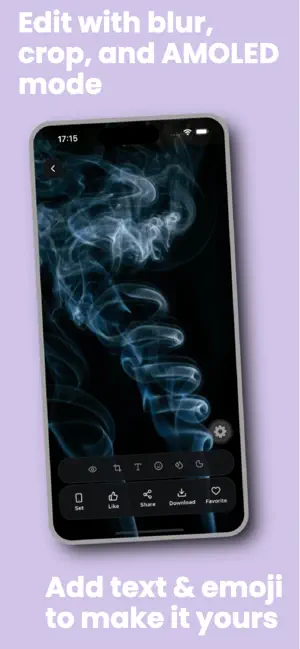
Transform your phone with Wallflow — a clean, focused wallpaper app built for people who care how their Home Screen and Lock Screen look. Wallflow brings together a curated collection of high-quality HD backgrounds across popular styles, from minimal and AMOLED-friendly designs to nature, space, anime, abstract art, and more. Browse beautiful wallpapers, preview them on a realistic phone screen, fine-tune the look with built-in editing tools, and apply your favorite in seconds. Whether you want a calm minimal background, a bold aesthetic Lock Screen, or a dark AMOLED wallpaper for OLED displays, Wallflow makes it easy to find, customize, and save the perfect wallpaper for your device. ## WHY WALLFLOW Wallflow helps you discover great wallpapers and personalize your device with confidence. No clutter, no unnecessary extras — just smooth browsing, powerful preview tools, and backgrounds that look sharp on modern phones and tablets. ## DISCOVER WALLPAPERS YOU WILL ACTUALLY USE Explore a growing library of HD wallpapers organized into clear categories: * AI Art * Anime * Nature * Minimal * AMOLED * Cars * Space * Abstract * City * Animals Use category tabs to jump straight to the style you want, or browse everything at once. A trending section highlights popular wallpapers based on community likes. ## FIND THE RIGHT BACKGROUND FASTER * Search wallpapers by keyword * Browse in a clean staggered grid layout * Switch between grid views for faster scanning * Save favorites for quick access later * Pull to refresh for updated content * Enjoy a dark-first interface for comfortable browsing ## PREVIEW BEFORE YOU SET Stop guessing how a wallpaper will look on your phone. Wallflow includes a realistic screen preview that helps you see your background in context before applying it. * Preview wallpapers before saving * Simulate Home Screen and Lock Screen layouts * See how icons and UI elements sit over your background ## POWERFUL BUILT-IN WALLPAPER EDITOR Make every wallpaper feel personal with editing tools built into the preview screen: * Blur backgrounds for a softer, aesthetic look * AMOLED mode for darker, OLED-friendly wallpapers * Crop, zoom, and reposition to frame the perfect shot * Add custom text overlays with color options * Add emoji layers for a more personal touch * Export your edited wallpaper when saving or sharing ## SAVE AND SHARE WITH EASE * Save wallpapers to your Photos library * Download wallpapers in high quality * Share wallpapers with friends and family * Follow a simple in-app guide to set your wallpaper ## CURATED FOR MODERN SCREENS Wallpapers in Wallflow are selected to look great on today's phones and tablets. Whether you prefer minimal backgrounds, cinematic cityscapes, deep space scenes, or dark AMOLED-friendly designs, you'll find wallpapers that look crisp and ready for everyday use. ## PERFECT FOR * Users who want beautiful Home Screen and Lock Screen backgrounds * Minimal wallpaper lovers * AMOLED and dark mode enthusiasts * Anime, nature, space, and abstract wallpaper fans * Anyone who wants to preview and edit wallpapers before saving ## WHAT YOU CAN DO WITH WALLFLOW * Browse curated HD wallpapers * Explore by category or trending picks * Search for specific styles and themes * Like and save your favorite wallpapers * Preview wallpapers on a simulated phone screen * Edit wallpapers with blur, crop, text, emoji, and AMOLED tools * Save wallpapers for your Home Screen and Lock Screen * Download and share your favorite wallpapers * Build your own collection of saved favorites ## START CUSTOMIZING YOUR SCREEN Your phone is something you look at dozens of times every day. Wallflow helps make it feel more personal with beautiful wallpapers, smart preview tools, and an easy customization experience. Make your Home Screen and Lock Screen stand out with Wallflow.
What’s new
Version 1.0.1 · Updated July 26, 2026
• Collections — browse curated wallpaper packs in one place • Color filters & looks — brightness, contrast, warmth, vignette, and ready-made styles • Import from gallery — turn your own photos into wallpapers • Daily reminders — a gentle nudge to refresh your home screen • Smoother preview editing and overall performance improvements Thanks for using Wallflow. Enjoy the update!
App privacy
The developer, IT INFO DEV, reported these privacy practices to Apple.
Data Used to Track You
The following data may be used to track you across apps and websites owned by other companies:
- Identifiers: Device ID
- Usage Data: Advertising Data
Data Not Linked to You
The following data, which may be collected but is not linked to your identity, may be used for the following purposes:
- Location: Coarse Location
- Identifiers: Device ID
- Usage Data: Product Interaction, Advertising Data
- Diagnostics: Crash Data, Performance Data, Other Diagnostic Data
Used for: Third-Party Advertising
Alternatives to wallflow
Looking for apps like wallflow? Here are 6 similar apps on the App Store. The highest rated is Countdown: Minimal Event Timer (5.0/5), and all 6 are free to download.
-
 Zoney Timezone & World Clock
4.3
-
 World Time Map: Time Zone
-
 Private AI Models
1.0
-
 Live Screen & Voice Translate
2.5
-
 Countdown: Minimal Event Timer
5.0
-
 Luma Sleep – Night Screen
3.9
| App | Rating | Price | Last updated | Compare |
|---|---|---|---|---|
| wallflow | – | Free | July 26, 2026 | |
| Zoney Timezone & World Clock | 4.3 / 5 (3) | Free | Oct 30, 2026 | Compare |
| World Time Map: Time Zone | – | Free | Jun 3, 2026 | Compare |
| Private AI Models | 1.0 / 5 (1) | Free | Oct 24, 2026 | Compare |
| Live Screen & Voice Translate | 2.5 / 5 (4) | Free | Oct 26, 2026 | Compare |
| Countdown: Minimal Event Timer | 5.0 / 5 (16) | Free | Mar 3, 2026 | Compare |
| Luma Sleep – Night Screen | 3.9 / 5 (36) | Free | Mar 17, 2026 | Compare |
Compare wallflow with the top alternatives: ratings, updates, ASO score and keyword gaps →