

Tempo Loop: Video Slow Downer
Alexander Perez Lorenzo Music iPhoneiPadiPod touch
Tempo Loop: Video Slow Downer is a free Music app for iPhone and iPad by Alexander Perez Lorenzo. Rated 3.0/5 from 1 ratings. Requires iOS 15.0.
- Rating
- 3.0
- 1 ratings
- Price
- Free
- on the App Store
- Size
- 25 MB
- Age 4+
- Updated
- Oct 11
- 2026 · v1.0.3
Screenshots


About Tempo Loop: Video Slow Downer
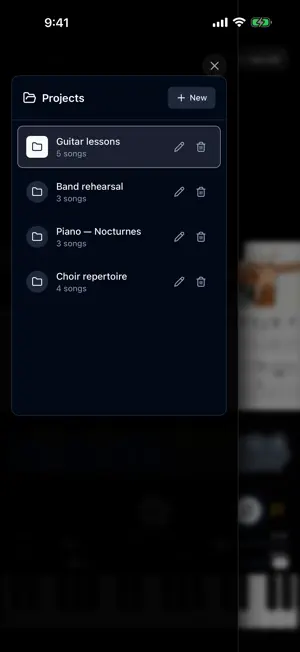
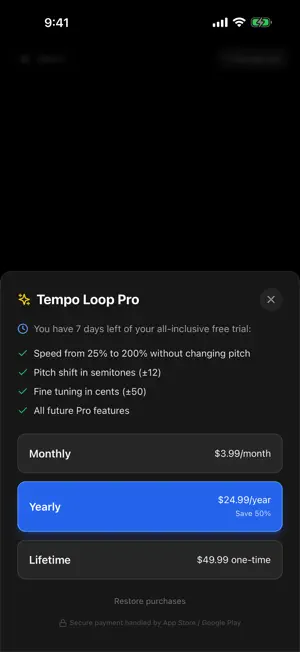
The ultimate practice tool for musicians and music students. Load any audio or video file and work on the piece like in a professional studio: slow it down to decipher the hard passages, change the key to match your instrument or voice, and loop exactly the bar that resists you — all with professional audio quality and without altering the pitch. SPEED WITHOUT CHANGING PITCH • From 25% to 200%, with high-quality native processing • Perfect for transcribing solos, working up fast passages or ear training CHANGE THE KEY • Transpose in semitones (±12) without altering speed • Fine tuning in cents (±50) for old recordings or non-standard tunings PRACTICE LOOPS • Press and hold on the waveform and drag to create a loop instantly • A/B button to mark the start and end while the music plays • Loop edges adjust precisely and snap to your markers UNLIMITED MARKERS • Mark the intro, the chorus, the solo... and jump between sections with one tap • Name them and move them with your finger VIDEO TOO • Load videos and study watching the performer's hands in full screen • Tap the screen and the controls disappear so nothing gets in the way BUILT FOR PRACTICE • Music keeps playing with the screen locked, with lock screen controls • Your library and markers are remembered between sessions: every song keeps its speed, key and loops • Built-in reference piano to check notes instantly • Open files directly from the iOS Share menu FREE FOREVER, WITH A 7-DAY FULL TRIAL Download it free and use ALL the features for 7 days. Afterwards, the player, loops, markers and piano remain free forever; speed and pitch shift unlock with Tempo Loop Pro (monthly or yearly subscription, or one-time lifetime purchase). Made by musicians, for musicians. If you study an instrument, sing in a choir, play in a band or prepare an audition, Tempo Loop Pro is the tool you will use every day. ALSO ON YOUR MAC • The same app on Apple silicon Macs (M1 or later): big screen, same loops and markers — Terms of Use (EULA): https://www.apple.com/legal/internet-services/itunes/dev/stdeula/ Privacy Policy: https://tempolooppro.github.io/privacy.html
What’s new
Version 1.0.3 · Updated October 11, 2026
New app preview video and refreshed screenshots, so you can see at a glance how to slow down music and video, change the key and loop the hard parts. No changes to how the app works.
App privacy
The developer, Alexander Perez Lorenzo, reported these privacy practices to Apple.
Data Not Linked to You
The following data, which may be collected but is not linked to your identity, may be used for the following purposes:
- Purchases: Purchase History
- Identifiers: Device ID
Used for: App Functionality
Alternatives to Tempo Loop: Video Slow Downer
Looking for apps like Tempo Loop: Video Slow Downer? Here are 6 similar apps on the App Store. The highest rated is Pitch Battle (5.0/5), and all 6 are free to download.
-
 iDoctor MusicBand
-
 MelloNote
-
 Pitch Battle
5.0
Pitch Battle
5.0
-
 Tapo - Minimalist Metronome
-
 ToneVault - Tone Saver
-
 Bandwolf
| App | Rating | Price | Last updated | Compare |
|---|---|---|---|---|
| Tempo Loop: Video Slow Downer | 3.0 / 5 (1 rating) | Free | October 11, 2026 | |
| iDoctor MusicBand | – | Free | Aug 25, 2026 | Compare |
| MelloNote | – | Free | Jun 22, 2026 | Compare |
| Pitch Battle | 5.0 / 5 (3) | Free | Jan 8, 2026 | Compare |
| Tapo - Minimalist Metronome | – | Free | Jul 15, 2026 | Compare |
| ToneVault - Tone Saver | – | Free | Jul 24, 2026 | Compare |
| Bandwolf | – | Free | Oct 3, 2026 | Compare |