

Size Calculation
CODEO SOLUTIONS LIMITED Health & Fitness iPhoneiPadiPod touch
Size Calculation is a free Health & Fitness app for iPhone and iPad by CODEO SOLUTIONS LIMITED. Requires iOS 17.0. Updated October 20, 2026.
- Price
- Free
- on the App Store
- Size
- 2 MB
- Age 4+
- Updated
- Oct 20
- 2026 · v1.6
Screenshots


About Size Calculation
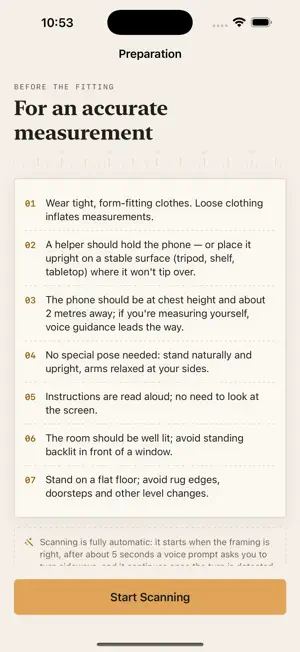
Size Calculation turns your iPhone into a body-measuring tool. In under two minutes it captures your key body measurements and tells you the size that fits — read from the clothing brand's own chart for the exact garment you are buying. No measuring tape, no guesswork. HOW IT WORKS A measurement starts by scanning the QR code on a shop's product page, so the app knows which garment it is measuring for. Prop the phone up or hand it to someone about two metres away, face the camera, then turn ninety degrees; spoken guidance walks you through it. On Pro iPhones the LiDAR scanner measures real distances. On every other iPhone the app asks your height once and scales the scan from it, cross-checked against the floor the phone tracks. The same measurement engine runs in both cases. WHAT IT MEASURES - Chest, waist and hip circumference - Shoulder width - Height - Inseam and arm length YOUR SIZE, FROM THE BRAND'S OWN CHART The app never asks your gender, fit, brand or size system — the product's code carries all of that. Your measurements are matched against the size chart the brand uploaded for that garment, and when a cut runs close the roomier size is offered as well. Every value is shown in centimetres and inches together, with an accuracy rate for each scan. PRIVATE BY DESIGN All processing happens on your device. Camera and depth frames are never saved and never leave your iPhone. Your measurements leave the device only when you scan a company's QR code and confirm the transfer on a screen that lists exactly what will be sent — never silently, and never to anyone else. REQUIREMENTS Any iPhone from the XS and XR onwards. For best results, keep the phone about two metres away at chest height and wear close-fitting clothing. Measure smarter. Shop with confidence.
What’s new
Version 1.6 · Updated October 20, 2026
• Chest, waist and hip are more accurate. The hip is now measured at its widest point, and results were checked against measurements of 1,447 real people. • Results outside a realistic human range are no longer shown. • The live guide tells you whether your head or feet are out of frame, can be read from two metres away, and gives a clearer hint if the scan stalls. • On iPhones without LiDAR, the height of the person being measured is confirmed before each scan and can be entered in feet and inches. • Measurements you send to a company stay in your history, and an expired QR code is flagged before the camera opens. • Settings now link to the Privacy Policy, Terms of Use and Support, plus many smaller fixes.
App privacy
The developer, CODEO SOLUTIONS LIMITED, reported these privacy practices to Apple.
Data Linked to You
The following data, which may be collected and linked to your identity, may be used for the following purposes:
- Health & Fitness: Health
- Other Data: Other Data Types
Used for: Product Personalization, App Functionality
Data Not Linked to You
The following data, which may be collected but is not linked to your identity, may be used for the following purposes:
- Usage Data: Product Interaction
Used for: Analytics, App Functionality
Alternatives to Size Calculation
Looking for apps like Size Calculation? Here are 6 similar apps on the App Store. The highest rated is Calorie Tracker AI, Diet: Tang (5.0/5), and all 6 are free to download.
-
 Calorie Tracker AI, Diet: Tang
5.0
-
 FitMesh Sync: health dashboard
-
 FontaFit max
-
 MaxMile: Running Coach
4.7
-
 Body Tape Measurement Tracker
-
 Ada: Skin Scanner & Analyzer
4.0
| App | Rating | Price | Last updated | Compare |
|---|---|---|---|---|
| Size Calculation | – | Free | October 20, 2026 | |
| Calorie Tracker AI, Diet: Tang | 5.0 / 5 (7) | Free | Sep 21, 2026 | Compare |
| FitMesh Sync: health dashboard | – | Free | Sep 10, 2026 | Compare |
| FontaFit max | – | Free | Dec 14, 2023 | Compare |
| MaxMile: Running Coach | 4.7 / 5 (3) | Free | Oct 29, 2026 | Compare |
| Body Tape Measurement Tracker | – | Free | Sep 11, 2026 | Compare |
| Ada: Skin Scanner & Analyzer | 4.0 / 5 (3) | Free | Nov 1, 2025 | Compare |
Compare Size Calculation with the top alternatives: ratings, updates, ASO score and keyword gaps →