

Clippar: Golf Highlights
Clippar Pty Ltd Sports iPhoneiPadiPod touch
Clippar: Golf Highlights is a free Sports app for iPhone and iPad by Clippar Pty Ltd. Requires iOS 15.1. Updated October 25, 2026.
- Price
- Free
- on the App Store
- Size
- 232 MB
- Age 4+
- Updated
- Oct 25
- 2026 · v1.3.4
Screenshots


About Clippar: Golf Highlights
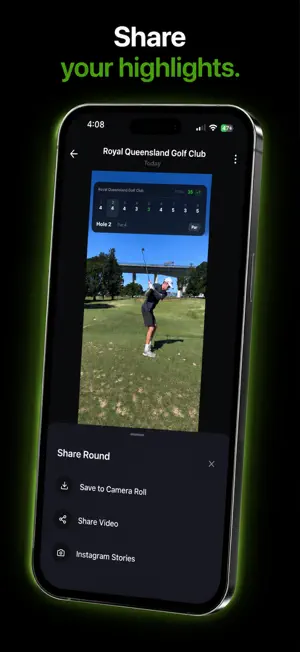
Clippar films your round of golf and cuts it into a highlight reel. No editing. Clip your phone to your bag or buggy and tap a small Bluetooth clicker before and after each shot, or use the button on screen. Clippar finds the swing in each recording, trims away the walk-up and the waiting, and puts the round together hole by hole, on your phone. HOW IT WORKS • Mount your phone on your bag or buggy. • Tap the clicker before and after each shot. The phone stays where it is. • Clippar finds the swing and cuts to the shot. If it can't find one, it says so and leaves that shot for you to trim. • Pick a scorecard, then share the whole round or just a few holes. SEE IT BEFORE YOU PLAY There is already a round in the app when you sign in: three real holes, filmed on course, cut and traced. A short guided walkthrough shows you the reel, the editor and export before you record anything of your own. SHOT TRACER On full swings, Clippar looks for your ball in the footage. Where it can follow it, it draws an estimated line of the ball's flight onto the video, and before it draws it checks that what it's following really is a ball. Some shots it can't follow, such as a ball lost against the sky or hit into a low sun, and those are left as filmed. You can draw the line yourself in a few taps, then set its direction and shape. AT THE RANGE Film a practice session by club, trim every shot to the same length in one go, and play the whole session back as one reel. YOUR LIBRARY Home keeps your rounds, practice sessions and single shots side by side. Filter shots by result, course, hole or club, and use Play all to watch them back to back. Import videos from Photos, or record more shots into a round you've already finished. YOUR SCORE ON THE REEL Five scorecard designs, or none at all. Share or save just a few holes and Clippar asks whether to add the card, which then shows only those holes. WHAT ELSE • Trim any shot, reorder them, drop the ones you'd rather forget. • Each shot you record is also saved to a Clippar album in Photos, so your golf survives deleting the app. You can switch this off. • Leave the app mid-export and it pauses, then picks up where it left off. TRY IT FREE Clippar is free to download. The first time you record, you can start a 7-day free trial of Clippar Pro. After the trial, recording or importing a round or a practice session needs Clippar Pro, which also includes: • Unlimited highlight reels and exports. • The automatic shot tracer. • Cloud backup, when you switch it on: your clips upload in the background, and your library restores on a reinstall or a new phone. Subscriptions are billed through your Apple ID and renew automatically unless cancelled at least 24 hours before the end of the period. Manage or cancel anytime in your App Store account settings. Privacy Policy: https://clippargolf.com/privacy Terms of Service: https://clippargolf.com/terms
What’s new
Version 1.3.4 · Updated October 25, 2026
Practice imports now count toward your 3 free shots, so they get traced too. Plus bug fixes and polish.
App privacy
The developer, Clippar Pty Ltd, reported these privacy practices to Apple.
Data Linked to You
The following data, which may be collected and linked to your identity, may be used for the following purposes:
- Purchases: Purchase History
- Identifiers: Device ID, User ID
- Usage Data: Product Interaction, Other Usage Data
- Location: Coarse Location, Precise Location
- Other Data: Other Data Types
- Contact Info: Email Address, Name
- User Content: Photos or Videos
Used for: Developer’s Advertising or Marketing, Analytics, Product Personalization, App Functionality
Data Not Linked to You
The following data, which may be collected but is not linked to your identity, may be used for the following purposes:
- Contact Info: Email Address
- Identifiers: User ID
- Usage Data: Product Interaction
- Diagnostics: Crash Data, Performance Data
Used for: Developer’s Advertising or Marketing, Analytics, App Functionality
Alternatives to Clippar: Golf Highlights
Looking for apps like Clippar: Golf Highlights? Here are 6 similar apps on the App Store. The highest rated is Ryform Golf: AI Swing Analyzer (5.0/5), and all 6 are free to download.


| App | Rating | Price | Last updated | Compare |
|---|---|---|---|---|
| Clippar: Golf Highlights | – | Free | October 25, 2026 | |
| FairwayCam | – | Free | Feb 23, 2025 | Compare |
| TraceLab | – | Free | Jul 4, 2026 | Compare |
| swinglens | – | Free | Nov 8, 2025 | Compare |
| Ryform Golf: AI Swing Analyzer | 5.0 / 5 (1) | Free | Oct 22, 2026 | Compare |
| PracticeLoop | 5.0 / 5 (1) | Free | Jun 12, 2026 | Compare |
| watchMynumbers | – | Free | Jan 6, 2026 | Compare |