

Overprint
AHMET DUMAN Graphics & Design iPhoneiPadiPod touch
Overprint is a free Graphics & Design app for iPhone and iPad by AHMET DUMAN. Requires iOS 26.0. Updated July 20, 2026.
- Price
- Free
- on the App Store
- Size
- 8 MB
- Age 4+
- Updated
- Jul 20
- 2026 · v1.1
Screenshots


About Overprint
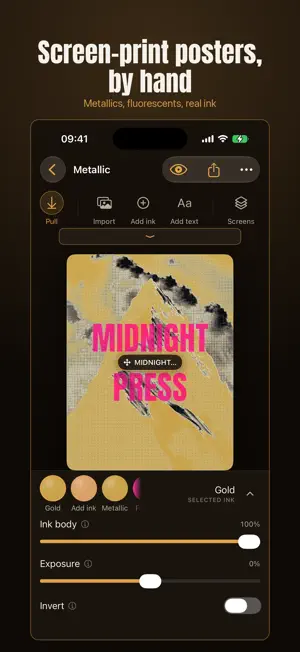
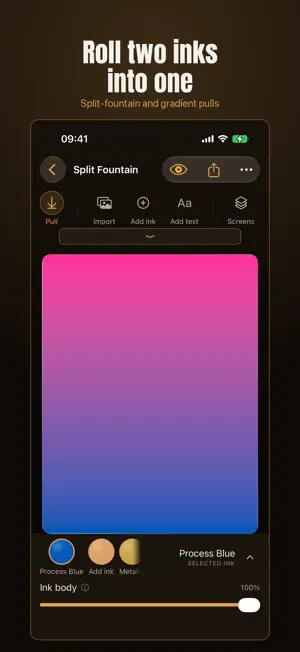
Overprint turns a photo into a screen-printed poster, the way a real print shop would pull it: separated by tone, screened into halftone dots, and laid down one spot ink at a time. This isn't a filter. Every layer is a real screen. Drag the squeegee and the ink develops across the sheet, heavy where you pull slow, thin where you pull fast, so no two pulls are the same. THE PRESS - Import any photo and Overprint auto-levels it onto the ink, so bright subjects read instead of washing out to bare paper. - Real halftone screening with per-ink angles, so the inks interleave instead of muddying, exactly like a physical press. - Overprint two inks and the overlap multiplies into a third color, the effect the app is named for. - Set text in heavy poster type and place it anywhere on the sheet. - Warm paper stocks with real tooth, from bright white to midnight. PULL BY HAND - Grab the squeegee and pull. Speed and dwell become ink body and gradient. - Split-fountain and gradient pulls roll one ink into another across the sheet. - Tune each ink's body, screen angle, and registration. EXPORT AND SHARE - Share a clean, web-ready poster for free, with a small Overprint mark. - Overprint Plus removes it and unlocks the full print shop: full-resolution files, one file per ink separation for the printer, a proof PDF with registration and crop marks, and apparel mockups. OVERPRINT PLUS One purchase. Yours forever. Family Sharing and a free Restore. - Take home prints with 3 to 6 spot inks - Premium inks: a metallic gold with a real glint, a fluoro magenta glow - Manual press controls: split-fountain and gradient pulls - Print-grade export: full resolution, separations, and a proof PDF Made for anyone who loves the look of a screen-printed gig poster, a risograph zine, or a two-color art print, without the ink under your nails.
What’s new
Version 1.1 · Updated July 20, 2026
Overprint 1.1: the whole press is now free to try. Every ink (metallic and fluoro included), split-fountain pulls, the full type library, and every poster size work live in the studio for everyone. Overprint Plus unlocks exporting prints that use them. Also new: a poster size picker (Letter to 24 x 36), an ink Remove control, and localization fixes. Free exports now include a small Overprint mark; Plus removes it.
App privacy
The developer, AHMET DUMAN, reported these privacy practices to Apple.
Data Not Collected
The developer does not collect any data from this app.
Alternatives to Overprint
Looking for apps like Overprint? Here are 6 similar apps on the App Store. The highest rated is PressInk (5.0/5), and 5 of the 6 are free to download.
-
 tone+
tone+
-
 PressInk
5.0
PressInk
5.0
-
 写真版画- その一枚を、彫って、塗る。
-
 Print Lab: Riso Photo FX
-
 Fineline Studios
-
 Megalith: Text Poster Maker
5.0
Megalith: Text Poster Maker
5.0
| App | Rating | Price | Last updated | Compare |
|---|---|---|---|---|
| Overprint | – | Free | July 20, 2026 | |
| tone+ | – | Free | Aug 20, 2026 | Compare |
| PressInk | 5.0 / 5 (1) | Free | Oct 21, 2026 | Compare |
| 写真版画- その一枚を、彫って、塗る。 | – | Free | Aug 14, 2026 | Compare |
| Print Lab: Riso Photo FX | – | Free | Sep 19, 2026 | Compare |
| Fineline Studios | – | Free | Oct 6, 2026 | Compare |
| Megalith: Text Poster Maker | 5.0 / 5 (2) | 4.99 USD | Oct 30, 2026 | Compare |
Compare Overprint with the top alternatives: ratings, updates, ASO score and keyword gaps →