

Yellow AI Camera & Filters
傲 吴 Photo & Video iPhoneiPadiPod touch
Yellow AI Camera & Filters is a free Photo & Video app for iPhone and iPad by 傲 吴. Rated 5.0/5 from 1 ratings. Requires iOS 17.0. Updated September 5, 2026.
- Rating
- 5.0
- 1 ratings
- Price
- Free
- on the App Store
- Size
- 89 MB
- Age 4+
- Updated
- Sep 5
- 2026 · v1.0.16
Screenshots


About Yellow AI Camera & Filters
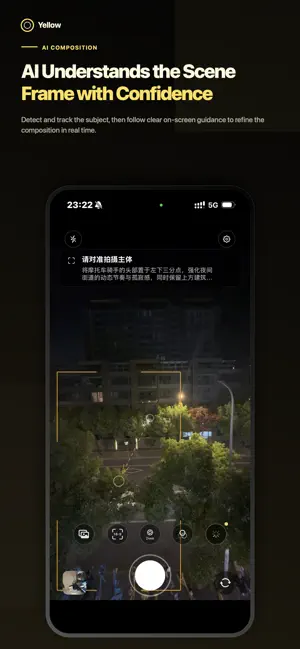
Better composition. A color style that feels like yours. Yellow is an AI-powered camera built for photography enthusiasts. It helps you frame the subject, refine the shot, and create original color presets from a reference photo or a few simple words. 【AI COMPOSITION GUIDANCE】 Yellow detects and tracks the main subject in real time, then provides clear framing guidance as you move your phone. Once the subject is stable, the camera smoothly completes the composition for a more natural shooting flow. 【AI-GENERATED FILTERS】 Choose a reference photo from your library and Yellow will analyze its visual style to create a similar color preset. You can also describe the look you want, such as “warm sunset with soft contrast,” and let AI create it for you. Choose a Subtle, Balanced, or Stylized result, then save the preset and use it immediately while shooting. 【SIX REFINED PRESETS】 Start with Original, Film, Teal & Orange, Elegant Gray, Black & Gold, or Black & White. Each preset is carefully adjusted across tone curves, HSL, highlights, shadows, vignette, and grain. 【REFERENCE COMPOSITION】 Overlay a reference photo directly on the viewfinder to recreate a composition you admire. Adjust its opacity and brightness, or remove people from the reference image to focus on the background and structure. 【PRO CAMERA CONTROLS】 • 9:16, 4:3, and 1:1 aspect ratios • Tap to focus and slide to adjust exposure • Smooth pinch-to-zoom controls • Multiple focal lengths and camera switching • Shutter flash and haptic feedback • Optimized and quick export modes Available focal lengths depend on the cameras supported by your device. 【REAL-TIME ADJUSTMENTS】 Fine-tune intensity, exposure, temperature, tint, contrast, vignette, and grain with an instant live preview. Press and hold “Preview Original” whenever you want to compare the unfiltered image. 【PRIVACY ON YOUR TERMS】 Download the on-device model to process images locally and work offline. Photos are not uploaded when on-device mode is selected. When you need additional performance, you can choose to switch to the cloud model. Yellow helps you spend less time navigating tools and more time noticing light, color, and the moment in front of you. Terms of Use (EULA): https://www.apple.com/legal/internet-services/itunes/dev/stdeula/
What’s new
Version 1.0.16 · Updated September 5, 2026
fix some bug
App privacy
The developer, 傲 吴, reported these privacy practices to Apple.
Data Linked to You
The following data, which may be collected and linked to your identity, may be used for the following purposes:
- Purchases: Purchase History
- Identifiers: User ID
Used for: App Functionality
Data Not Linked to You
The following data, which may be collected but is not linked to your identity, may be used for the following purposes:
- User Content: Photos or Videos
Used for: App Functionality
Alternatives to Yellow AI Camera & Filters
Looking for apps like Yellow AI Camera & Filters? Here are 6 similar apps on the App Store. The highest rated is Paku相机-AI构图&AI滤镜&复古胶片&CCD相机滤镜 (5.0/5), and all 6 are free to download.
-
 Paku相机-AI构图&AI滤镜&复古胶片&CCD相机滤镜
5.0
Paku相机-AI构图&AI滤镜&复古胶片&CCD相机滤镜
5.0
-
 光迹ColorMap
-
 LensMentor
4.5
LensMentor
4.5
-
 Espresso - True Color Film Cam
-
 Halo Camera – AI Photography
-
 Rovo Cam: Film Camera
5.0
Rovo Cam: Film Camera
5.0
| App | Rating | Price | Last updated | Compare |
|---|---|---|---|---|
| Yellow AI Camera & Filters | 5.0 / 5 (1 rating) | Free | September 5, 2026 | |
| Paku相机-AI构图&AI滤镜&复古胶片&CCD相机滤镜 | 5.0 / 5 (1) | Free | Oct 7, 2026 | Compare |
| 光迹ColorMap | – | Free | Sep 25, 2026 | Compare |
| LensMentor | 4.5 / 5 (2) | Free | Oct 5, 2026 | Compare |
| Espresso - True Color Film Cam | – | Free | Oct 21, 2026 | Compare |
| Halo Camera – AI Photography | – | Free | Oct 21, 2026 | Compare |
| Rovo Cam: Film Camera | 5.0 / 5 (7) | Free | Oct 20, 2026 | Compare |