

415 Studios: Mix Video Sound
Porter Bliquez Music iPhoneiPadiPod touch
415 Studios: Mix Video Sound is a free Music app for iPhone and iPad by Porter Bliquez. Rated 4.9/5 from 48 ratings. Requires iOS 17.0.
- Rating
- 4.9
- 48 ratings
- Price
- Free
- on the App Store
- Size
- 140 MB
- Age 4+
- Updated
- Nov 27
- 2026 · v1.82
Screenshots
Save to Pinterest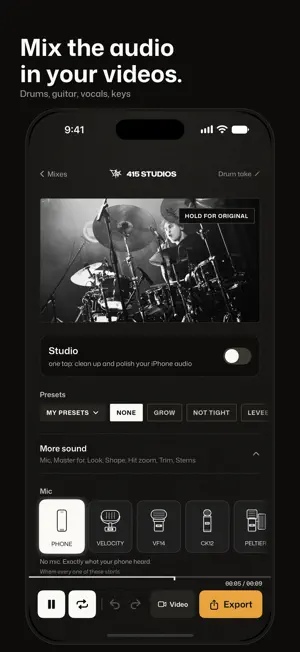


About 415 Studios: Mix Video Sound
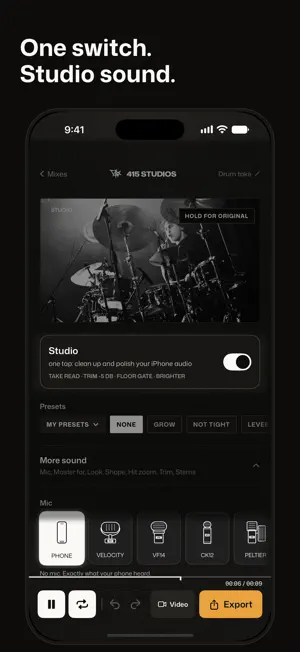
Your video looks great. The audio sounds like a phone in a room. The old fix was three apps: export the audio, mix it in a DAW, re-attach it and hope nothing drifts. 415 Studios does the whole job in one app, right on your video, on your phone. HOW IT WORKS 1. Pick a video from Photos, play along to a song, or open an audio file. 2. Flip the Studio switch, or mix it yourself with real effects, right on the video. 3. Export a finished video and post it. No bouncing files. No re-syncing. No laptop. STUDIO One switch cleans up and polishes your iPhone audio, including Kick Rescue, which brings your kick back on phone speakers that can't play the low end on their own. Press and hold the picture to hear the original, let go to hear the mix. PLAY ALONG Put a song in your headphones, film yourself playing to it on the front or back camera, and get back a video with the song already mixed under your take. Pro adds Click, in beta: the app finds the song's own beat and plays a click on it in your headphones while you play. The click never ends up in your video. MIC Change the mic after the take. Six modeled mics, from a dark ribbon to a bright condenser. BUILT FOR DRUMS Phone mics ruin drums, so five effects exist for the kit. Smack brings the snare back. Heat adds the saturation a room mic never caught. Crush is parallel compression for weight. Air opens the cymbals. Transient sharpens the stick. 18 EFFECTS, ONE RACK Four tabs: Punch, Tone, Space, Level. Transient. Smack. Compressor with a live gain-reduction meter. Crush. 4-band EQ with a live spectrum and bands you drag. Reverb with six characters. Tape saturation plus vinyl crackle. Heat. Air. Stereo Width. Overdrive. Lo-Fi. Gain. Shape, with the kick, the snare and the tail on their own knobs. Glue, a three-band drum-bus squeeze. Tame, for cymbal wash. Clip. Loud, a true limiter. 8 PRESETS Grow. Not Tight. Levee. Voodoo. Donuts. Two Star. Nevermind. Aja. One tap, a finished sound. Save your own anytime. MASTER FOR SOCIALS Platforms turn loud posts down and rarely lift quiet ones, and a raw phone recording sits far below the music around it. Master for Reels, TikTok or Shorts with a true-peak limiter and your clip sits level with the feed. SPLIT THE STEMS Separate your take into drums, bass, music and vocals and set every fader. It runs on your phone: no signal needed, nothing uploaded. LOOK, TRIM, AUTOMATE Eight film looks for the picture. Trim with fades, loop, undo and redo. Automate one section of the video, then let it ease back to your base mix: slam the chorus, leave the verse alone. AUDIO FILES Mix a song or a bounce with the same tools. Open a WAV, MP3, M4A or AIFF from the Files app. WHO IT'S FOR Musicians who post: covers, practice clips, gig footage, drum cam. Drums, guitar, bass, vocals and full bands. Filmed on an iPhone, headed for Instagram, TikTok or Shorts? This is the last step before you post. FREE, PRO AND STUDIO Free gets you the Studio switch, Play Along, stems to listen to, and one finished video export a day with a small 415 STUDIOS mark. The effects, the mics, the presets, Master for, Looks, Automate, Click and audio exports are Pro: tap one and the plans open, with the prices on them. Studio is everything in Pro, plus the drum and room stems as WAV for your DAW, batch export, preset packs and two more mics. Pro: $9.99 per month, or $69.99 per year with a 7-day free trial Studio: $19.99 per month, or $129.99 per year with a 7-day free trial Studio Lifetime: $199.99 once, which never renews Payment is charged to your Apple Account at confirmation of purchase. Subscriptions renew automatically unless cancelled at least 24 hours before the end of the current period. Manage or cancel anytime in your Apple Account settings. Privacy policy: https://415porter.com/studio/privacy Terms of use: Apple's standard EULA (https://www.apple.com/legal/internet-services/itunes/dev/stdeula/) Questions or requests: [email protected]
Ratings & reviews
4.9
48 ratings
What’s new
Version 1.82 · Updated November 27, 2026
• Small polish across the app, including more text in your language. • Under-the-hood fixes for crash reporting and the home screen widget.
App privacy
The developer, Porter Bliquez, reported these privacy practices to Apple.
Data Linked to You
The following data, which may be collected and linked to your identity, may be used for the following purposes:
- Contact Info: Physical Address, Email Address, Phone Number
- Identifiers: User ID
Used for: Developer’s Advertising or Marketing, App Functionality
Data Not Linked to You
The following data, which may be collected but is not linked to your identity, may be used for the following purposes:
- Purchases: Purchase History
- Identifiers: Device ID
- Usage Data: Product Interaction, Advertising Data
- User Content: Other User Content
- Diagnostics: Crash Data, Performance Data, Other Diagnostic Data
Used for: Analytics, App Functionality
Alternatives to 415 Studios: Mix Video Sound
Looking for apps like 415 Studios: Mix Video Sound? Here are 6 similar apps on the App Store. The highest rated is RhythmBot (5.0/5), and all 6 are free to download.
-
 Shedtracks: Drumless Tracks
4.6
-
 RhythmBot
5.0
-
 DrumPitchPro
3.3
-
 Drum Notation by Beat Note
4.6
-
 Rec'n'Share
2.5
-
 GrooveClix Metronome
4.1
| App | Rating | Price | Last updated | Compare |
|---|---|---|---|---|
| 415 Studios: Mix Video Sound | 4.9 / 5 (48 ratings) | Free | November 27, 2026 | |
| Shedtracks: Drumless Tracks | 4.6 / 5 (16) | Free | Oct 26, 2026 | Compare |
| RhythmBot | 5.0 / 5 (148) | Free | Oct 7, 2026 | Compare |
| DrumPitchPro | 3.3 / 5 (24) | Free | Nov 18, 2026 | Compare |
| Drum Notation by Beat Note | 4.6 / 5 (88) | Free | Nov 11, 2026 | Compare |
| Rec'n'Share | 2.5 / 5 (163) | Free | Jun 17, 2025 | Compare |
| GrooveClix Metronome | 4.1 / 5 (119) | Free | Nov 19, 2026 | Compare |