

Wavelength Pro Audio Editor
Mehrdad Yazdani Music iPhoneiPadiPod touchMac
Wavelength Pro Audio Editor is a free Music app for iPhone and iPad by Mehrdad Yazdani. Requires iOS 17.0. Updated September 5, 2026.
- Price
- Free
- on the App Store
- Size
- 6 MB
- Age 4+
- Updated
- Sep 5
- 2026 · v1.1.4
Screenshots


About Wavelength Pro Audio Editor
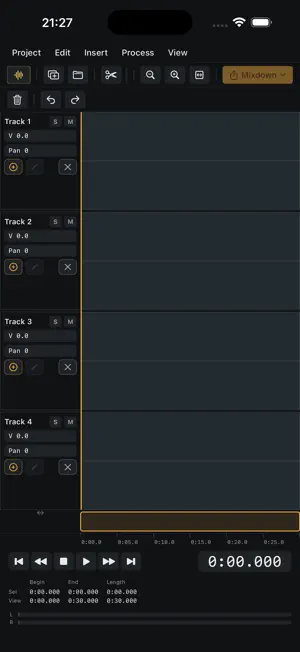
Wavelength is a classic waveform audio editor for people who record, edit, and send audio every day - journalists in the field, clinicians, podcasters, anyone who lives on a waveform. Record a take, trim it on the wave, clean it up, mark the quotes, and export at the right level. It works the way desktop wave editors always have - a big waveform, menu-driven editing, and the keyboard habits your hands already know - rebuilt as a fast, native app for iPhone and iPad. RECORD - Record straight from the microphone with live meters and a scrolling waveform. - Every take autosaves to a Vault - nothing is ever lost, and you can reopen any recording from Open Recent. EDIT ON THE WAVEFORM - Cut, copy, paste, mix, crossfade, and trim directly on the wave. - Deep undo, so you can experiment without fear of losing the take. A FULL PROCESSING MENU - Normalize, fade in/out, time stretch (pitch-preserving), pitch shift, reverse, and DC-offset removal. - Loudness normalize toward broadcast levels for delivery. MARKERS, REGIONS & DELIVERY - Drop markers and define regions to mark the moments that matter. - Export regions, or the whole file, to WAV, MP3, or AAC - at the level the other end expects. MORE - A separate multitrack view (four lanes, clip blocks, volume envelopes, mixdown) for assembling packages. - Eight interface themes, from dark slate to porcelain. - Keyboard-first: J/K/L shuttle, space transport, the classic key habits. Wavelength has no account and no sign-in. Your recordings stay on your device - nothing is uploaded, no analytics, no tracking.
What’s new
Version 1.1.4 · Updated September 5, 2026
Copy and paste now work on a selection of any length, including long interviews. Save As works on edited long takes, and a new file can be named when you save it. Markers and regions are kept with a file and come back when you reopen it. The selected span is far clearer, and markers are easier to spot. Menus close when you pick something.
App privacy
The developer, Mehrdad Yazdani, reported these privacy practices to Apple.
Data Not Collected
The developer does not collect any data from this app.
Alternatives to Wavelength Pro Audio Editor
Looking for apps like Wavelength Pro Audio Editor? Here are 6 similar apps on the App Store. The highest rated is FinalFX (5.0/5), and 4 of the 6 are free to download.
-
 Play In Reverse
-
 AutoMaster
-
 Voice Morph-Change Your Voice
-
 FinalFX
5.0
-
 Sidechain Compressor Plugin
3.6
-
 Metronome - BPM Rhythm Trainer
| App | Rating | Price | Last updated | Compare |
|---|---|---|---|---|
| Wavelength Pro Audio Editor | – | Free | September 5, 2026 | |
| Play In Reverse | – | Free | May 27, 2026 | Compare |
| AutoMaster | – | Free | Oct 12, 2026 | Compare |
| Voice Morph-Change Your Voice | – | Free | May 14, 2026 | Compare |
| FinalFX | 5.0 / 5 (2) | 3.99 USD | Aug 13, 2026 | Compare |
| Sidechain Compressor Plugin | 3.6 / 5 (5) | 5.99 USD | Sep 4, 2025 | Compare |
| Metronome - BPM Rhythm Trainer | – | Free | Sep 1, 2024 | Compare |