

Photospital: Restore Photos
EKPK INC. Photo & Video iPhoneiPadiPod touch
Photospital: Restore Photos is a free Photo & Video app for iPhone and iPad by EKPK INC. Rated 5.0/5 from 2 ratings. Requires iOS 16.0.
- Rating
- 5.0
- 2 ratings
- Price
- Free
- on the App Store
- Size
- 21 MB
- Age 4+
- Updated
- Oct 19
- 2026 · v2.13
Screenshots


About Photospital: Restore Photos
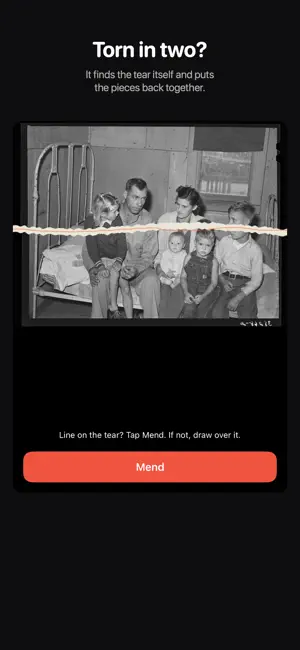
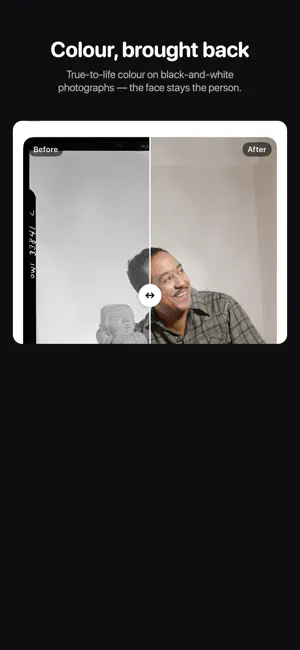
Photospital is a hospital for your photos. Bring faded, torn, and blurry pictures back to life with powerful AI — right on your iPhone. A cracked print of your grandparents. A blurry childhood snapshot. A black‑and‑white photo that deserves color. Photospital restores them in seconds. And once a photo is back, a full editor is waiting — the same retouching tools you'd expect from a portrait app, pointed at the picture that actually matters to you. RESTORATION TOOLS • Full Restore — one tap repairs, enhances, and colorizes automatically • Enhance Faces — deblur and sharpen faces • Repair Damage — scratches, creases, stains, even a torn-off corner • Colorize — add natural, realistic color to black‑and‑white photos • Upscale — increase resolution and recover detail • Remove Background — cleanly cut out the subject • Erase Object — paint over anything you want gone • AI Edit — just describe the fix in your own words • Animate — bring a still photo to life as a short video clip PORTRAIT & RETOUCH • Smooth Skin — soften texture without the plastic look • Heal, Conceal & Patch — blemishes, spots and scratches; Patch copies clean detail from elsewhere in the same photo instead of inventing it • Eyes — brighten, whiten, fix red‑eye, deepen the iris • Teeth — take the yellow out • Lips, brows, lashes, blush and eye shadow — subtle by default • Reshape — nudge, grow or shrink any part of the picture, with a Restore brush to paint the original back • Hair color, hairline and beard definition • A magnifier follows your brush, so you can see what your finger is covering ADJUST & EDIT • Light — brightness, contrast, highlights, shadows, plus a studio light you aim yourself • Color — warmth, tint, saturation and vibrance, for casts that faded prints drift into • Detail — sharpen, structure, texture and clarity • Crop, straighten, rotate and flip, with fixed sizes for common print formats • Film looks and filters that keep the face recognizable • Blur the background, or drop in a studio backdrop for a headshot • Presets — save the settings you worked out on one photo and apply them to the next MORE • Batch restore several photos at once • Scan a whole album page and auto‑crop every photo • Import straight from Files, or share a photo into Photospital from any app • Before/after slider to see the difference, in the editor and in History • Save to your library or share a beautiful before/after card Perfect for restoring family memories, old scans, damaged prints and vintage photographs — and for everyday retouching once they're back. Your photos stay yours. Restoring sends a photo to our AI service and returns the result; we don't sell your photos or use them to train models. Photospital Pro unlocks unlimited restorations. A subscription auto‑renews unless canceled at least 24 hours before the end of the period; manage or cancel anytime in your Apple ID settings. Terms: https://photospital.com/terms Privacy: https://photospital.com/privacy
What’s new
Version 2.13 · Updated October 19, 2026
• Photospital now speaks Spanish and Portuguese (Brazil). • Changed your mind about a print order? You can cancel it within 30 minutes for a full refund, and follow every order from Settings › Print orders. • Fixes and improvements.
App privacy
The developer, EKPK INC., reported these privacy practices to Apple.
Data Linked to You
The following data, which may be collected and linked to your identity, may be used for the following purposes:
- Purchases: Purchase History
- Contact Info: Physical Address, Email Address, Name
- User Content: Photos or Videos
Used for: App Functionality
Alternatives to Photospital: Restore Photos
Looking for apps like Photospital: Restore Photos? Here are 6 similar apps on the App Store.
-
 Velora Photo Restore
-
 Offline Photo Restorer
-
 Revive: Restore Old Photos
-
 ClearShot: Photo Restore
-
 Revive - Old Photo Restore
-
 Stain Remover: Restore Photos
| App | Rating | Price | Last updated | Compare |
|---|---|---|---|---|
| Photospital: Restore Photos | 5.0 / 5 (2 ratings) | Free | October 19, 2026 | |
| Velora Photo Restore | – | Free | Jul 1, 2026 | Compare |
| Offline Photo Restorer | – | Free | Aug 6, 2026 | Compare |
| Revive: Restore Old Photos | – | Free | Oct 14, 2026 | Compare |
| ClearShot: Photo Restore | – | Free | Jun 18, 2026 | Compare |
| Revive - Old Photo Restore | – | Free | May 26, 2026 | Compare |
| Stain Remover: Restore Photos | – | Free | Jun 26, 2026 | Compare |