

SwiftSpend — Expense Tracker
Ashrafulla Atadjanov Finance iPhoneiPadiPod touch
SwiftSpend — Expense Tracker is a free Finance app for iPhone and iPad by Ashrafulla Atadjanov. Requires iOS 17.0. Updated October 9, 2026.
- Price
- Free
- on the App Store
- Size
- 20 MB
- Age 4+
- Updated
- Oct 9
- 2026 · v2.0
Screenshots
About SwiftSpend — Expense Tracker
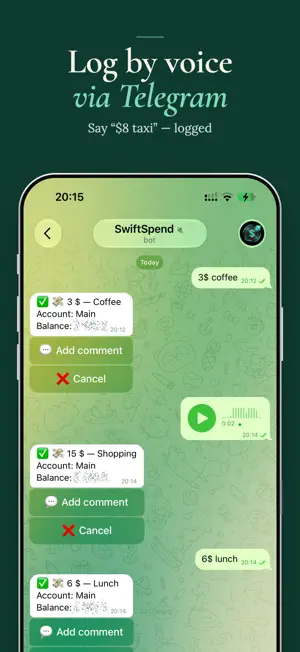
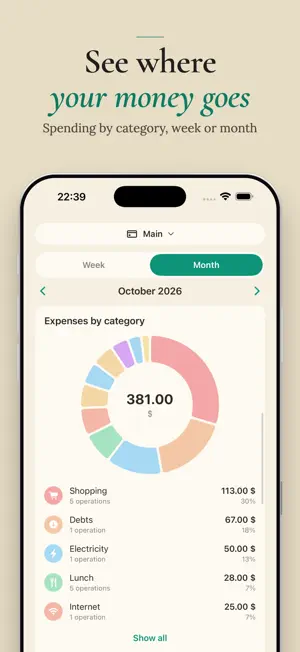
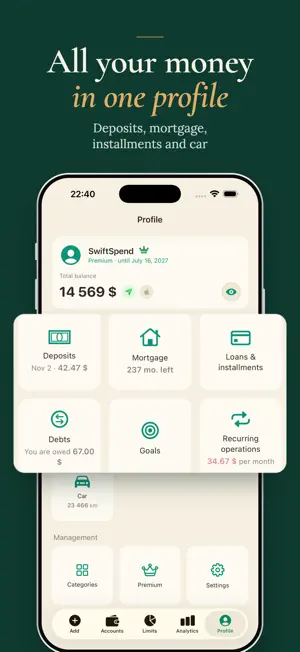
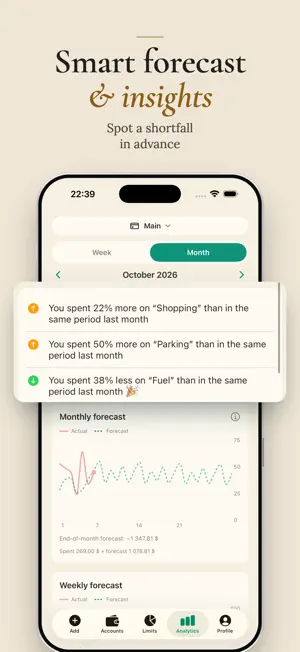
Tell the Telegram bot "taxi $8, coffee $3" – and it's logged. SwiftSpend works out the amounts and categories by itself and shows you one number: how much you can spend today and still make it to payday. Three seconds a day. No spreadsheets. No bank access. HOW IT WORKS You spend – you tell the bot, by voice or text, without opening the app. Wrong category? Fix it with one tap. Open SwiftSpend – see what's left for today and the forecast to the end of the month. BANK SMS – FORWARD IT TO THE BOT Forward a bank debit notification to the bot – it picks out the amount and offers to log the transaction. Still no access to your bank. WHAT'S LEFT FOR TODAY Your remaining money is divided across the days to the end of the month, with category limits taken into account. Spend less – tomorrow's number grows. Spend more – it shows you where to cut back. FORECAST AND AI REVIEW Based on your history, the app forecasts your spending to the end of the month – by day and by week – so you find out about going into the red two weeks early, not on payday. On the 1st, AI writes you a short personal review: where the money went and what to change. ACCOUNTS, DEPOSITS, LOANS, DEBTS Cash, cards and savings deposits in different currencies – one total balance at the current exchange rate. Deposits with interest accrued on schedule. Loans and instalment plans: payment schedule, early repayment. Debts: who owes you and whom you owe. Savings goals with progress. CAR (PREMIUM) Logged a fill-up? Enter the mileage and litres – the app does the rest: fuel consumption, cost per kilometre and all your car spending by month – fuel, repairs, car wash. TWO TAPS TO ADD Not into Telegram? The in-app keypad adds an expense in two taps. No signal? The expense is saved and syncs later. PRIVACY No bank access needed. Sign in with Apple; link Telegram later, if you want. Hide all amounts with one tap and lock the app with Face ID. FREE FOREVER Expenses and income, accounts in multiple currencies, limits, debts, goals, one loan or instalment plan, today's spendable amount, 20 voice messages and 10 bank SMS to the bot per month. SWIFTSPEND PREMIUM Forecast to the end of the month, AI review, car, mortgage with tranches and a grace period, category groups, unlimited voice and SMS, a weekly summary in Telegram, advanced analytics and higher limits. Download SwiftSpend – and by tonight you'll know exactly where your budget went. The subscription is charged to your Apple Account and renews automatically unless auto-renewal is turned off at least 24 hours before the end of the current period. Manage your subscription in your Apple Account settings. Terms of Use: https://kaib5343.github.io/swiftspend-legal/terms-of-use.html Privacy Policy: https://kaib5343.github.io/swiftspend-legal/privacy-policy.html
What’s new
Version 2.0 · Updated October 9, 2026
SwiftSpend 2.0 – the biggest update since launch. Bank SMS – forward it to the bot: Forward a debit notification – the bot picks out the amount and offers to log the transaction. 10 transactions a month free, unlimited with Premium. Car: Logged a fill-up – enter the mileage. The app calculates full-to-full fuel consumption, cost per kilometre and all your car spending by month: fuel, repairs, car wash. Deposits: Open, top up and withdraw, interest accrued on schedule, a chart by week and month, recalculation when the terms change. Loans and instalment plans: Payment schedule, adding and editing payments, early repayment. Mortgage with tranches and a grace period – in Premium. Category groups: Combine categories into groups – Analytics now has a "Categories / Groups" switch. Forecast and analytics: Weekly forecast with past weeks' history: press and hold to see any point. Analytics now covers expenses only; income is a separate card with period comparison. Debts: "Add to debt" button; the balance is calculated from all movements. Bot: Weekly spending summary.
App privacy
The developer, Ashrafulla Atadjanov, reported these privacy practices to Apple.
Data Linked to You
The following data, which may be collected and linked to your identity, may be used for the following purposes:
- Financial Info: Other Financial Info
- Identifiers: User ID
Used for: App Functionality
Data Not Linked to You
The following data, which may be collected but is not linked to your identity, may be used for the following purposes:
- User Content: Other User Content
Used for: App Functionality
Alternatives to SwiftSpend — Expense Tracker
Looking for apps like SwiftSpend — Expense Tracker? Here are 6 similar apps on the App Store. The highest rated is Money Keeper — Expense Tracker (5.0/5), and all 6 are free to download.
-
 Money Keeper — Expense Tracker
5.0
Money Keeper — Expense Tracker
5.0
-
 Kapitallo - Учёт расходов
-
 eply: daily budget planner
-
 Лад
Лад
-
 Мои расходы: учёт финансов
5.0
Мои расходы: учёт финансов
5.0
-
 Держи Баланс: Учёт Расходов
| App | Rating | Price | Last updated | Compare |
|---|---|---|---|---|
| SwiftSpend — Expense Tracker | – | Free | October 9, 2026 | |
| Money Keeper — Expense Tracker | 5.0 / 5 (1) | Free | Jun 8, 2026 | Compare |
| Kapitallo - Учёт расходов | – | Free | Oct 10, 2026 | Compare |
| eply: daily budget planner | – | Free | Sep 26, 2026 | Compare |
| Лад | – | Free | Jun 28, 2026 | Compare |
| Мои расходы: учёт финансов | 5.0 / 5 (4) | Free | Oct 5, 2026 | Compare |
| Держи Баланс: Учёт Расходов | – | Free | Jul 24, 2026 | Compare |