

Wime: Where I Spend Time
Abdulaziz Alawshan Productivity iPhoneiPadiPod touch
Wime: Where I Spend Time is a free Productivity app for iPhone and iPad by Abdulaziz Alawshan. Requires iOS 17.0. Updated October 23, 2026.
- Price
- Free
- on the App Store
- Size
- 5 MB
- Age 4+
- Updated
- Oct 23
- 2026 · v1.10
Screenshots



About Wime: Where I Spend Time
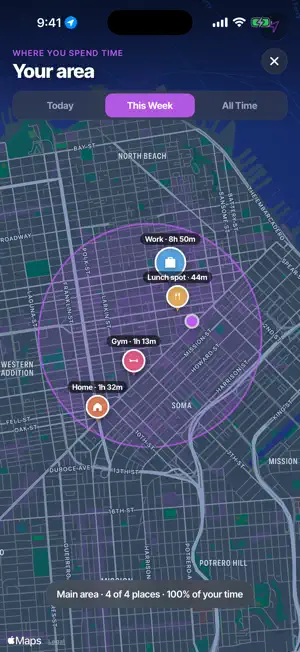
Where does your time actually go? Wime answers that automatically. It runs quietly in the background and turns your day into a clean timeline of the places you spent time, home, work, the gym, your favorite lunch spot, with no typing, no timers, and no account. EVERYTHING STAYS ON YOUR IPHONE Wime has no login and no cloud. Your places, visits, trips, and notes live only on your device. Nothing is ever uploaded, sold, or shared. Privacy isn't a setting, it's the whole design. AUTOMATIC TIMELINE Move through your day and Wime builds your timeline for you: when you arrived, how long you stayed, and the trips in between. Name a place once and Wime remembers it. INSIGHTS THAT MAKE SENSE A clean breakdown of where your hours went, by place and by category, for today or the whole week. See at a glance whether your time matched your intentions. YOUR ACTIVITY MAP See the area you actually live your life in, drawn as a single zone around the places you visit most, with the occasional one-off trip left out, so it reflects your real routine. EXPORT ANYTIME Own your data. Export everything as JSON to share with other apps, back it up, or hand it to an AI assistant to analyze your week. FIVE LANGUAGES Fully localized in English, العربية (with full right-to-left layout), Español, 简体中文, and 한국어. WIME PRO Wime is free to try for 7 days. Wime Pro unlocks unlimited history, insights, your activity map, and data export, with a monthly or yearly plan. Built for people who want to understand their time without handing their life to a server. an auto-renewing subscription: • Wime Pro (Monthly) — $2.99 per month • Wime Pro (Yearly) — $19.99 per year Payment is charged to your Apple Account at confirmation of purchase. Your subscription automatically renews unless it is canceled at least 24 hours before the end of the current period. You can manage or cancel anytime in your Apple Account settings. Any unused portion of a free trial is forfeited when you purchase a subscription. Terms of Use (EULA): https://www.apple.com/legal/internet-services/itunes/dev/stdeula/ Privacy Policy: https://3zcs.me/wime/privacy/
What’s new
Version 1.10 · Updated October 23, 2026
Label a place as Friends, for time at a friend's place or a get-together. You'll find it under the + with the other categories. Not sure where a stay was? Open it and you'll see it on a map, with the shops and streets around it, so it's easier to remember and name. Tap the map to look around. The widgets now keep up on their own. Today's and this week's hours keep counting while you stay somewhere, and start fresh at midnight, without you opening Wime.
App privacy
The developer, Abdulaziz Alawshan, reported these privacy practices to Apple.
Data Not Collected
The developer does not collect any data from this app.
Alternatives to Wime: Where I Spend Time
Looking for apps like Wime: Where I Spend Time? Here are 6 similar apps on the App Store. The highest rated is Workiom (5.0/5), and all 6 are free to download.
-
 PortfolioOS
-
 TimeLog: Auto Diary & Timeline
-
 ToDoSphere: Visual Day Planner
4.0
-
 Workiom
5.0
-
 HEY Calendar
4.7
-
 Time Wallet: Unrot Your Brain
4.5
| App | Rating | Price | Last updated | Compare |
|---|---|---|---|---|
| Wime: Where I Spend Time | – | Free | October 23, 2026 | |
| PortfolioOS | – | Free | Oct 5, 2026 | Compare |
| TimeLog: Auto Diary & Timeline | – | Free | Jul 18, 2026 | Compare |
| ToDoSphere: Visual Day Planner | 4.0 / 5 (1) | Free | Oct 18, 2026 | Compare |
| Workiom | 5.0 / 5 (3) | Free | Oct 6, 2026 | Compare |
| HEY Calendar | 4.7 / 5 (658) | Free | Jun 17, 2026 | Compare |
| Time Wallet: Unrot Your Brain | 4.5 / 5 (22) | Free | Sep 17, 2026 | Compare |