

Headshot Studio: Real Photos
3 Paws AI Studio Photo & Video iPhoneiPadiPod touch
Headshot Studio: Real Photos is a free Photo & Video app for iPhone and iPad by 3 Paws AI Studio. Requires iOS 17.0. Updated August 24, 2026.
- Price
- Free
- on the App Store
- Size
- 4 MB
- Age 4+
- Updated
- Aug 24
- 2026 · v1.3
Screenshots

About Headshot Studio: Real Photos
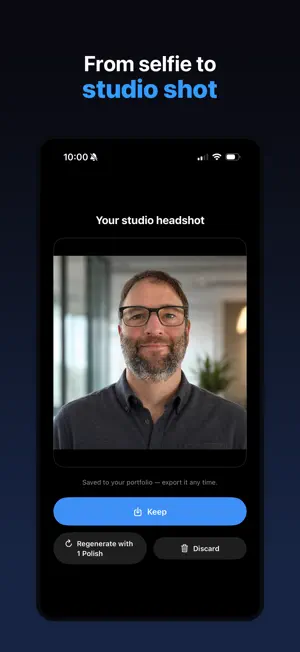
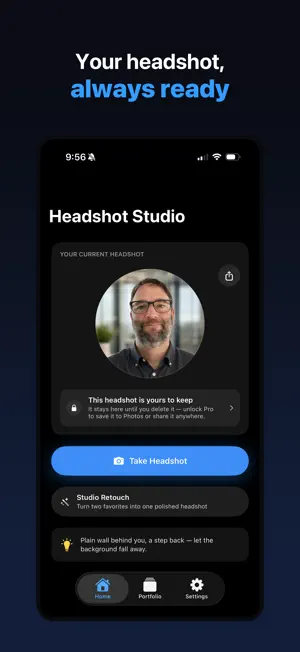
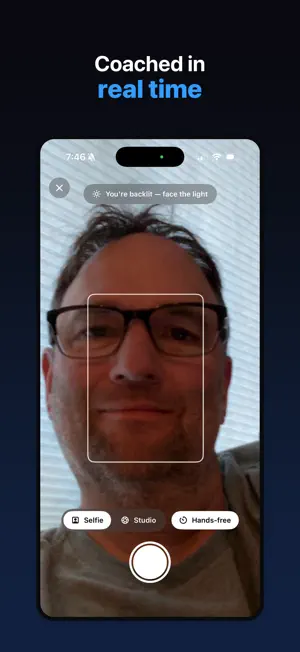
A real headshot, not an AI avatar — coached live on your own iPhone camera. Headshot Studio guides you through taking a genuinely professional headshot with your own camera. No AI face generation, no synthetic photos, no studio booking. Just you, coached in real time. **How it works** Open the camera and get live, on-device coaching on your framing, lighting, and distance. Shoot hands-free with voice capture, or use the shutter yourself. When you're done, swipe through your shots and keep your favorites. **Studio Retouch** Turn two of your favorite shots into one polished studio headshot. Studio Retouch blends them into a single, refined result — a professional finish without a photographer. **Free to shoot. One unlock to keep.** Shooting, coaching, and reviewing your photos are always free — try the whole experience before you pay for anything. A single one-time unlock (Studio Pro) lets you save and export your headshots: LinkedIn, portrait, and original formats, studio backdrop replacement, and one free Studio Retouch included. No subscription, ever. Need more Studio Retouch results later, pick them up as a small one-time pack. **Built around your privacy** Live coaching runs entirely on your iPhone — your camera feed never leaves your device. Studio Retouch is opt-in: if you use it, your two chosen photos are sent securely and used only to create your retouched headshot, then deleted immediately. Your photos are never used to train AI. There's no account, no sign-up, and no tracking. Take a real headshot you're proud of — coached, not faked.
What’s new
Version 1.3 · Updated August 24, 2026
- The Studio Pro unlock screen now speaks to what you were doing: tap Save and it opens on "Save your polished headshot," with your own photo shown large and a button that reads "Unlock & Save." - Sharing reads "Unlock & Share," and Set as LinkedIn photo reads "Unlock & Post" and previews your photo as the circle LinkedIn will show. - The buy button and the Restore and legal links stay on screen instead of scrolling away at large text sizes. - The camera's first-session tip now names the button that's actually there ("Review") instead of a "Done" that wasn't. - Fixes and refinements throughout.
App privacy
The developer, 3 Paws AI Studio, reported these privacy practices to Apple.
Data Not Linked to You
The following data, which may be collected but is not linked to your identity, may be used for the following purposes:
- Usage Data: Advertising Data, Product Interaction
- Purchases: Purchase History
- Identifiers: User ID
- User Content: Photos or Videos
Used for: Developer’s Advertising or Marketing, Analytics, App Functionality
Alternatives to Headshot Studio: Real Photos
Looking for apps like Headshot Studio: Real Photos? Here are 6 similar apps on the App Store. The highest rated is braintrance - 3D Memories (5.0/5), and all 6 are free to download.
-
 Musa Studio: AI Headshots
-
 braintrance - 3D Memories
5.0
braintrance - 3D Memories
5.0
-
 TopShot: AI Dating Photos
4.0
TopShot: AI Dating Photos
4.0
-
 Memoria - Search Your Photos
-
 PoseCam: Photo Pose Guide
-
 Elf Maker: Christmas Photos
1.0
Elf Maker: Christmas Photos
1.0
| App | Rating | Price | Last updated | Compare |
|---|---|---|---|---|
| Headshot Studio: Real Photos | – | Free | August 24, 2026 | |
| Musa Studio: AI Headshots | – | Free | Feb 16, 2026 | Compare |
| braintrance - 3D Memories | 5.0 / 5 (2) | Free | Aug 12, 2026 | Compare |
| TopShot: AI Dating Photos | 4.0 / 5 (4) | Free | Sep 17, 2026 | Compare |
| Memoria - Search Your Photos | – | Free | Oct 13, 2026 | Compare |
| PoseCam: Photo Pose Guide | – | Free | Aug 26, 2026 | Compare |
| Elf Maker: Christmas Photos | 1.0 / 5 (1) | Free | Oct 20, 2026 | Compare |