

Demote: Universal TV Remote
MADE WITH BEST PRACTICE LLC Utilities iPhoneiPadiPod touch
Demote: Universal TV Remote is a free Utilities app for iPhone and iPad by MADE WITH BEST PRACTICE LLC. Rated 5.0/5 from 1 ratings. Requires iOS 15.0.
- Rating
- 5.0
- 1 ratings
- Price
- Free
- on the App Store
- Size
- 56 MB
- Age 4+
- Updated
- Oct 22
- 2026 · v2.1.5
Screenshots


About Demote: Universal TV Remote
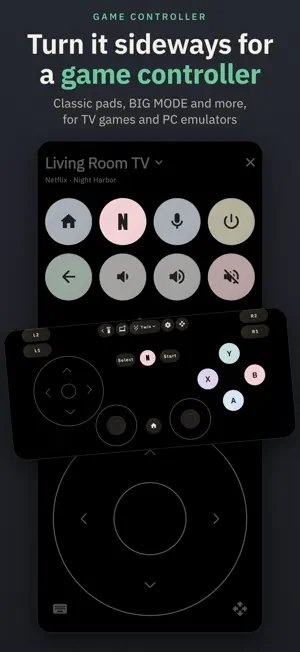
The TV remote that never charges for volume, and runs your house too. Demote turns your iPhone into a remote for every TV in the house: Roku, Samsung, LG, Apple TV, Google TV, Vizio, Sony and more. Turn it sideways and it's a controller. No ads, no account, no subscription. Open it and it finds the TVs on your Wi-Fi. Pick yours, enter the code if your TV shows one, and you're set. MADE FOR IPHONE DUO AND IPAD Open your iPhone Duo and the remote splits around the fold: buttons on one side, what's playing and a full-size wheel on the other, or the wheel on the left if you like. Half-open on a table, what's playing sits on top. iPad splits sideways. HOME ASSISTANT, ON YOUR REMOTE Demote talks to your TV itself, so there's no dashboard to build. • Fill a pane from a room: pick a Home Assistant area, and its scenes, lights, switches, fans, blinds and media fill the pane's empty buttons (panes come with the Lifetime Unlock). Locks, alarms and garage doors are never added. • Talk to Assist: set the mic to Assist, hold it and ask your Home Assistant, whatever TV you're on. Its answer is spoken and shown on screen. • A single-button widget runs a Home Assistant button without opening Demote. • Send a TV's volume to a soundbar, and add packs for Sonos, Govee, WLED, Kodi and more. Turn it on in Settings › Button Packs. A CONTROLLER FOR TV GAMES AND EMULATORS Turn your iPhone sideways for ten free layouts: • Toaster, Rainbow, Crescent, Twin and Redmond: classic pads • BIG MODE: big buttons for the basics • Swiper: your own buttons as a big deck you swipe through • Cupertino: an Apple TV-style touch surface, with what's playing above it when the TV reports it • Gaben 1 and Gaben 2: twin trackpads, or two sticks over two small trackpads On a TV it sends the remote's keys. Emulator mode, over Wi-Fi, adds analog sticks, triggers and motion aiming for PC emulators that support DSU, such as Dolphin and Cemu. One custom button per layout is free. MACROS THAT DO THE WHOLE JOB One button can wake the TV and wait for it, switch the input, dim the lights and open your app. Start from a template, try it, and tap to stop. THE WHOLE REMOTE IS FREE • D-pad, OK, back, home, playback, volume, mute and power • Your iPhone's volume buttons (turn on in Settings) • Typing, dictation, a trackpad and your apps one tap away • What's playing, with a live timeline, and a TV switcher • Send a photo or video to the TV, or mirror with AirPlay • Widgets, and Lock Screen and Control Center buttons (iOS 18) • A 30-minute sleep timer, and your first custom button • Home Assistant, Assist, button packs, and every controller layout and mode Nothing that's free today will ever become paid. WORKS WITH Google TV and Android TV (including TCL and Hisense), Roku TVs and players (including TCL, Hisense and onn.), Apple TV, Samsung from 2016 on (Tizen), LG webOS, Vizio SmartCast, Sony Bravia and most Panasonic Viera TVs. Your iPhone and TV need to share a Wi-Fi network. Power on needs a TV that can wake over the network. Roku players don't take volume or power keys, and app launching isn't available on Sony yet. Apple TV changes the volume only over HDMI-CEC and has no mute. Hisense VIDAA TVs aren't supported. ONE LIFETIME UNLOCK, NEVER A SUBSCRIPTION A one-time Lifetime Unlock adds: • 24 more custom buttons on three more panes, more in the controller, and moving and resizing its buttons • Your photo behind the remote, trackpad, keyboard and controller • More themes, like Peanut • Button and glow colors, remapping, App-specific remotes, All TVs off, single-button widgets and a sleep timer of any length Preview every theme, color and photo first. Family Sharing is on. SIRI, VOICEOVER AND BIG TEXT "Hey Siri, mute the TV with Demote" works; Siri opens Demote to send it. Every key works with VoiceOver, Switch Control and a keyboard, and Dynamic Type is honored. PRIVATE BY DESIGN Demote talks to your TV and Home Assistant directly over your network, with no Demote account.
What’s new
Version 2.1.5 · Updated October 22, 2026
Made for iPhone Duo and iPad • Open your iPhone Duo and the remote splits around the fold: your buttons on one side, what's playing and a full-size wheel on the other. The trackpad, keyboard and sheets open on the wheel's side, so your buttons stay in reach. • Rather have the wheel under your left thumb? Settings › Remote › Wheel on the left. • Stand it half-open on a table and what's playing sits up top, with the controls below the fold. • Your TV list, pairing, Settings and Button Packs use both halves too, and themes, glow colors and your photo get a big live preview beside their controls. • The controller fills the screen however you hold it, with nothing on the fold. • Closed, everything keeps clear of the camera strip. • On iPad, turn it sideways for the same two-sided remote. Home Assistant • Fill a pane from a room: in the Button Builder's Home Assistant page, choose Fill this pane from an area and pick a room. Its scenes, lights, switches, fans, blinds and media fill the pane's empty buttons. Locks, alarms and garage doors are never added. • Talk to Assist: in Settings › Button Packs, set Mic sends to Assist, then hold the mic and ask your Home Assistant, whatever TV you're on. Assist answers out loud. • Home Assistant buttons on a single-button widget run without opening Demote. Also new • Cupertino shows what's playing, with a progress line, when the TV reports it. • Steadier connections: presses made while a TV reconnects are held and sent once it's back, a TV that moves to a new address is followed, and LG and Samsung recover from a stalled link instead of losing keys. • If Local Network access is off for Demote, the TV list says so, with a way to Settings. • Where getting a TV working stops, Tell us about your TV is one tap away. • VoiceOver: double-tap what's playing to hear how far in it is. • The Lifetime Unlock works with Family Sharing.
App privacy
The developer, MADE WITH BEST PRACTICE LLC, reported these privacy practices to Apple.
Data Not Collected
The developer does not collect any data from this app.
Alternatives to Demote: Universal TV Remote
Looking for apps like Demote: Universal TV Remote? Here are 6 similar apps on the App Store. The highest rated is Notifs Grapevine (5.0/5), and all 6 are free to download.
-
 Notifs Grapevine
5.0
Notifs Grapevine
5.0
-
 Ginjer IoT
5.0
Ginjer IoT
5.0
-
 Spacetime Clock
2.8
Spacetime Clock
2.8
-
 ZenMote: Android TV Remote
5.0
ZenMote: Android TV Remote
5.0
-
 Battery Health Estimator
-
 Clicker: TV Remote, No Ads
| App | Rating | Price | Last updated | Compare |
|---|---|---|---|---|
| Demote: Universal TV Remote | 5.0 / 5 (1 rating) | Free | October 22, 2026 | |
| Notifs Grapevine | 5.0 / 5 (3) | Free | Aug 19, 2026 | Compare |
| Ginjer IoT | 5.0 / 5 (1) | Free | Aug 10, 2026 | Compare |
| Spacetime Clock | 2.8 / 5 (4) | Free | Oct 20, 2026 | Compare |
| ZenMote: Android TV Remote | 5.0 / 5 (1) | Free | Jul 30, 2026 | Compare |
| Battery Health Estimator | – | Free | Aug 29, 2026 | Compare |
| Clicker: TV Remote, No Ads | – | Free | Aug 25, 2026 | Compare |