

LifeOS: Money, Plans & AI
Piciriga Vasile Finance iPhoneiPadiPod touch
LifeOS: Money, Plans & AI is a free Finance app for iPhone and iPad by Piciriga Vasile. Requires iOS 17.0. Updated October 6, 2026.
- Price
- Free
- on the App Store
- Size
- 27 MB
- Age 4+
- Updated
- Oct 6
- 2026 · v2.6.0
Screenshots
About LifeOS: Money, Plans & AI
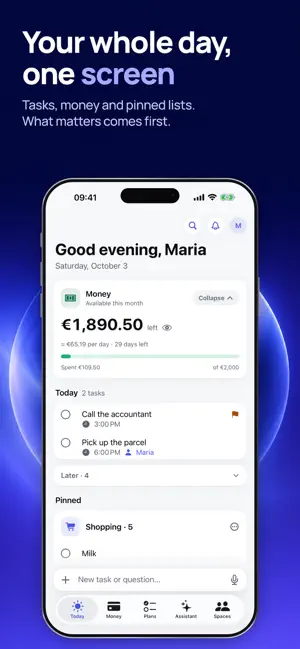
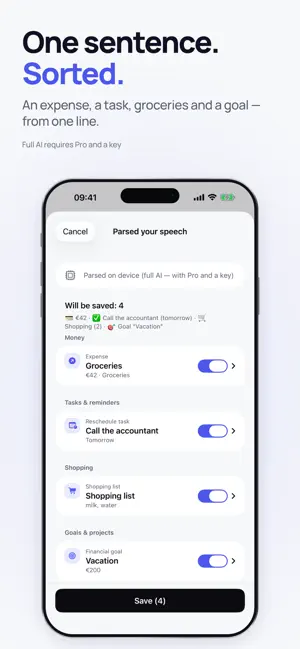
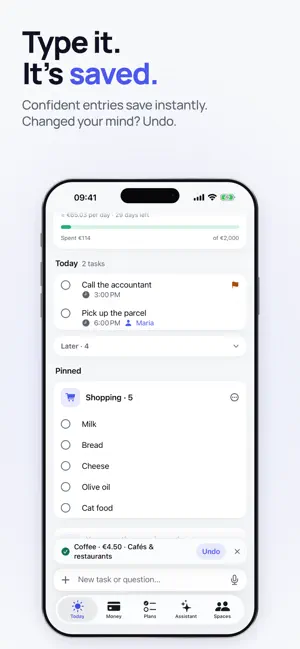
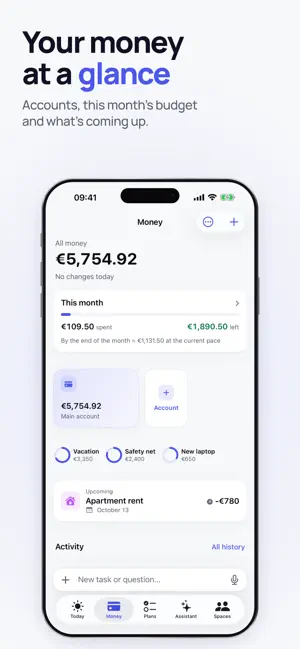
LifeOS is a personal system for money and everyday life with an AI assistant. SUBSCRIPTIONS AND TERMS Terms of Use (EULA): https://www.apple.com/legal/internet-services/itunes/dev/stdeula/ Privacy Policy: https://lifeos-legal.pages.dev/privacy • Personal Pro (Monthly) — €6.99/month • Personal Pro (Yearly) — €49.99/year (7 days free) • Couple / Family (Monthly) — €11.99/month, up to 6 people • Couple / Family (Yearly) — €89.99/year (7 days free), up to 6 people Payment is charged to your Apple ID at confirmation of purchase. The subscription renews automatically unless cancelled at least 24 hours before the end of the current period; your account is charged for renewal within 24 hours prior to the end of the period. Manage the subscription and turn off auto-renewal in your Apple ID settings after purchase. ONE PHRASE — EVERYTHING IN PLACE Say or type: "Spent 42 € on groceries, call the accountant tomorrow, add milk to shopping and put 150 € toward the vacation." LifeOS parses it into entries and shows them on a single confirmation screen — nothing is saved until you tap Save, and every save can be undone in one tap. MONEY UNDER CONTROL • expenses and income with smart categories that learn from your edits; • monthly budget, safe daily limit and end-of-month forecast; • recurring payments with reminders the day before; • receipt scanning and CSV statement import; • transfers between your own accounts — they don't distort the month; • savings goals with a monthly plan. TASKS, SHOPPING, NOTES • tasks with priorities and reminders, projects, shopping lists; • personal notes — say "note: don't forget the passport" and it's saved; • widgets and Siri: add entries without opening the app. AI ASSISTANT (Personal Pro / Family) • answers questions about your own data: "Can I afford…?", "Where can I cut spending?"; • voice dialogue: say everything in one go and get a structured breakdown; • understands long phrases whole and catches corrections on the fly; • works right after subscribing — no setup needed. Before anything is sent, the app shows a consent screen explaining exactly what data is shared and with whom (Anthropic or OpenAI). Without your permission no data is sent, and permission can be withdrawn in Settings. The analysis is informational and not individual financial advice. AI features require an internet connection. TOGETHER — AS A COUPLE OR FAMILY (Couple / Family) Shared budget, lists and goals for up to 6 people via iCloud. Accepting an invitation is free — only the space owner pays. PRIVATE BY DEFAULT Your data lives on your device and in your personal iCloud (optional). No accounts, no tracking. Full data deletion is one step. The voice recording is sent only to refine transcription and is deleted from the device right after parsing. FREE Entries, tasks, shopping, 1 active goal, a 2-month history view, the demo assistant and 2 full AI requests to try. Pro/Family unlocks the full AI, unlimited goals and your complete history.
What’s new
Version 2.6.0 · Updated October 6, 2026
LifeOS 2.6 — capture without opening the app. • Action Button, Control Center and the Lock Screen: press and say “coffee 4.50, earned 250 euros, call mom tomorrow” — LifeOS sorts it all out, even on a locked iPhone. Press again to stop. • Live Activity and Dynamic Island show that recording is on, how long it has run and what was saved — with an Undo button. • New widgets: Quick entry, Today (tick off tasks right from the Home Screen), Finances and Tip of the Day — on the Home Screen and the Lock Screen. Amounts on the Lock Screen are hidden by default. • Siri phrases: “Voice entry in LifeOS”, “New task in LifeOS”, “Add an expense in LifeOS” and more. • Spaces → Settings → Voice outside the app: how to set up the button and whether to save without review. • Better at understanding speech: “four fifty” means 4.50, “they paid me 250” is income, and “don’t forget to buy milk” is a new to-do, not an edit of your last expense.
App privacy
The developer, Piciriga Vasile, reported these privacy practices to Apple.
Data Used to Track You
The following data may be used to track you across apps and websites owned by other companies:
- Purchases: Purchase History
- Identifiers: Device ID
- Usage Data: Product Interaction
Data Linked to You
The following data, which may be collected and linked to your identity, may be used for the following purposes:
- Identifiers: Device ID
- Purchases: Purchase History
- Usage Data: Product Interaction
Used for: Third-Party Advertising, Developer’s Advertising or Marketing, Analytics, App Functionality
Data Not Linked to You
The following data, which may be collected but is not linked to your identity, may be used for the following purposes:
- Diagnostics: Performance Data, Crash Data
- Other Data: Other Data Types
- Financial Info: Other Financial Info
- Contact Info: Name
- User Content: Audio Data, Other User Content
Used for: Analytics, App Functionality
Alternatives to LifeOS: Money, Plans & AI
Looking for apps like LifeOS: Money, Plans & AI? Here are 6 similar apps on the App Store. The highest rated is RenewPal: Subscription Tracker (5.0/5), and all 6 are free to download.
-
 Sejf: Net Worth Tracker
-
 ZUDCRM - Учет торговли
-
 BMD: Njangui, Susu & Tontine
-
 RenewPal: Subscription Tracker
5.0
RenewPal: Subscription Tracker
5.0
-
 Trove: Budget & Spending Plan
-
 LaunchLab Money: Budgeting
| App | Rating | Price | Last updated | Compare |
|---|---|---|---|---|
| LifeOS: Money, Plans & AI | – | Free | October 6, 2026 | |
| Sejf: Net Worth Tracker | – | Free | Jun 24, 2026 | Compare |
| ZUDCRM - Учет торговли | – | Free | Oct 20, 2026 | Compare |
| BMD: Njangui, Susu & Tontine | – | Free | Oct 21, 2026 | Compare |
| RenewPal: Subscription Tracker | 5.0 / 5 (3) | Free | Oct 21, 2026 | Compare |
| Trove: Budget & Spending Plan | – | Free | Oct 22, 2026 | Compare |
| LaunchLab Money: Budgeting | – | Free | Aug 2, 2026 | Compare |