

Doodle Schedule: Draw Planner
BY MILLY CO. LTD Productivity iPhoneiPadiPod touch
Doodle Schedule: Draw Planner is a free Productivity app for iPhone and iPad by BY MILLY CO. LTD. Requires iOS 18.0. Updated October 21, 2026.
- Price
- Free
- on the App Store
- Size
- 48 MB
- Age 4+
- Updated
- Oct 21
- 2026 · v1.7
Screenshots

About Doodle Schedule: Draw Planner
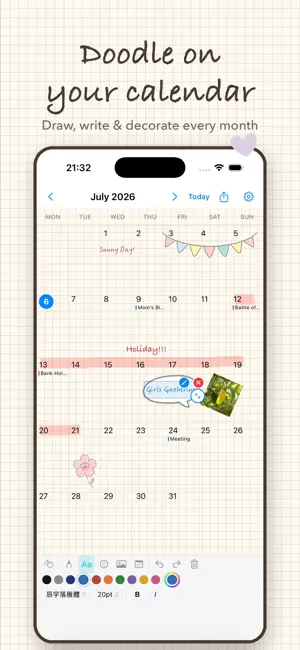
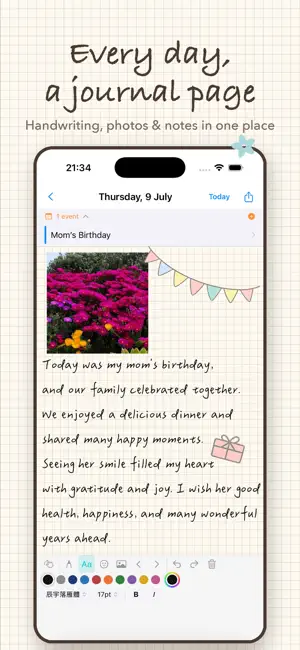
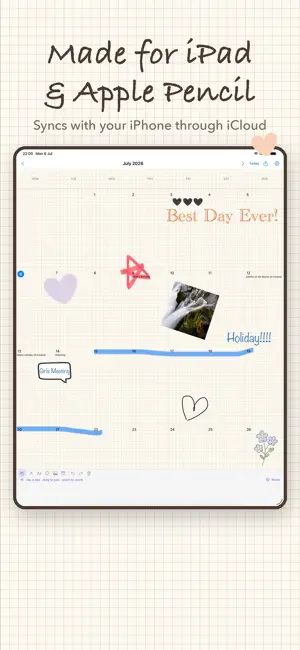
Doodle Schedule turns your calendar into a hand-drawn journal. Instead of typing plain events into boxes, draw, write and decorate your days the way you would on paper, with all the flexibility of digital. DRAW AND WRITE ON YOUR CALENDAR • Sketch, highlight and jot notes on any month or day with Apple Pencil or your finger • Add typed text in a choice of fonts, including handwritten and Chinese calligraphy styles • Separate undo and redo for drawing, photos and text A JOURNAL PAGE FOR EVERY DAY • Tap any day to open its own page • Write about your day, add photos, and resize and rotate them freely STICKERS FOR EVERY MOOD • Floral, botanical and black-and-white sticker sets • Import your own images as stickers PAPER THAT FEELS REAL • Blank, cream, grid, lined, dot-grid and more, for your month and day pages YOUR REAL SCHEDULE, TOO • See your Apple Calendar events next to your doodles • Create and edit events without leaving the app • A month widget for your Home Screen shows every event as a colour bar YOURS, PRIVATELY • Syncs across your iPhone and iPad through your own iCloud account • Lock the app with Face ID or Touch ID • No accounts, no servers, no ads. Your journal never leaves your devices and your iCloud. KEEP IT FOREVER • Export any month or day as an image • Create a PDF keepsake of your whole journal to print or archive Unlock everything with a monthly or yearly subscription, each starting with a 1-month free trial, or with a one-time purchase. Privacy Policy: https://bymilly.co/doodleschedule-privacy-policy-en/ Terms of Use (EULA): https://www.apple.com/legal/internet-services/itunes/dev/stdeula/
What’s new
Version 1.7 · Updated October 21, 2026
New in 1.7 • New Large widget: see your whole month at a glance, with every event shown as a colour bar and multi-day events as one long bar. Tap the arrows to switch months and + to add an event. • Option to show events as bars on the app's calendar too (in Settings, turn on "Show events as bars"). • Events that span several days now appear on every day, not just the first. • All-day events can now span several days and keep their dates when edited. • Editing an event no longer changes its repeat or reminder settings unless you change them. • The widget now updates at midnight and right after you use the app. • Improved Chinese wording throughout.
App privacy
The developer, BY MILLY CO. LTD, reported these privacy practices to Apple.
Data Not Collected
The developer does not collect any data from this app.
Alternatives to Doodle Schedule: Draw Planner
Looking for apps like Doodle Schedule: Draw Planner? Here are 6 similar apps on the App Store. The highest rated is Timi: The Timekeeper (5.0/5), and all 6 are free to download.
-
 Timi: The Timekeeper
5.0
Timi: The Timekeeper
5.0
-
 Heatmap Studio
-
 MatchaNote: Notes & Tasks
-
 Penlog: Handwriting Journal
4.8
Penlog: Handwriting Journal
4.8
-
 YouTim · Organize your groups
-
 Daypages - Calm Calendar
4.5
Daypages - Calm Calendar
4.5
| App | Rating | Price | Last updated | Compare |
|---|---|---|---|---|
| Doodle Schedule: Draw Planner | – | Free | October 21, 2026 | |
| Timi: The Timekeeper | 5.0 / 5 (2) | Free | Oct 23, 2026 | Compare |
| Heatmap Studio | – | Free | Sep 28, 2026 | Compare |
| MatchaNote: Notes & Tasks | – | Free | Oct 23, 2026 | Compare |
| Penlog: Handwriting Journal | 4.8 / 5 (5) | Free | Oct 23, 2026 | Compare |
| YouTim · Organize your groups | – | Free | Oct 23, 2026 | Compare |
| Daypages - Calm Calendar | 4.5 / 5 (2) | Free | Oct 24, 2026 | Compare |