

Link Auth
Hangzhou Lingke Networks Technology Co.Ltd Utilities iPhoneiPadiPod touch
Link Auth is a free Utilities app for iPhone and iPad by Hangzhou Lingke Networks Technology Co.Ltd. Requires iOS 15.5. Updated September 5, 2026.
- Price
- Free
- on the App Store
- Size
- 39 MB
- Age 17+
- Updated
- Sep 5
- 2026 · v1.0.2
Screenshots
About Link Auth
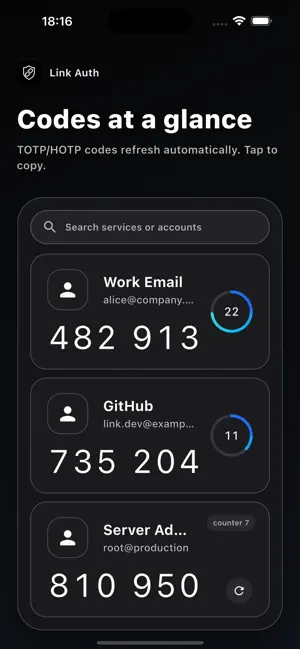
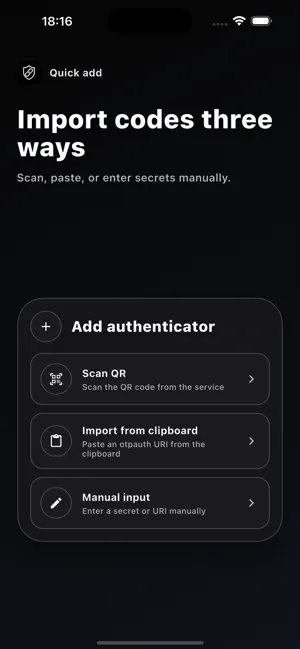
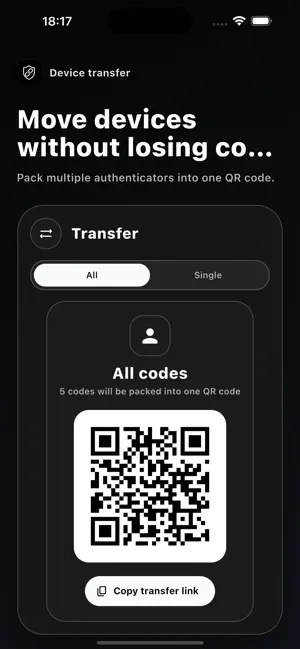
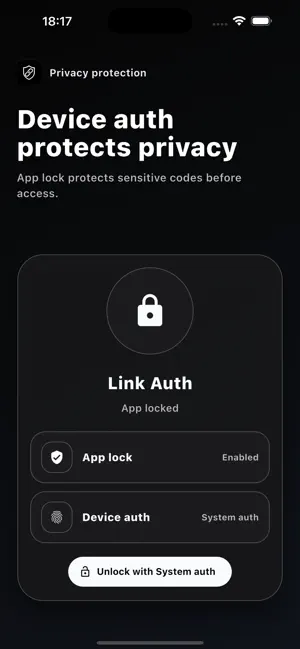
Link Auth is a focused and secure authenticator app for managing two-factor verification codes across email, developer tools, cloud services, finance systems, and other important accounts. It supports both TOTP and HOTP authenticators. Codes refresh automatically when needed, and you can tap a code to copy it quickly. Add authenticators by scanning a QR code, importing from the clipboard, or entering a secret manually. When moving to a new device, export your authenticators as a QR code for a smoother transfer. Key features: - Manage TOTP and HOTP verification codes - Add codes by QR scan, clipboard import, or manual entry - Search by service name or account - Protect sensitive codes with device authentication and app lock - Transfer authenticators by QR code - Support for dark mode, light mode, and multiple languages Link Auth keeps two-factor verification clear, organized, and ready for everyday use.
What’s new
Version 1.0.2 · Updated September 5, 2026
Add chain import
App privacy
The developer, Hangzhou Lingke Networks Technology Co.Ltd, reported these privacy practices to Apple.
Data Not Collected
The developer does not collect any data from this app.
Alternatives to Link Auth
Looking for apps like Link Auth? Here are 6 similar apps on the App Store.


| App | Rating | Price | Last updated | Compare |
|---|---|---|---|---|
| Link Auth | – | Free | September 5, 2026 | |
| Apowersoft Screenshot | – | Free | Oct 29, 2026 | Compare |
| Ai财算子 | – | Free | Jul 11, 2026 | Compare |
| 民鋒金融 | – | Free | Sep 22, 2026 | Compare |
| Quick QR Scan & Generator | – | Free | Mar 25, 2026 | Compare |
| 华泰香港易盛 | – | Free | Jul 24, 2026 | Compare |
| 中新智投 | – | Free | Jan 9, 2026 | Compare |
Compare Link Auth with the top alternatives: ratings, updates, ASO score and keyword gaps →