

TinyDoor: Tilt Shift Editor
HYOUNG NAE OH Photo & Video iPhoneiPadiPod touch
TinyDoor: Tilt Shift Editor is a free Photo & Video app for iPhone and iPad by HYOUNG NAE OH. Requires iOS 26.0. Updated September 23, 2026.
- Price
- Free
- on the App Store
- Size
- 17 MB
- Age 4+
- Updated
- Sep 23
- 2026 · v1.2
Screenshots


About TinyDoor: Tilt Shift Editor
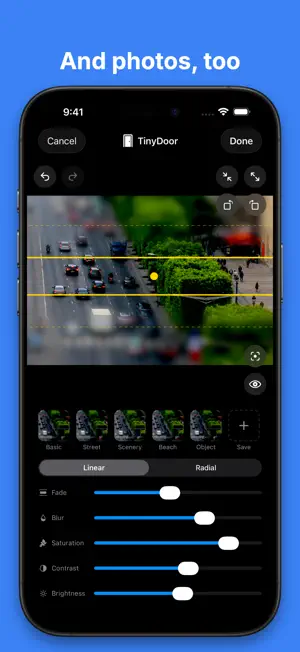
Make the real world look like a miniature model. TinyDoor uses a tilt-shift blur to shrink cities, streets, and crowds into an adorable toy world — for both photos and video. ▶ WHY TINYDOOR • Photos AND videos — most tilt-shift apps stop at photos. TinyDoor does both. • Two focus modes — linear band or radial circle. Drag, pinch, and rotate to place the sharp zone exactly where you want. • Real toy-model look — boosted saturation and contrast make scenes feel like plastic dioramas, not just blurred photos. • Miniature motion for video — speed up 2x–8x and drop the frame rate for that classic stop-motion, tiny-people feel. • One-tap presets — Basic, Street, Scenery, Beach, and Object. Save your own, too. • Full-resolution export — save to Photos or share straight to social apps. ▶ FREE & PRO Everything is free to use. Free exports include a small watermark. Go Pro to remove it and unlock extra preset slots. ◆ Terms of Use (EULA): https://www.apple.com/legal/internet-services/itunes/dev/stdeula/
What’s new
Version 1.2 · Updated September 23, 2026
• Background music for videos: pick a built-in track made for the miniature look. • TinyDoor now speaks Dutch and Portuguese (Portugal). • Minor fixes and improvements.
App privacy
The developer, HYOUNG NAE OH, reported these privacy practices to Apple.
Data Not Collected
The developer does not collect any data from this app.