

Hi3D Scan
Oceano HK Holding Limited Graphics & Design iPhoneiPadiPod touch
Hi3D Scan is a free Graphics & Design app for iPhone and iPad by Oceano HK Holding Limited. Requires iOS 16.4. Updated August 21, 2026.
- Price
- Free
- on the App Store
- Size
- 64 MB
- Age 4+
- Updated
- Aug 21
- 2026 · v1.0.3
Screenshots

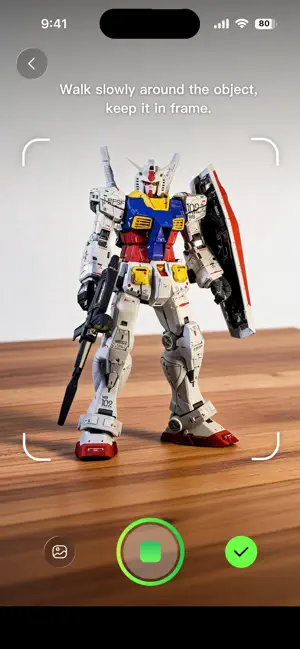

About Hi3D Scan
Hi3D Scan turns videos of real-world objects into 3D models with guided capture and cloud reconstruction. HOW IT WORKS 1. Record an object from multiple angles with the on-screen capture guide, or choose an existing video from your photo library. 2. Review the clip and upload it for cloud reconstruction. 3. Follow the task status in your model library. 4. Preview the generated model, download it as a GLB file, or share it with a link. KEY FEATURES • Guided object capture Follow visual guidance designed to help you move around an object and capture useful coverage. • Record or choose a video Capture inside the app or select an existing video from your library. • Cloud 3D reconstruction Submit a video and let the reconstruction service create the 3D result. • Model library and task status Keep your reconstruction tasks and generated models together in your account. • Interactive 3D preview Inspect a completed model directly in the app. • Download and share Download the generated GLB file or create a link to share the result. • Showcase Explore a curated collection of 3D models for inspiration. • Flexible sign-in Use email verification, Sign in with Apple, or Google Sign-In. Account deletion is available inside the app. Hi3D Scan supports both iPhone and iPad. Capture quality and reconstruction results depend on the object, lighting, video coverage, network connection, and service processing. Support: https://static.hi3d.ai/FE/static/scan/legal/html/en/support.html Privacy: https://static.hi3d.ai/FE/static/scan/legal/html/en/privacy-policy.html
What’s new
Version 1.0.3 · Updated August 21, 2026
• Added capture-pose and motion-sensor metadata to improve 3D reconstruction • Improved guided capture prompts and capture-quality assistance • Improved capture reliability and performance
App privacy
The developer, Oceano HK Holding Limited, reported these privacy practices to Apple.
Data Linked to You
The following data, which may be collected and linked to your identity, may be used for the following purposes:
- Location: Coarse Location
- Usage Data: Product Interaction
- Diagnostics: Other Diagnostic Data
- Other Data: Other Data Types
- Contact Info: Email Address, Name
- User Content: Photos or Videos, Audio Data, Other User Content
- Identifiers: User ID, Device ID
Used for: Analytics, App Functionality
Data Not Linked to You
The following data, which may be collected but is not linked to your identity, may be used for the following purposes:
- Identifiers: User ID, Device ID
Used for: Analytics
Alternatives to Hi3D Scan
Looking for apps like Hi3D Scan? Here are 6 similar apps on the App Store. The highest rated is 3Dup - Image to 3D Model (4.6/5), and all 6 are free to download.
-
 Meshora 3D : AI Model Maker
-
 Rodin ai - 3D Model Generator
1.0
Rodin ai - 3D Model Generator
1.0
-
 AI Image to 3D Model Maker
4.2
AI Image to 3D Model Maker
4.2
-
 Mesh 3D AI Generator Model
3.9
Mesh 3D AI Generator Model
3.9
-
 MAKAR 3D Scan
4.0
MAKAR 3D Scan
4.0
-
 3Dup - Image to 3D Model
4.6
3Dup - Image to 3D Model
4.6
| App | Rating | Price | Last updated | Compare |
|---|---|---|---|---|
| Hi3D Scan | – | Free | August 21, 2026 | |
| Meshora 3D : AI Model Maker | – | Free | Sep 15, 2026 | Compare |
| Rodin ai - 3D Model Generator | 1.0 / 5 (2) | Free | May 7, 2026 | Compare |
| AI Image to 3D Model Maker | 4.2 / 5 (27) | Free | Oct 10, 2026 | Compare |
| Mesh 3D AI Generator Model | 3.9 / 5 (156) | Free | Sep 1, 2026 | Compare |
| MAKAR 3D Scan | 4.0 / 5 (3) | Free | Oct 20, 2024 | Compare |
| 3Dup - Image to 3D Model | 4.6 / 5 (88) | Free | Feb 14, 2026 | Compare |
Compare Hi3D Scan with the top alternatives: ratings, updates, ASO score and keyword gaps →