

Receipt Keeper - Expense Track
Mamadou Balde Finance iPhoneiPadiPod touch
Receipt Keeper - Expense Track is a free Finance app for iPhone and iPad by Mamadou Balde. Rated 5.0/5 from 2 ratings. Requires iOS 16.0.
- Rating
- 5.0
- 2 ratings
- Price
- Free
- on the App Store
- Size
- 2 MB
- Age 4+
- Updated
- Oct 17
- 2026 · v1.3.0
Screenshots


About Receipt Keeper - Expense Track
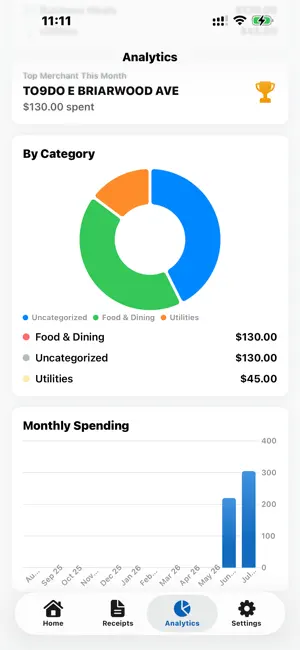
Receipt Keeper turns a shoebox of receipts into tax-ready records. Scan any receipt with your camera, let on-device AI extract the merchant, date, total, and tax — then mark it as a write-off and export a complete Tax Package your accountant will love. All 100% private: your data never leaves your device. BUILT FOR TAX SEASON • Mark any receipt as tax deductible with one tap • 14 tax categories: Business Meals, Travel, Home Office, Vehicle, Software, Equipment, and more • See your year's total write-offs and deductions by category at a glance • Quarterly estimated-tax deadline reminders so you never miss a payment • Tax Package export: one tap creates a ZIP with your yearly spreadsheet, PDF summary report, and every receipt photo — ready to email your accountant SCAN IN SECONDS • Point your camera at any receipt — merchant, date, total, and sales tax are extracted automatically • Import existing receipt photos from your library • Every field stays editable, and itemized line items are captured too • Auto-categorization sorts expenses into Food & Dining, Transportation, Travel, Office, and more KNOW WHERE YOUR MONEY GOES • Interactive dashboard with spending by category, monthly trends, and top merchants • Month and year summaries on your home screen • Search and filter every receipt by merchant, category, or amount EXPORT EVERYTHING • Clean CSV spreadsheets with tax columns for Excel, Numbers, or Google Sheets • Professional PDF expense reports with tax totals and deduction breakdowns • Share by email, AirDrop, or save to Files PRIVATE BY DESIGN • No account. No sign-up. No cloud. • Receipts are processed with on-device AI — nothing is ever uploaded • Your financial data belongs to you, period MADE FOR Freelancers, contractors, small business owners, gig workers, and anyone who files a 1099 or tracks business expenses. If you've ever lost a deduction because you lost a receipt, Receipt Keeper is for you. FREE vs PRO Free: 20 scans per month with core scanning and categorization. Pro (one-time purchase): unlimited scans, tax deduction tracking, Tax Package export, CSV/PDF reports, analytics dashboard, multi-currency, line items, and custom appearance — yours for life. No subscriptions. No hidden fees. No ads. Your data stays on your device. Questions or feedback? Reach us anytime from Settings → Contact Support.
What’s new
Version 1.3.0 · Updated October 17, 2026
• Smarter receipt scanning with improved merchant name detection • Month-over-month spending comparison on home screen • Interactive spending chart — tap any bar to view receipts • Scan streak tracker to build healthy expense habits • Budget tracker with visual progress bar • Monthly summary share card • Better insights and tax deduction tracking
App privacy
The developer, Mamadou Balde, reported these privacy practices to Apple.
Data Not Collected
The developer does not collect any data from this app.
Alternatives to Receipt Keeper - Expense Track
Looking for apps like Receipt Keeper - Expense Track? Here are 6 similar apps on the App Store. The highest rated is Receipts - Receipt Scanner (5.0/5), and all 6 are free to download.
-
 Receipts: Scan and Organize
-
 Receipts - Receipt Scanner
5.0
Receipts - Receipt Scanner
5.0
-
 Receipt Scanner - Pip Wallet
-
 Expense Tracker: Receipt Scan
-
 ReceiptVault: Receipt Manager
-
 Slip Vault: Receipt Keeper
| App | Rating | Price | Last updated | Compare |
|---|---|---|---|---|
| Receipt Keeper - Expense Track | 5.0 / 5 (2 ratings) | Free | October 17, 2026 | |
| Receipts: Scan and Organize | – | Free | Jun 4, 2026 | Compare |
| Receipts - Receipt Scanner | 5.0 / 5 (1) | Free | Oct 10, 2026 | Compare |
| Receipt Scanner - Pip Wallet | – | Free | Sep 29, 2026 | Compare |
| Expense Tracker: Receipt Scan | – | Free | Oct 12, 2026 | Compare |
| ReceiptVault: Receipt Manager | – | Free | Jul 29, 2026 | Compare |
| Slip Vault: Receipt Keeper | – | Free | Oct 7, 2026 | Compare |