

SpendCheck: Expense Tracker
MANIKANDAN CHELLAPPAN NADAR Finance iPhoneiPadiPod touch
SpendCheck: Expense Tracker is a free Finance app for iPhone and iPad by MANIKANDAN CHELLAPPAN NADAR. Rated 4.7/5 from 6 ratings. Requires iOS 17.6.
- Rating
- 4.7
- 6 ratings
- Price
- Free
- on the App Store
- Size
- 3 MB
- Age 4+
- Updated
- Oct 17
- 2026 · v2.7
Screenshots

About SpendCheck: Expense Tracker
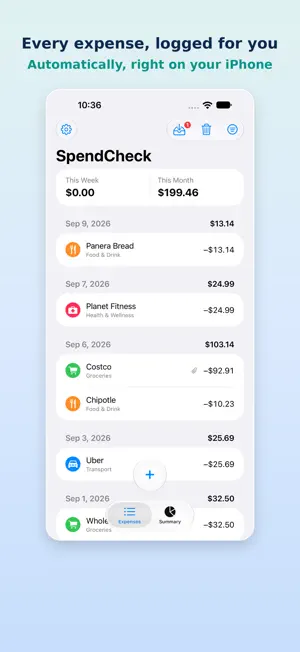
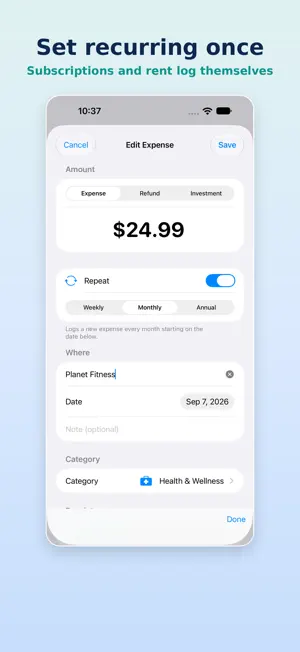
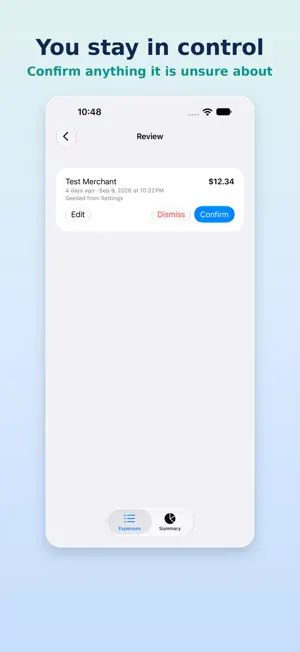
SpendCheck is the expense tracker for people who just want to see where their money goes — without accounts, ads, subscriptions, or a single byte leaving their phone unless they choose otherwise. Everything you log lives only on your device by default. There's no sign-up, no ads, and no analytics — and no company, including us, that can see your spending. You can explicitly turn on encrypted backup to your own cloud storage. Open the app and start tracking in seconds. WHY YOU'LL LIKE IT • Purchases that log themselves — Set up a Shortcuts automation once (a guided setup screen in Settings shows the exact steps) and alerts from recognized bank and card apps, plus Apple Pay, are added to your list for you, marked Auto, with Undo if anything looks wrong. Prefer to confirm everything? Turn Auto-log off and every detected purchase waits for you instead. • One purchase, one entry — An Apple Pay tap, a wallet notification and a bank alert for the same purchase are matched into a single entry, while two real purchases a few minutes apart are both kept. A small orange label flags anything that looks logged twice, so you can compare and keep the one you want. • Review before it counts — Anything unclear, unusually large or possibly doubled waits in a Review screen. Confirm, edit or dismiss it in a tap. • Merchants, your way — Rename a business once and see it everywhere, merge duplicates, or split entries off. SpendCheck learns the different names a bank uses for the same place, so future purchases land in the right spot. • Fast entry — A bank-app-style keypad lets you punch in an amount and save an expense in a couple of taps. No fiddly decimal typing. • Expenses, refunds, and investments — Track money going out, money coming back, and money you've moved into brokerage or crypto platforms. Investments are kept separate so they never inflate what you "spent." • Receipt photos, made searchable — Scan a receipt with an auto-detecting document scanner (multi-page in one go), crop it anytime, and search for anything printed on it later, even if you never typed it in. All text recognition happens right on your device. • Encrypted Backup & Restore — Back up your expenses and receipts to your own cloud storage — iCloud by default, or anywhere you choose — protected by a passphrase only you know. Nobody but you, not even SpendCheck, can read it. Fully optional, and off by default. Restoring brings back every entry and never deletes what's already on your phone. • Recently Deleted — Delete something by mistake? It's recoverable for 14 days, not gone the moment you swipe. • Smart categories — As you type a business name, SpendCheck pre-fills the category you last used there. Less thinking, faster logging. • Recurring expenses — Mark something as weekly, monthly, or annual and it logs itself automatically — perfect for subscriptions, rent, and yearly renewals. • Clear summaries — See what you spent this week and this month, a breakdown by business and by category, and a simple chart — all for any month you pick. • Export anytime — Send a clean CSV of your full history to Files, Numbers, Excel, or Google Sheets whenever you want a copy. • Make it yours — Pick an accent color to match your style. PRIVATE BY DESIGN SpendCheck stores everything locally using Apple's on-device database. There is no server, no login, and no tracking. Automatic logging runs through Shortcuts on your own phone: SpendCheck only sees the alert text your automation hands to it, and nothing is sent anywhere. Your financial life is nobody's business but yours. If you ever turn on Backup & Restore, that backup is encrypted on your device before it ever leaves it — your passphrase, your cloud storage, and no way for anyone (including us) to read it without that passphrase. FREE SpendCheck is free to use. No ads, no data selling, no catch. Questions or feedback? Reach us in one tap from Settings → Send Feedback, or through the contact link on our website.
Ratings & reviews
4.7
6 ratings
What’s new
Version 2.7 · Updated October 17, 2026
Purchases can now log themselves. Alerts from recognized bank and card apps, and Apple Pay, are added to your list automatically, marked Auto, with Undo if anything looks wrong. Anything unclear, large or possibly doubled waits in Review. Prefer to confirm everything? Turn off Auto-log in Settings. One purchase, one entry. An Apple Pay tap, a wallet notification and a bank alert for the same purchase are matched into a single entry, while two real purchases a few minutes apart are both kept. A small orange label flags anything that looks logged twice. Merchants, your way. A new Merchants screen lets you rename a business once and see it everywhere, merge duplicates, or split entries off. SpendCheck also offers to link a new name that looks like one you already have. Easier setup for automatic logging. A new setup screen shows the exact names to use and when your last alert arrived, so you can tell if your automation stopped. Restore from Backup now brings back every entry, including repeat purchases of the same amount. New users get a short Welcome screen. Free, as always: no ads, no accounts, and your data stays on your device unless you choose to back it up.
App privacy
The developer, MANIKANDAN CHELLAPPAN NADAR, reported these privacy practices to Apple.
Data Not Collected
The developer does not collect any data from this app.
Alternatives to SpendCheck: Expense Tracker
Looking for apps like SpendCheck: Expense Tracker? Here are 6 similar apps on the App Store. The highest rated is Crobo (4.8/5), and all 6 are free to download.
-
 Xpat: Send Money USA to India
4.0
Xpat: Send Money USA to India
4.0
-
 ICICI Bank Money2India
1.8
ICICI Bank Money2India
1.8
-
 SBNRI: NRI Mutual Fund & Tax
4.6
SBNRI: NRI Mutual Fund & Tax
4.6
-
 Crobo
4.8
Crobo
4.8
-
 Bajaj Life Insurance
1.0
Bajaj Life Insurance
1.0
-
 Abound: Send Money to India
4.4
Abound: Send Money to India
4.4
| App | Rating | Price | Last updated | Compare |
|---|---|---|---|---|
| SpendCheck: Expense Tracker | 4.7 / 5 (6 ratings) | Free | October 17, 2026 | |
| Xpat: Send Money USA to India | 4.0 / 5 (101) | Free | Oct 19, 2026 | Compare |
| ICICI Bank Money2India | 1.8 / 5 (304) | Free | Oct 5, 2026 | Compare |
| SBNRI: NRI Mutual Fund & Tax | 4.6 / 5 (1,010) | Free | Oct 12, 2026 | Compare |
| Crobo | 4.8 / 5 (2,520) | Free | Oct 12, 2026 | Compare |
| Bajaj Life Insurance | 1.0 / 5 (2) | Free | Sep 16, 2026 | Compare |
| Abound: Send Money to India | 4.4 / 5 (14,082) | Free | Oct 18, 2026 | Compare |