

PixelArtCam: Pixel Art Maker
Yuki Okawa Photo & Video iPhoneiPadiPod touch
PixelArtCam: Pixel Art Maker is a free Photo & Video app for iPhone and iPad by Yuki Okawa. Requires iOS 17.0. Updated July 19, 2026.
- Price
- Free
- on the App Store
- Size
- 24 MB
- Age 4+
- Updated
- Jul 19
- 2026 · v1.0.2
Screenshots
Save to Pinterest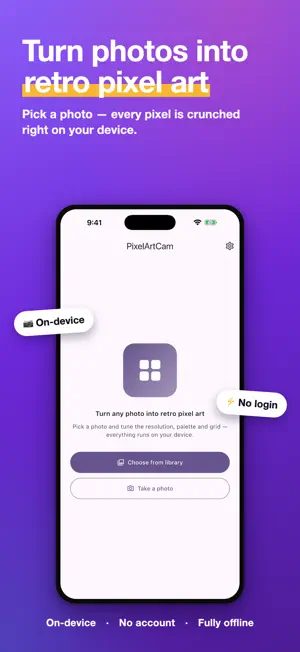

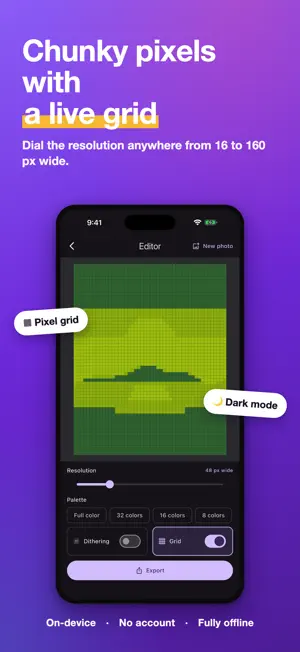

About PixelArtCam: Pixel Art Maker
PixelArtCam turns your photos into retro-game pixel art — fully offline, right on your device. - One-tap convert: pick a photo from your library or take one, and watch it become 8-bit / 16-bit pixel art. - Adjust the dots: a resolution slider from 16 to 160 px wide lets you dial in chunky retro blocks or fine pixel detail in real time. - Retro palettes: full color, 32 / 16 / 8 / 4-color reduction, plus Game Boy, grayscale, sepia, 1-bit and a PICO-8-style 16-color palette. - Dithering & grid: Floyd–Steinberg dithering keeps rich gradients with few colors; toggle a pixel grid to check every dot. - Export in high resolution: the pixels are kept crisp (never blurred) and saved as a PNG you can share anywhere in one tap. - Private by design: all conversion happens on-device. Your photos are never uploaded. No account, no login. Perfect for retro-game fans, pixel-art avatar makers and anyone who loves the 8-bit / 16-bit look.
What’s new
Version 1.0.2 · Updated July 19, 2026
Fixed minor bugs.
App privacy
The developer, Yuki Okawa, reported these privacy practices to Apple.
Data Not Collected
The developer does not collect any data from this app.
Alternatives to PixelArtCam: Pixel Art Maker
Looking for apps like PixelArtCam: Pixel Art Maker? Here are 6 similar apps on the App Store.
-
 Chipix: Photo to Pixel Art
-
 xelka: Pixel Art Camera
-
 Image2pixel
-
 imgPixel : Pixel Art Generator
-
 PashaPiku ドット絵カメラ
-
 PixelCute
| App | Rating | Price | Last updated | Compare |
|---|---|---|---|---|
| PixelArtCam: Pixel Art Maker | – | Free | July 19, 2026 | |
| Chipix: Photo to Pixel Art | – | Free | Oct 12, 2026 | Compare |
| xelka: Pixel Art Camera | – | Free | Sep 18, 2026 | Compare |
| Image2pixel | – | 2.99 USD | Nov 13, 2026 | Compare |
| imgPixel : Pixel Art Generator | – | 0.99 USD | Dec 19, 2024 | Compare |
| PashaPiku ドット絵カメラ | – | Free | Jun 15, 2026 | Compare |
| PixelCute | – | Free | Sep 4, 2025 | Compare |