

OnPoint Legal Billing
Tycho Works LLC Business iPhoneiPadiPod touch
OnPoint Legal Billing is a free Business app for iPhone and iPad by Tycho Works LLC. Rated 5.0/5 from 4 ratings. Requires iOS 15.0. Updated October 19, 2026.
- Rating
- 5.0
- 4 ratings
- Price
- Free
- on the App Store
- Size
- 16 MB
- Age 4+
- Updated
- Oct 19
- 2026 · v2.0.3
Screenshots


About OnPoint Legal Billing
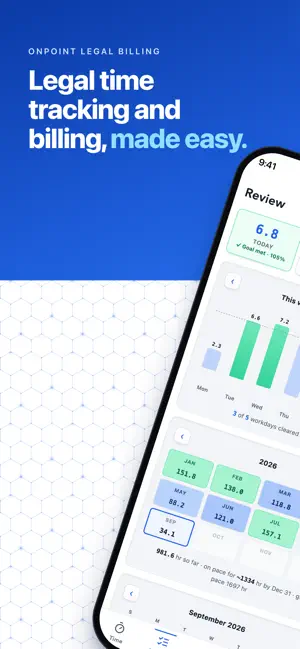
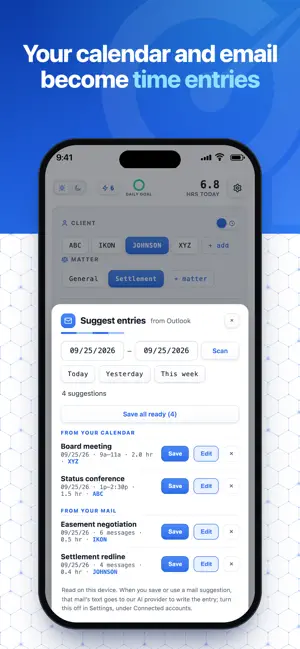
OnPoint Legal Billing is built for attorneys, from solo practitioners to members of large law firms. Capture the day in your own words, and send bills written in the language clients expect. ROUGH NOTES IN, BILL-READY LANGUAGE OUT • Polish uses OnPoint's proprietary logic system intertwined with frontier AI to turn a rough narrative into clean billing language with one tap. • For example, "Talked to the other side's lawyer about the fence line disagreement" quickly becomes "Conference with opposing counsel re boundary dispute" • Your words and the rewrite appear side by side; accept it or keep yours • Polish never invents work you didn't describe. It rephrases, nothing more YOUR ACCOUNTS, CONNECTED • Link your Microsoft 365 / Outlook account and OnPoint drafts entries from your calendar and mail • Meetings become timed entries; the day's correspondence clusters by client • Complete suggestions save in one tap. Anything less fills the capture form for your review • Suggestions are matched to your clients on your device. When you save or use a mail suggestion, the AI writes the entry from the text of those messages, and you can turn that off BILLS YOUR CLIENTS TAKE SERIOUSLY • Letterhead bills in Word, PDF, or Excel with your firm header and logo • Per-client invoice numbering, issue and due dates, and a saved invoice history • Export through the share sheet. Attach to an email or save to Files CAPTURE TIME THE MOMENT IT HAPPENS • Tap a client, tap the hours, save. An entry in seconds; a built-in timer when you'd rather clock the work live • Tenths, quarter hours, fifths or half hours, your choice • Optional phrase chips drop in the billing language you use every day DICTATE YOUR DAY • Chain Dictation is a dictation room: talk through your day and AI structures every entry: client, hours, matter, narrative • Say "next entry" and keep going; approve everything with one tap AN ASSISTANT THAT KNOWS YOUR LEDGER • Ask "how many hours for ABC this month?" or "email the March bill as a PDF" • Every bulk change shows a confirmation before anything is touched KNOW WHAT YOU'RE SITTING ON • Home shows what's unbilled and what clients owe; Billing lists every client with unbilled time and what it comes to • Overdue bills are flagged with day counts; Remind drafts a courteous payment reminder YOUR WHOLE FIRM, ONE BILL • Invite colleagues from Settings. Everyone captures against shared firm clients and matters • A review queue for the firm's time: approve, send back, or edit. You set how many approvals an entry needs, from none to three • Consolidated firm invoices grouped by timekeeper, with per-matter subtotals and rates frozen when the bill is issued • Rate cards, timekeeper summaries, payment recording, and firm-wide unbilled totals YOUR CLIENTS' BUSINESS STAYS YOURS • Entries sync privately to your own account; in a firm, the firm's administrators and reviewers see the time you record for it • AI features receive the text you dictate or type, or the messages behind a mail suggestion you save or use, plus your client and matter names — never audio, never your documents • No ads, no cross-app tracking. Product analytics see which features get used, never your entries, client names, or documents • Optional Face ID lock; delete your account and every synced record in-app, any time OnPoint is a subscription with a 7-day free trial. Payment is charged to your Apple ID at confirmation of purchase, and the subscription renews automatically unless cancelled at least 24 hours before the end of the current period. Manage or cancel anytime in your Apple ID subscription settings. Your data stays exportable either way. Terms of Use (EULA): https://www.apple.com/legal/internet-services/itunes/dev/stdeula/ Privacy Policy: https://onpointtimeentry.com/privacy.html Service terms: https://onpointtimeentry.com/terms.html Built by a practicing attorney who wanted the day billed before the drive home. Questions? [email protected]
What’s new
Version 2.0.3 · Updated October 19, 2026
Fixes and improvements: • The welcome tour no longer gets stuck partway through on iPhone. • Billing's "Ready to bill" list now updates as soon as you add, change or delete an entry, and Refresh works. • Bills from new accounts now show your initials instead of part of your email address. • Payment dates show your local day. • Costs such as filing fees no longer show as "hasn't uploaded yet."
App privacy
The developer, Tycho Works LLC, reported these privacy practices to Apple.
Data Linked to You
The following data, which may be collected and linked to your identity, may be used for the following purposes:
- Usage Data: Product Interaction, Advertising Data
- Purchases: Purchase History
- Contact Info: Email Address
- User Content: Emails or Text Messages, Other User Content
- Identifiers: User ID
Used for: Analytics, App Functionality
Data Not Linked to You
The following data, which may be collected but is not linked to your identity, may be used for the following purposes:
- Purchases: Purchase History
- Identifiers: User ID
Used for: Analytics
Alternatives to OnPoint Legal Billing
Looking for apps like OnPoint Legal Billing? Here are 6 similar apps on the App Store. The highest rated is MailSage AI (5.0/5), and all 6 are free to download.
-
 Time Tracker for Lawyers
-
 LegalBill AI
-
 Fract: Billable Time Tracker
-
 Narrate Billing
-
 MailSage AI
5.0
-
 Voice Invoice for Contractors
| App | Rating | Price | Last updated | Compare |
|---|---|---|---|---|
| OnPoint Legal Billing | 5.0 / 5 (4 ratings) | Free | October 19, 2026 | |
| Time Tracker for Lawyers | – | Free | Aug 27, 2026 | Compare |
| LegalBill AI | – | Free | Sep 29, 2026 | Compare |
| Fract: Billable Time Tracker | – | Free | Mar 26, 2026 | Compare |
| Narrate Billing | – | Free | Jul 6, 2026 | Compare |
| MailSage AI | 5.0 / 5 (1) | Free | May 28, 2026 | Compare |
| Voice Invoice for Contractors | – | Free | Oct 22, 2026 | Compare |