

Skull Keys
Hernand Gonzalez Utilities iPhoneiPadiPod touch
Skull Keys is a free Utilities app for iPhone and iPad by Hernand Gonzalez. Rated 5.0/5 from 9 ratings. Requires iOS 16.0. Updated September 29, 2026.
- Rating
- 5.0
- 9 ratings
- Price
- Free
- on the App Store
- Size
- 31 MB
- Age 4+
- Updated
- Sep 29
- 2026 · v1.2
Screenshots
Save to Pinterest


About Skull Keys
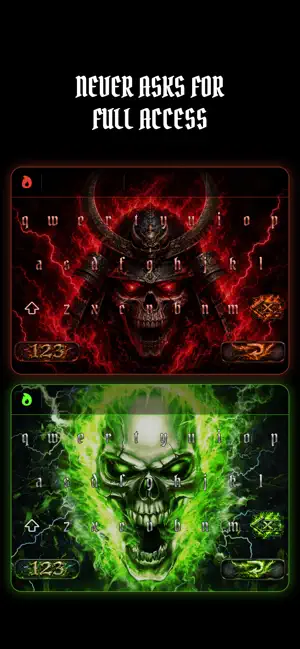
A gothic keyboard that sounds as good as it looks. Every key makes a sound, flames burn off the letters as you type, and it works in every app. It never asks for Full Access. EVERY KEY MAKES A SOUND • Letters, space, backspace, return, send and search each have their own sound. • Plays over your music and videos without pausing them. The silent switch mutes it. TYPES THE WAY YOU'RE USED TO • Autocorrect with one tap undo. Undo a fix once and it leaves that word alone from then on. • dont, im and ill become don't, I'm and I'll. • Suggestions above the keys. Tap one to use it. • Auto caps, and double space for a period. • Hold a letter for accents (é, ñ, ü) or a symbol for more (€, £, °). • Full numbers and symbols pages. 36 LANGUAGES Each language is its own keyboard. Add the ones you want in Settings and switch with the globe key, the same way Apple's keyboards work. Every one uses your iPhone's own dictionary. English, Spanish, French, German, Italian, Portuguese, Dutch, Swedish, Danish, Norwegian, Polish, Finnish, Indonesian, Romanian, Turkish, Czech, Slovak, Hungarian, Croatian, Bosnian, Serbian (Latin and Cyrillic), Slovenian, Lithuanian, Latvian, Estonian, Icelandic, Catalan, Galician, Basque, Malay, Albanian, Russian, Ukrainian, Bulgarian and Macedonian. YOUR TYPING STAYS YOURS Skull Keys never asks for Full Access. No internet, no tracking, no analytics. iOS itself keeps the keyboard away from your information. SETUP 1. Open Skull Keys and tap Open Settings 2. General > Keyboard > Keyboards 3. Add New Keyboard > Skull Keys 4. In any text field, hold the globe key and pick Skull Keys Type like an alpha.
Ratings & reviews
5.0
9 ratings
What’s new
Version 1.2 · Updated September 29, 2026
NOW IN 36 LANGUAGES Every language is its own keyboard. Add the ones you want in Settings and switch with the globe key, just like Apple's keyboards. FASTER TYPING Keys respond quicker and typing feels smoother. THE LANGUAGES English, Spanish, French, German, Italian, Portuguese, Dutch, Swedish, Danish, Norwegian, Polish, Finnish, Indonesian, Romanian, Turkish, Czech, Slovak, Hungarian, Croatian, Bosnian, Serbian (Latin and Cyrillic), Slovenian, Lithuanian, Latvian, Estonian, Icelandic, Catalan, Galician, Basque, Malay, Albanian, Russian, Ukrainian, Bulgarian and Macedonian.
App privacy
The developer, Hernand Gonzalez, reported these privacy practices to Apple.
Data Not Collected
The developer does not collect any data from this app.
Alternatives to Skull Keys
Looking for apps like Skull Keys? Here are 6 similar apps on the App Store. The highest rated is LED Keyboard - Fonts & Themes (4.5/5), and all 6 are free to download.
-
 Aesthetic Keyboard & Fonts
4.4
-
 KotoKey: Custom Keyboard
4.2
-
 Keyboard - Smart & Stylish
3.5
-
 Clink: Custom Keyboards
4.0
-
 LED Keyboard - Fonts & Themes
4.5
-
 Neon LED Keyboard: Cute Themes
4.5
| App | Rating | Price | Last updated | Compare |
|---|---|---|---|---|
| Skull Keys | 5.0 / 5 (9 ratings) | Free | September 29, 2026 | |
| Aesthetic Keyboard & Fonts | 4.4 / 5 (55) | Free | Oct 26, 2026 | Compare |
| KotoKey: Custom Keyboard | 4.3 / 5 (8) | Free | Oct 28, 2026 | Compare |
| Keyboard - Smart & Stylish | 3.5 / 5 (83) | Free | Feb 28, 2025 | Compare |
| Clink: Custom Keyboards | 4.0 / 5 (45) | Free | Oct 24, 2026 | Compare |
| LED Keyboard - Fonts & Themes | 4.5 / 5 (791) | Free | Oct 23, 2026 | Compare |
| Neon LED Keyboard: Cute Themes | 4.5 / 5 (400) | Free | Mar 26, 2026 | Compare |
Compare Skull Keys with the top alternatives: ratings, updates, ASO score and keyword gaps →