

WrenchStrike: Mechanic Invoice
HENOK KUDUS TESFAI Business iPhoneiPadiPod touch
WrenchStrike: Mechanic Invoice is a free Business app for iPhone and iPad by HENOK KUDUS TESFAI. Rated 5.0/5 from 1 ratings. Requires iOS 15.0.
- Rating
- 5.0
- 1 ratings
- Price
- Free
- on the App Store
- Size
- 25 MB
- Age 4+
- Updated
- Oct 24
- 2026 · v1.2.8
Screenshots


About WrenchStrike: Mechanic Invoice
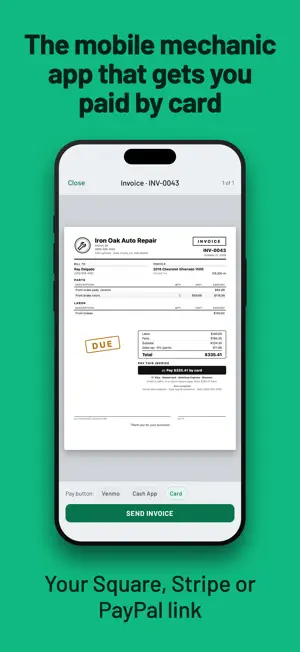
The invoicing app built for mobile mechanics and one-bay shops. Write a professional estimate in the driveway, get it approved, and send an invoice that looks like it came from a real shop system — your logo, warranty, and signature on the paper. Works offline and keeps your Schedule C ready for tax season. Turn on iCloud backup in Settings to keep your jobs safe. SCAN THE VIN, SKIP THE TYPING Point your camera at the door-jamb barcode and the year, make, model, and engine fill themselves in. Or pick from a list. Or type it. Your call. ESTIMATES THAT BECOME INVOICES Write an estimate at the car, tap once to approve, and it turns into an invoice. No re-typing. Track every job from estimate to paid. YOUR DAY, STOP BY STOP A Calendar tab lists your appointments in time order. Remind the customer, send an on-my-way text, and start the job when you arrive. Add inspection photos with captions to the estimate so the customer sees why. After a paid job, ask for a Google review by text. FIND THE PART FOR THE CAR Tap Find parts, scan the VIN or tap a recent car, and search used and new parts for that car. Parts eBay confirms will fit are marked "Fits your" car; the rest say "May fit", so you check before you buy. Tap Buy on eBay to open the listing, or add the part to the job. In the US, UK, Canada and Australia, with a connection. WrenchStrike may earn a commission at no extra cost to you. TAX DONE RIGHT Set your tax rate once. Parts are taxed and labor isn't by default — flip one switch in Settings to tax labor too, and mark any line taxable or not. GET PAID YOUR WAY A Pay button on your invoices opens your Venmo or Cash App; Zelle, PayPal, and bank details print right under it. Customers can also pay by card through your own Square, Stripe or PayPal link. Request a parts deposit when the estimate is approved, log a partial payment, watch the balance. Get paid before you leave the driveway. READY FOR TAX SEASON A running Schedule C summary — income, parts, expenses — ready to hand your accountant every April. Look back at any year. SCAN THE RECEIPT Bought parts or fuel? In Money, tap Add expense, then Scan receipt. The document camera reads the total and the date into the expense, right on your phone. BUILT FOR A PHONE IN A GLOVE Big buttons. Call or text a customer from their card. Attach before-and-after photos. Collect a signature right on the glass. Every customer and every vehicle, on file. WORKS ANYWHERE, OWNED BY YOU No accounts. No login. Works with no signal in a dead parking garage. Everything lives on your phone. Turn on iCloud backup in Settings, and if you lose your phone, restore in one tap. Your first 5 jobs are free. After that, WrenchStrike Pro unlocks unlimited jobs: $5.99 per month, or $55.99 per year. Everything you already made stays yours forever. Payment is charged to your Apple ID at confirmation of purchase. Subscriptions renew automatically unless cancelled at least 24 hours before the end of the current period, and your account is charged for renewal within 24 hours before the period ends. Manage or cancel your subscription anytime in your App Store account settings. WrenchStrike helps you prepare invoices and tax summaries. It does not provide tax, legal, or accounting advice. Terms of Use (EULA): https://www.apple.com/legal/internet-services/itunes/dev/stdeula/ Privacy Policy: https://wrenchstrike.com/privacy WrenchStrike Terms of Service: https://wrenchstrike.com/terms
What’s new
Version 1.2.8 · Updated October 24, 2026
Card payments, invoice reminders, service-due texts and parts markup. • Card payments: in Settings › Payment details › Card payments, paste your own Square, Stripe or PayPal payment link. WrenchStrike checks it as you paste, and "How do I get my link?" shows you how to make one. • Choose Card as your Pay button, and every unpaid invoice and estimate deposit prints a black "Pay $X by card" button with the cards your customer can use. Your customer pays on your own Square, Stripe or PayPal page, and the money goes straight to your account. • A PayPal.Me link prints "Pay $X with PayPal" instead, so it never promises a card. • The send screen has a Card choice too, so you can switch the Pay button for a single invoice. • A deposit request text includes your card link, and Mark deposit received records the deposit as Card (or PayPal). • A one-time tip, "Your customers can pay by card now", appears once, the second time you open WrenchStrike after updating, if no card link is saved yet. Tap "Add your Square or Stripe link" to go straight to Card payments, or close it with X. It replaces the pay-by-card survey. • Text a reminder: a sent invoice that is still unpaid shows Text a reminder under Preview & send again. It opens Messages with the invoice, the car, the amount still open and how to pay you, ready for you to send. • Next service: on a paid job, save what the car needs next and when, for example "Oil change · in 5 months". It is saved on the car. • When a car's service is due within 14 days, or is past due, the customer's page shows it with a Text button that opens Messages with a short note for you to send, and Done to clear it. • Parts markup: set your markup in Settings › Your shop. When you add a part, type Your cost and Price fills in from your markup. Your cost is private and never prints. • Parts you add from Find parts bring their item price plus shipping in as Your cost. • Find parts opens at half height again, so Jobs and today's appointments stay in view. Your search results sit right under the chips, as in 1.2.7. Drag the sheet up or scroll for the new rows, and drag down to go back to half height. • Find parts now says "Included for everyone." Pick year / make / model lets you choose any car, and the car you pick leads Recent cars. • Find parts: add Side (Driver, Passenger or Both) and Engine to narrow the eBay search. A VIN scan fills in the Engine for you. • The Calendar tab has a Calendar title at the top, and wrenchstrike://calendar links open the Calendar tab, even when the app was closed. • Clearer plan wording: Jobs and Settings › Plan show "X of 5 included jobs used", and the plan before Pro is called Starter. The Find parts filter reads Shipping included, and the iCloud messages ask you to make room in iCloud. • Small fixes: the Card link hint wraps neatly on smaller iPhones, Find parts results keep their spacing, part hints stay readable in dark mode, and a next service 15 days away reads "in 15 days". Thank you for using WrenchStrike!
App privacy
The developer, HENOK KUDUS TESFAI, reported these privacy practices to Apple.
Data Linked to You
The following data, which may be collected and linked to your identity, may be used for the following purposes:
- Purchases: Purchase History
- Diagnostics: Other Diagnostic Data
- Location: Coarse Location
- Contact Info: Email Address, Name
- User Content: Photos or Videos, Customer Support
- Identifiers: User ID
- Usage Data: Other Usage Data
Used for: Analytics, App Functionality
Data Not Linked to You
The following data, which may be collected but is not linked to your identity, may be used for the following purposes:
- Search History: Search History
- Identifiers: Device ID
- Usage Data: Product Interaction
- Diagnostics: Crash Data
Used for: Analytics, App Functionality
Alternatives to WrenchStrike: Mechanic Invoice
Looking for apps like WrenchStrike: Mechanic Invoice? Here are 6 similar apps on the App Store. The highest rated is Invoice & Estimate Maker (4.8/5), and all 6 are free to download.
-
 CarService – Auto Shop Manager
-
 Mobile Mechanic Hub
-
 Car Repair Estimator Repair+
4.5
Car Repair Estimator Repair+
4.5
-
 ARI (Auto Repair Software)
4.7
ARI (Auto Repair Software)
4.7
-
 Direct-Hit Mobile by Identifix
4.3
Direct-Hit Mobile by Identifix
4.3
-
 Invoice & Estimate Maker
4.8
Invoice & Estimate Maker
4.8
| App | Rating | Price | Last updated | Compare |
|---|---|---|---|---|
| WrenchStrike: Mechanic Invoice | 5.0 / 5 (1 rating) | Free | October 24, 2026 | |
| CarService – Auto Shop Manager | – | Free | Oct 7, 2026 | Compare |
| Mobile Mechanic Hub | – | Free | Sep 4, 2026 | Compare |
| Car Repair Estimator Repair+ | 4.5 / 5 (97) | Free | Oct 26, 2026 | Compare |
| ARI (Auto Repair Software) | 4.7 / 5 (286) | Free | Aug 14, 2026 | Compare |
| Direct-Hit Mobile by Identifix | 4.3 / 5 (33) | Free | Oct 14, 2026 | Compare |
| Invoice & Estimate Maker | 4.8 / 5 (12,252) | Free | Jan 30, 2026 | Compare |