

FlowState: App Blocker & Focus
YAGIZ ADA UMUR Productivity iPhoneiPadiPod touch
FlowState: App Blocker & Focus is a free Productivity app for iPhone and iPad by YAGIZ ADA UMUR. Requires iOS 17.0. Updated October 13, 2026.
- Price
- Free
- on the App Store
- Size
- 8 MB
- Age 4+
- Updated
- Oct 13
- 2026 · v2.0
Screenshots


About FlowState: App Blocker & Focus
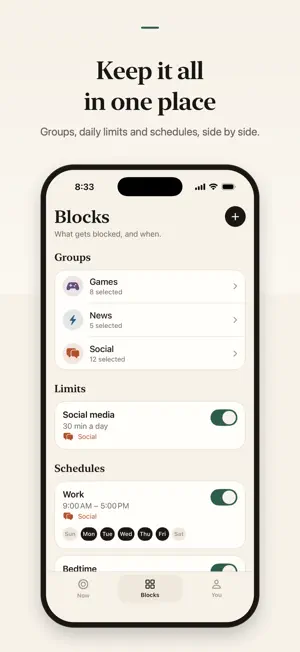
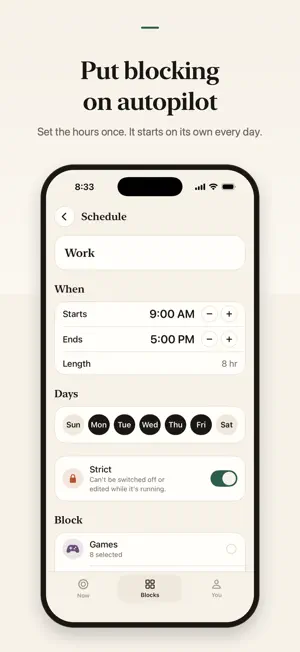
FlowState blocks the apps that pull at you, for as long as you say. Pick the apps and websites that distract you, choose how long, and start. They stay blocked until the timer ends. No account, no setup maze. FOCUS SESSIONS • Block a group of apps, categories and websites for anywhere from 5 minutes to 3 hours. • Pomodoro: focus in cycles, with short breaks in between. • Strict mode: a session that can't be ended early. • Tag to unlock: end a session only by scanning an NFC tag you keep in another room. • A calm blocked screen, with your own message and "5 more minutes" for when you really need it. BLOCKING ON AUTOPILOT • Schedules: block apps automatically every day, like Work from 9 to 5 or Bedtime overnight. • Strict schedules can't be switched off while they run. • Daily limits: allow yourself 30 minutes of social media a day. After that, the apps stay blocked until midnight. • Focus link: block a group automatically while an iOS Focus is on. • Start a session from the Home Screen widget or with Siri, and follow it on the Lock Screen. WATCH YOUR FOCUS ADD UP • Your day streak, with one missed day a week protected. • Your week at a glance, and a recap every Sunday. • Insights: how often you finish, and your best time of day. • Screen time, pickups and the apps that take most of your time, measured on your iPhone. PRIVATE BY DESIGN FlowState uses Apple's Screen Time to block apps on your device. There's no account, no tracking and no ads. Your data stays on your device and is never sent to us. FREE AND PRO Free: unlimited focus sessions, one block group, Pomodoro, your day streak and one "5 more minutes" a day. FlowState Pro adds more groups, schedules, daily limits, strict mode, Tag to unlock, Focus link, insights, screen-time numbers, streak protection and the Sunday recap. FlowState Pro is an auto-renewable subscription, billed monthly or yearly. The yearly plan starts with a free trial. Payment is charged to your Apple Account when you confirm the purchase. The subscription renews automatically unless auto-renew is turned off at least 24 hours before the end of the current period, and the renewal is charged within the 24 hours before the period ends. You can manage or cancel it anytime in your App Store account settings. Any unused part of a free trial is forfeited when you buy a subscription. Terms of Use: https://flowstate.magalar.com/terms Privacy Policy: https://flowstate.magalar.com/privacy Terms of Use (EULA): https://www.apple.com/legal/internet-services/itunes/dev/stdeula/
What’s new
Version 2.0 · Updated October 13, 2026
FlowState 2.0 is a fresh start. • A calm new design, in light and dark, with three simple tabs: Now, Blocks and You. • Daily limits: give a group of apps a daily allowance, like 30 minutes of social media. When it's used up, the apps stay blocked until midnight. • Schedules: block apps automatically, like Work from 9 to 5 or Bedtime. Make a schedule strict and it can't be switched off while it runs. • A smarter blocked screen, with your own message and "5 more minutes" for when you really need it. • Tag to unlock: end a session only by scanning an NFC tag you keep in another room. • Focus link: block a group automatically while an iOS Focus is on. • Screen time and insights: your screen time, pickups and most-used apps, your best time of day and how often you finish. • Streak protection: one missed day a week won't break your streak. • A recap of your week every Sunday. • Start a session from the Home Screen widget or with Siri, and follow it on the Lock Screen. • Made for iPad, and available in 16 languages. Thanks for using FlowState. If it helps you focus, a rating means a lot.
App privacy
The developer, YAGIZ ADA UMUR, reported these privacy practices to Apple.
Data Not Collected
The developer does not collect any data from this app.
Alternatives to FlowState: App Blocker & Focus
Looking for apps like FlowState: App Blocker & Focus? Here are 6 similar apps on the App Store. The highest rated is Flowstate: Block Apps & Focus (1.0/5), and all 6 are free to download.
-
 Eyle: App Blocker & Focus
-
 Whittle: Reduce Screen Time
-
 Odak - Social Media Blocker
-
 Flowstate: Block Apps & Focus
1.0
Flowstate: Block Apps & Focus
1.0
-
 Focus Guard: App Blocker
-
 Fryze - App Blocker & Focus
| App | Rating | Price | Last updated | Compare |
|---|---|---|---|---|
| FlowState: App Blocker & Focus | – | Free | October 13, 2026 | |
| Eyle: App Blocker & Focus | – | Free | Jul 22, 2026 | Compare |
| Whittle: Reduce Screen Time | – | Free | Oct 6, 2026 | Compare |
| Odak - Social Media Blocker | – | Free | Sep 11, 2026 | Compare |
| Flowstate: Block Apps & Focus | 1.0 / 5 (1) | Free | Jun 20, 2026 | Compare |
| Focus Guard: App Blocker | – | Free | May 30, 2026 | Compare |
| Fryze - App Blocker & Focus | – | Free | Oct 12, 2026 | Compare |