

Splitor: Split Expenses
Zagir Nurgaliev Finance iPhoneiPadiPod touch
Splitor: Split Expenses is a free Finance app for iPhone and iPad by Zagir Nurgaliev. Requires iOS 17.0. Updated October 15, 2026.
- Price
- Free
- on the App Store
- Size
- 8 MB
- Age 4+
- Updated
- Oct 15
- 2026 · v1.17
Screenshots

About Splitor: Split Expenses
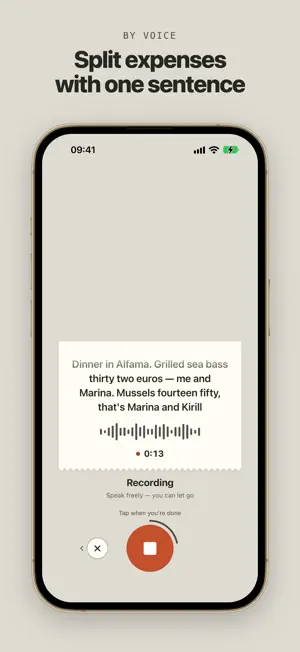
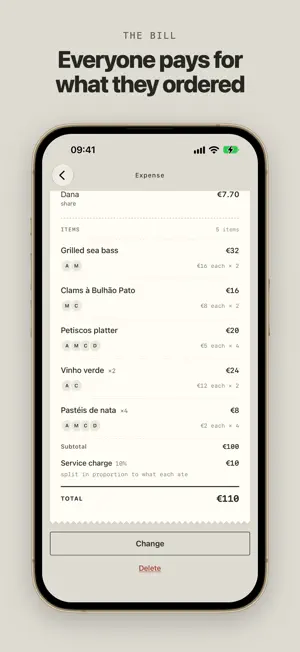
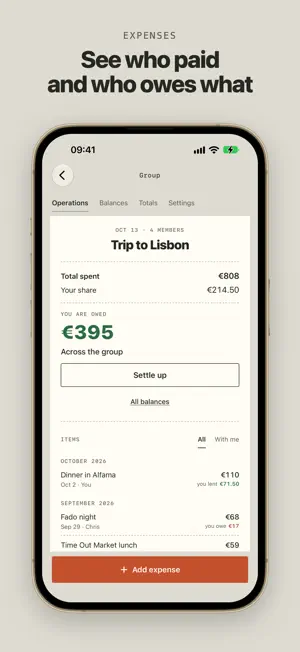
A shared dinner, a trip for four, a flat with roommates — Splitor remembers who paid for what and then tells you the one thing that matters: who owes whom, and how much. No spreadsheets. No calculator in your notes app. HOW IT WORKS — Create a group: a trip, a flat, a weekend with friends. — Add expenses: who paid, and who it's split between. — Splitor keeps the balances and nets out mutual debts, so five transfers become one. WHAT'S INSIDE — Add an expense by voice. Hold the mic and say who had what and what it cost — Splitor parses it and fills in the form. — Snap the receipt. Items and prices are read automatically; you just assign them to people. — Split evenly or by exact amounts. Someone skipped dessert? Give them their own number. — Group totals. Where the money went this month, who paid most often, the biggest expenses. — Friends. Every balance across all your shared groups in one list. — Offline. On the metro, on a plane, abroad with no data — entries are saved and sync themselves when you're back online. — Per-group currency. Euros, dollars, roubles — each group keeps its own. — Telegram bot. Same account: invite friends with a link, without making them install anything. YOUR MONEY STAYS YOURS Splitor doesn't process payments and never asks for a card. It only works out who owes whom. Send the money however you normally would. STRAIGHT ANSWERS Everything above is free. No ads. Your data isn't sold. Questions and requests: @split_money_bot on Telegram. SPLITOR PLUS — AN OPTIONAL SUBSCRIPTION Everything described above is free. Voice and receipt recognition works 5 times a day without a subscription — Plus lifts that daily cap and changes nothing else. — Splitor Plus, 1 month — $2.99 — Splitor Plus, 1 year — $19.99 The price in your currency is shown on the purchase screen. Payment is charged to your Apple ID on confirmation. The subscription renews automatically unless auto-renew is turned off at least 24 hours before the end of the period. You can manage the subscription and turn off auto-renew in your Apple ID settings. Terms of Use: https://splitor.zagirnur.dev/terms Privacy policy: https://splitor.zagirnur.dev/privacy
What’s new
Version 1.17 · Updated October 15, 2026
A new look — “Shared bill”: each group reads like one bill, with what you owe and a settle-up button right on top, Totals as a single report, and every expense as one document with its line items. A new icon, a calmer tab bar, and profile and group settings on a single sheet. Cancelling recognition no longer discards your recording — you can send it again.
App privacy
The developer, Zagir Nurgaliev, reported these privacy practices to Apple.
Data Linked to You
The following data, which may be collected and linked to your identity, may be used for the following purposes:
- Contact Info: Email Address, Name
- User Content: Photos or Videos, Audio Data, Other User Content
- Identifiers: Device ID
Used for: App Functionality
Data Not Linked to You
The following data, which may be collected but is not linked to your identity, may be used for the following purposes:
- Diagnostics: Crash Data
Used for: App Functionality
Alternatives to Splitor: Split Expenses
Looking for apps like Splitor: Split Expenses? Here are 6 similar apps on the App Store. The highest rated is Dolio — Split Bills & Expenses (5.0/5), and all 6 are free to download.
-
 friendBalance
-
 Travel Treasurer
-
 Kvit
Kvit
-
 Dolio — Split Bills & Expenses
5.0
Dolio — Split Bills & Expenses
5.0
-
 EventSplit – Group Expenses
-
 Balancer - Smart Bill Splitter
| App | Rating | Price | Last updated | Compare |
|---|---|---|---|---|
| Splitor: Split Expenses | – | Free | October 15, 2026 | |
| friendBalance | – | Free | Sep 22, 2026 | Compare |
| Travel Treasurer | – | Free | Oct 22, 2026 | Compare |
| Kvit | – | Free | Oct 19, 2026 | Compare |
| Dolio — Split Bills & Expenses | 5.0 / 5 (2) | Free | Oct 18, 2026 | Compare |
| EventSplit – Group Expenses | – | Free | Sep 26, 2026 | Compare |
| Balancer - Smart Bill Splitter | – | Free | Aug 3, 2026 | Compare |