

NetGlance: Network Speed
Emin Mammadov Utilities iPhoneiPadiPod touch
NetGlance: Network Speed is a free Utilities app for iPhone and iPad by Emin Mammadov. Rated 3.0/5 from 1 ratings. Requires iOS 16.2.
- Rating
- 3.0
- 1 ratings
- Price
- Free
- on the App Store
- Size
- 4 MB
- Age 4+
- Updated
- Sep 18
- 2026 · v1.1.2
Screenshots


About NetGlance: Network Speed
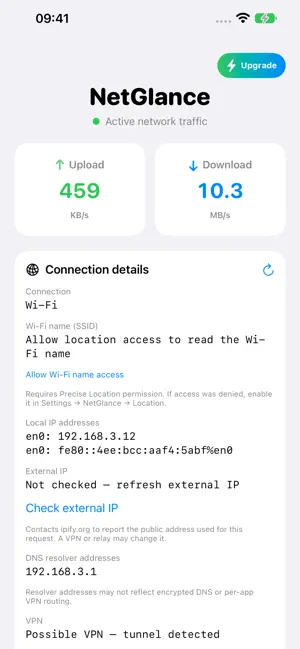
NetGlance puts your live network speed in the tray, so a glance at the top of your iPhone tells you exactly what your connection is doing — without opening anything. Two arrows, two numbers. The green up arrow sits in the top-left, the blue down arrow in the top-right — upload and download, updated every second in KB/s, MB/s, or GB/s automatically. The direction that's actively moving data lights up, so one glance tells you whether you're uploading, downloading, or idle. Built to stay out of your way: • LIVE UP & DOWN — Real-time upload and download rates, smoothed so they're readable instead of jittery. • Runs as a Live Activity. The compact up/down arrows appear in the tray on iPhone 14 Pro and later; on every supported iPhone the same live meter shows on the Lock Screen. Touch and hold for an expanded view with exact speeds. • SMART UNITS — Switches between KB/s, MB/s, and GB/s on its own. • BATTERY-FRIENDLY — When your network goes quiet, NetGlance freezes its display and stops working. No busy loops, no wasted CPU. • A CLEAN APP SCREEN — Open NetGlance for big upload/download cards and connection status. NetGlance Pro — one-time purchase Unlock everything with a single purchase. No subscription, ever. • SESSION & PEAK STATS — Total data moved this session, plus your fastest upload and download speeds. • CUSTOM THEMES — Recolor the meter with Aqua, Sunset, Grape, or Mono. • PAY ONCE — Unlock forever, and restore free on your other devices signed in to the same Apple Account. Private by design: NetGlance reads only your device's own interface counters. It has no accounts and no tracking.
What’s new
Version 1.1.2 · Updated September 18, 2026
What’s New • Added connection details, including Wi-Fi name, local and external IP addresses, DNS resolvers, cellular technology, and detected VPN tunnels. • Improved upload and download speed accuracy, especially during low traffic. • Updated Dynamic Island layouts for clearer readings and a better-positioned “Last measured” indicator. • Preserved the last measured speeds when the app is backgrounded, clearly marked as paused. • Improved Live Activity startup, stopping, and resuming. • Fixed connection refresh issues, outdated Wi-Fi information, and external-IP loading states. • Improved compatibility with iPhone 13 Pro and newer. Dynamic Island features require a supported model. • General bug fixes and stability improvements.
App privacy
The developer, Emin Mammadov, reported these privacy practices to Apple.
Data Not Collected
The developer does not collect any data from this app.
Alternatives to NetGlance: Network Speed
Looking for apps like NetGlance: Network Speed? Here are 6 similar apps on the App Store. The highest rated is NetFlow X (5.0/5), and all 6 are free to download.
-
 NetFlow X
5.0
NetFlow X
5.0
-
 All In One Usage Monitor
-
 Wavelet Network Monitor
-
 Internet Speed Meter Lite
3.3
Internet Speed Meter Lite
3.3
-
 InternetMeter + Speed Widget
4.3
InternetMeter + Speed Widget
4.3
-
 Device Status⁺ CPU x Monitor z
4.8
Device Status⁺ CPU x Monitor z
4.8
| App | Rating | Price | Last updated | Compare |
|---|---|---|---|---|
| NetGlance: Network Speed | 3.0 / 5 (1 rating) | Free | September 18, 2026 | |
| NetFlow X | 5.0 / 5 (2) | Free | Oct 15, 2026 | Compare |
| All In One Usage Monitor | – | Free | Oct 23, 2026 | Compare |
| Wavelet Network Monitor | – | Free | May 20, 2026 | Compare |
| Internet Speed Meter Lite | 3.3 / 5 (19) | Free | Jan 26, 2026 | Compare |
| InternetMeter + Speed Widget | 4.3 / 5 (190) | Free | Sep 7, 2026 | Compare |
| Device Status⁺ CPU x Monitor z | 4.8 / 5 (180) | Free | Oct 23, 2026 | Compare |