

Writer's Foundry
Alexander Benz Productivity iPadMac
Writer's Foundry is a free Productivity app for iPad and Mac by Alexander Benz. Rated 5.0/5 from 2 ratings. Requires iOS 17.0. Updated October 29, 2026.
- Rating
- 5.0
- 2 ratings
- Price
- Free
- on the App Store
- Size
- 4 MB
- Age 4+
- Updated
- Oct 29
- 2026 · v2.6.5
Screenshots


About Writer's Foundry
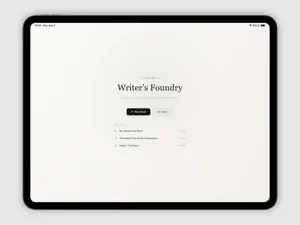
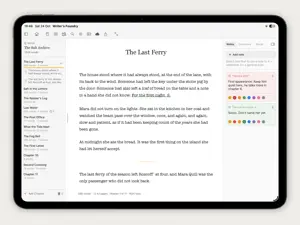
Writer's Foundry is a calm, focused place to write your novel on Mac and iPad. Everything you need to plan, write and finish a book, and nothing that gets in the way. WRITE IN DEEP FOCUS Dim everything but the lines you're working on, keep the current line centered as you type, or hide it all and let the page be just your words. Pick a font you love, from Georgia and Baskerville to Times New Roman and American Typewriter, in light or dark. CHAPTERS AND SCENES Organize your book in a clean sidebar. Split chapters into scenes and drag them into a new order, even into another chapter. Your notes and footnotes move with them. SEE THE WHOLE BOOK The corkboard shows every chapter as an index card, with a summary, a colored label and the faces of the characters who appear in it. Drag a card to restructure your story. A STORY BIBLE WITH PICTURES Characters, places, plot, items and moods in one place. Give your characters a face and your places reference pictures. Writer's Foundry finds who appears in each chapter by their names in your text. NOTES, FOOTNOTES AND VERSIONS Pin color-coded notes to any passage. Add footnotes that number themselves. Try a new version of a chapter and keep the earlier one safe. POLISH YOUR PROSE Live word counts and page estimates, search across the whole book, and a word check that finds overused words, steps through each one and suggests alternatives. READY TO SHARE Export a PDF, a Word document (on Mac), a standard manuscript for agents and publishers, or a real e-book with a cover you design yourself. YOURS, AND PRIVATE No account, no tracking. Your books are files you own, on your device or in your iCloud, where they sync between your Mac and iPad and are backed up automatically.
What’s new
Version 2.6.5 · Updated October 29, 2026
New: Plot Board (Beta) See every plotline of your book at a glance. On the Corkboard, switch to Plot Board: chapters down the side, plotlines across. Spot where a thread goes quiet, see who appears in each chapter, and choose a story structure such as Three Acts or Hero’s Journey to see where the big moments fall. Also new • Undo when you delete a Story Bible entry or a note • Edit or delete a chapter straight from its card
App privacy
The developer, Alexander Benz, reported these privacy practices to Apple.
Data Not Collected
The developer does not collect any data from this app.
Alternatives to Writer's Foundry
Looking for apps like Writer's Foundry? Here are 6 similar apps on the App Store. The highest rated is Traverse outliner mobile (5.0/5), and 5 of the 6 are free to download.
-
 PlotWeaver
4.0
PlotWeaver
4.0
-
 Office Letters
-
 Traverse outliner mobile
5.0
Traverse outliner mobile
5.0
-
 bookmoth
-
 ScrivenerBridge
-
 Charactiverse
4.5
Charactiverse
4.5
| App | Rating | Price | Last updated | Compare |
|---|---|---|---|---|
| Writer's Foundry | 5.0 / 5 (2 ratings) | Free | October 29, 2026 | |
| PlotWeaver | 4.0 / 5 (1) | 7.99 USD | May 28, 2025 | Compare |
| Office Letters | – | Free | Sep 25, 2026 | Compare |
| Traverse outliner mobile | 5.0 / 5 (1) | Free | Sep 30, 2026 | Compare |
| bookmoth | – | Free | Oct 26, 2026 | Compare |
| ScrivenerBridge | – | Free | Oct 8, 2026 | Compare |
| Charactiverse | 4.5 / 5 (2) | Free | Feb 20, 2026 | Compare |
Compare Writer's Foundry with the top alternatives: ratings, updates, ASO score and keyword gaps →