

HyperDrop – Send Files
Johann Brockstedt Utilities iPhoneiPadiPod touch
HyperDrop – Send Files is a free Utilities app for iPhone and iPad by Johann Brockstedt. Requires iOS 17.0. Updated October 23, 2026.
- Price
- Free
- on the App Store
- Size
- 4 MB
- Age 4+
- Updated
- Oct 23
- 2026 · v1.4
Screenshots



About HyperDrop – Send Files
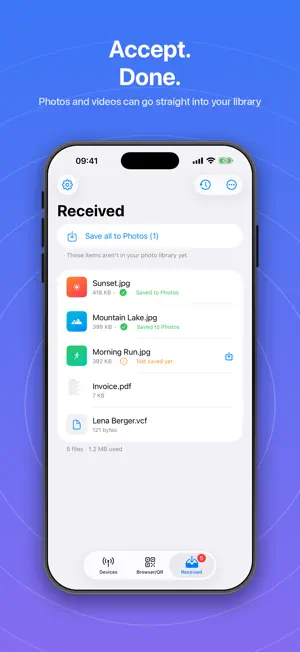
HyperDrop sends photos, videos, documents, texts, contacts and links directly from device to device – between iPhone and iPad, and to other phones running HyperDrop. Fast, private and without any detour through the cloud. No account, no sign-up, no ads. THREE WAYS TO SHARE • iPhone and iPad: Nearby devices find each other automatically over Bluetooth and direct Wi‑Fi – no shared network needed. Tap, send, done – with live progress and speed. • Other phones with HyperDrop: On the same Wi‑Fi they appear in the list automatically. Without a shared Wi‑Fi, the other phone opens its own small hotspot and shows a QR code – scan, connect, send. In both directions. • Browser/QR (only one has the app): HyperDrop shows a QR code and link. The other device opens it in any web browser to download your files or send you some back. Just a shared Wi‑Fi is needed. WHAT YOU CAN SEND • Photos & videos straight from your library (even whole albums) • Documents and any files, folders too (as a ZIP) • Texts and links • Your own contact card or a contact from your address book HANDY EVERY DAY • Multiple recipients at once • Accept or decline – you decide what arrives • Thumbnails for received files • Received photos and videos are saved to your library automatically • Transfer history with an overview by file type • "Send to HyperDrop" right from Photos, Safari & Files • Available in 12 languages YOUR FILES STAY WITH YOU All transfers go directly between devices on the local network or via Bluetooth – no servers, no account. Between devices with HyperDrop they are encrypted. Your files are not stored anywhere along the way. NOTE Browser mode transfers unencrypted within the local Wi‑Fi – use it on trusted networks. Use at your own responsibility.
What’s new
Version 1.4 · Updated October 23, 2026
• New: Exchange files with other phones running HyperDrop – automatically on the same Wi‑Fi, or via QR code with no shared Wi‑Fi at all • New: Transfers to these devices can be cancelled at any time – files that already arrived are kept • New: A notice when a new version of HyperDrop is available • Minor improvements and translations
App privacy
The developer, Johann Brockstedt, reported these privacy practices to Apple.
Data Not Linked to You
The following data, which may be collected but is not linked to your identity, may be used for the following purposes:
- Usage Data: Product Interaction
Used for: Analytics
Alternatives to HyperDrop – Send Files
Looking for apps like HyperDrop – Send Files? Here are 6 similar apps on the App Store. The highest rated is ValueLens:Scan, Value, Sell (4.8/5), and all 6 are free to download.
-
 knot ~ Simple Friend List ~
-
 Medidor De Decibelios App
-
 ValueLens:Scan, Value, Sell
4.8
-
 Wonder Incog - Privacy Browser
4.3
-
 Anemometer.
1.0
-
 PDF Merge & Split Tool
| App | Rating | Price | Last updated | Compare |
|---|---|---|---|---|
| HyperDrop – Send Files | – | Free | October 23, 2026 | |
| knot ~ Simple Friend List ~ | – | Free | Jan 22, 2024 | Compare |
| Medidor De Decibelios App | – | Free | Jun 14, 2026 | Compare |
| ValueLens:Scan, Value, Sell | 4.8 / 5 (5) | Free | Sep 20, 2026 | Compare |
| Wonder Incog - Privacy Browser | 4.3 / 5 (6) | Free | Oct 26, 2026 | Compare |
| Anemometer. | 1.0 / 5 (1) | Free | Dec 26, 2024 | Compare |
| PDF Merge & Split Tool | – | Free | Feb 26, 2026 | Compare |