

Turnativo: Shift Work Calendar
Ruben Gonzalez Productivity iPhoneiPadiPod touch
Turnativo: Shift Work Calendar is a free Productivity app for iPhone and iPad by Ruben Gonzalez. Requires iOS 26.0. Updated October 15, 2026.
- Price
- Free
- on the App Store
- Size
- 15 MB
- Age 4+
- Updated
- Oct 15
- 2026 · v2.0
Screenshots


About Turnativo: Shift Work Calendar
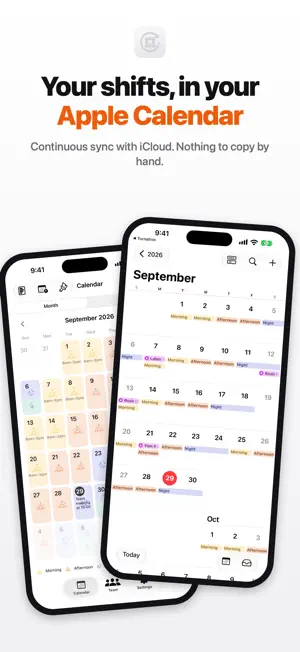
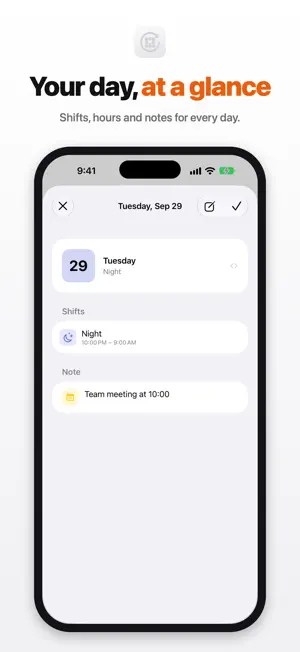
Turnativo turns your shift schedule into events in your Apple Calendar and keeps them synced automatically via iCloud. And if you run a team, you paint everyone's schedule and each person gets it in their own calendar. - YOUR SHIFTS, IN YOUR CALENDAR - Your shifts aren't locked inside an app: they're events in your Calendar. They show up on your iPhone, iPad, Mac and Apple Watch, alerts included. If you ever delete Turnativo, your shifts are still there. - HOW IT WORKS - • Create your shifts (morning, afternoon, night, on-call…) with their colour and icon. • Rotations that repeat themselves: set your cycle once and Turnativo fills the month. • Paint mode: pick a shift and swipe across days to fill them in seconds. • One-off change? Tap a day to adjust it, mark it off or add a note. • It warns you when two shifts overlap. • Month and year summary: hours, shifts, nights and Sundays, added up for you. • Home Screen and Lock Screen widget: your next shift at a glance. - ALL FREE FOR YOU - Personal mode is free and complete: unlimited shifts, multiple rotations, Calendar sync, paint mode, notes, alerts and summaries. No account, no ads. - NEW: TEAM MODE - For whoever plans the shifts of a café, a shop, a care home or a service: • Paint each worker's month in seconds, on iPhone, iPad or at turnativo.app. • Publish and everyone gets it in their app and their Calendar, with changes right away. • Contract hours, night hours, holidays, Sundays and leave, all counted for you. • A heads-up when someone has little rest between shifts. • Always free for workers. Every new team can use team mode for free for 14 days, with no subscription and no payment details. After that, to keep editing, you choose a subscription. - MADE FOR YOU - Nurses, police, firefighters, security, healthcare, factory, hospitality, retail, transport… anyone who works shifts or plans them. - REAL PRIVACY - In personal mode, your shifts live in your Calendar and your iCloud, not on our servers. Team mode asks for the minimum: a name and, if you like, an email. No third-party analytics, no tracking. Privacy: https://turnativo.app/en/privacy Terms of use: https://www.apple.com/legal/internet-services/itunes/dev/stdeula/
What’s new
Version 2.0 · Updated October 15, 2026
Turnativo 2.0 brings team mode: paint your team's schedule on iPhone, iPad or the web, publish it and everyone gets it in their calendar. Free for workers. And personal mode is now completely free: multiple rotations at once and the year summary, no payments or limits.
App privacy
The developer, Ruben Gonzalez, reported these privacy practices to Apple.
Data Linked to You
The following data, which may be collected and linked to your identity, may be used for the following purposes:
- Purchases: Purchase History
- Contact Info: Email Address, Name
- Identifiers: User ID
Used for: App Functionality
Alternatives to Turnativo: Shift Work Calendar
Looking for apps like Turnativo: Shift Work Calendar? Here are 6 similar apps on the App Store.
-
 myWorkShift: Cuadrante Turnos
-
 Kuadri: Shift Work Calendar
-
 RotaTally: Shifts & Pay
-
 Cuadrante Turnos
-
 Jornea: Shift Work Calendar
-
 Turno: Work Schedule Planner
| App | Rating | Price | Last updated | Compare |
|---|---|---|---|---|
| Turnativo: Shift Work Calendar | – | Free | October 15, 2026 | |
| myWorkShift: Cuadrante Turnos | – | Free | Sep 11, 2026 | Compare |
| Kuadri: Shift Work Calendar | – | Free | Oct 15, 2026 | Compare |
| RotaTally: Shifts & Pay | – | Free | Aug 24, 2026 | Compare |
| Cuadrante Turnos | – | Free | Sep 29, 2026 | Compare |
| Jornea: Shift Work Calendar | – | Free | Oct 15, 2026 | Compare |
| Turno: Work Schedule Planner | – | Free | Oct 1, 2026 | Compare |