

Hidden Cam Detect
DUY NHAN TRINH Utilities iPhoneiPadiPod touch
Hidden Cam Detect is a free Utilities app for iPhone and iPad by DUY NHAN TRINH. Requires iOS 16.0. Updated October 18, 2026.
- Price
- Free
- on the App Store
- Size
- 70 MB
- Age 4+
- Updated
- Oct 18
- 2026 · v1.0.2
Screenshots


About Hidden Cam Detect
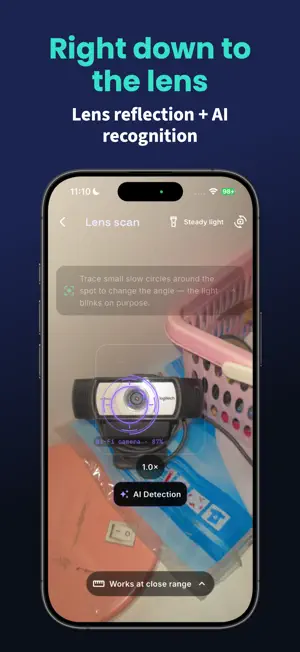
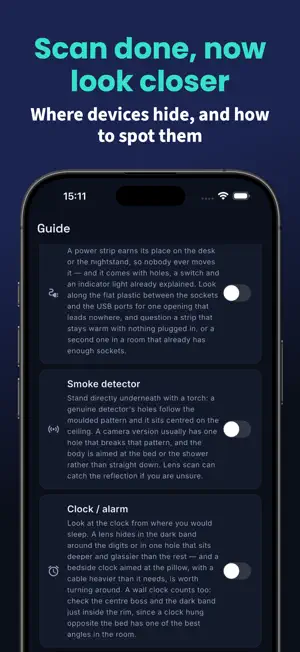
Hotel room, short-term rental, or your own home — Hidden Cam Detect sweeps the space for hidden cameras, microphones and tracking devices. And when something turns up, it helps you walk to it. SEE WHAT'S ON THE NETWORK Most hidden cameras need Wi-Fi to be useful. The app lists what's connected and tells you what each thing actually is — "IP camera, known brand" instead of "192.168.1.42" — along with the reason it was flagged. Printers, speakers and phones get ruled out instead of padding the list. WALK TO IT, DON'T JUST WORRY ABOUT IT - A proximity meter that rises as you get closer, with haptic feedback. - An AR signal map you paint by walking around the room, so you can see where the signal peaks. (Pro) - LiDAR depth markers that pin a suspicious reflection in 3D — needs an iPhone Pro. (Pro) CHECK WITH YOUR OWN EYES - Lens scan: your flashlight and camera catch the glint a lens reflects back. - Infrared viewer for the invisible IR light night-vision cameras give off. (Pro) - A guided checklist of the places devices usually hide — smoke detectors, alarm clocks, power strips, air vents — and what to look for in each. AFTER EVERY SCAN A clear risk score with the reasoning behind it, plus a panel showing which checks ran and which ones couldn't — so you always know what was covered and what wasn't. Save the result, compare it on your next visit, or export it as a PDF report. (Pro) HONEST ABOUT THE LIMITS No app can find every hidden device, and this one doesn't pretend to. It's a triage tool: it surfaces what a phone can pick up, then guides the rest of the search. "Nothing found" never means a room is safe. A recorder saving to a memory card, an older wired camera, or anything switched off gives off nothing a phone can detect. That's why every scan ends with the checklist. PRIVATE BY DEFAULT Your scan results stay on your phone and are never uploaded. No account, no sign-in. Optional anonymous crash and usage reports can be turned off in Settings. FREE Wi-Fi scan, Bluetooth scan, lens-glint tool, risk scoring, guided checklist and recent scans, plus one free Full Scan. PRO UNLOCKS Unlimited Full Scan, infrared viewer, magnetometer, LiDAR depth tools, AR locate, AR signal map, extended scan history and PDF export. - Trip Pass: one-time purchase, 72 hours of Pro. Does NOT renew. - Annual: auto-renewable subscription, billed yearly. - Lifetime: one-time purchase. Does NOT renew. Prices vary by region and your local price is shown before you buy. Payment is charged to your Apple Account at confirmation of purchase. Only the Annual plan renews automatically: it renews unless auto-renew is turned off at least 24 hours before the end of the current period, and your account is charged for renewal within 24 hours before the period ends. Manage or cancel in Settings > [your name] > Subscriptions. Terms of Use: https://nhanntv.github.io/hiddencamdetect/legal/en/terms.html Privacy Policy: https://nhanntv.github.io/hiddencamdetect/legal/en/privacy.html
What’s new
Version 1.0.2 · Updated October 18, 2026
Minor bug fixes and performance improvements
App privacy
The developer, DUY NHAN TRINH, reported these privacy practices to Apple.
Data Not Collected
The developer does not collect any data from this app.
Alternatives to Hidden Cam Detect
Looking for apps like Hidden Cam Detect? Here are 6 similar apps on the App Store.
-
 Bug Detector - Stakeout
-
 ThermaHome
-
 TipMate – Smart Split & Tip
-
 Anodes
-
 Expensio - Manage your expense
-
 SpyGuard: Hidden Cam Detector
| App | Rating | Price | Last updated | Compare |
|---|---|---|---|---|
| Hidden Cam Detect | – | Free | October 18, 2026 | |
| Bug Detector - Stakeout | – | Free | Aug 27, 2026 | Compare |
| ThermaHome | – | Free | Jul 28, 2026 | Compare |
| TipMate – Smart Split & Tip | – | Free | Apr 12, 2026 | Compare |
| Anodes | – | Free | Jul 7, 2026 | Compare |
| Expensio - Manage your expense | – | Free | Aug 30, 2024 | Compare |
| SpyGuard: Hidden Cam Detector | – | Free | Oct 5, 2026 | Compare |
Compare Hidden Cam Detect with the top alternatives: ratings, updates, ASO score and keyword gaps →