

Find Lost Devices・Phone Finder
TEAM V GAMES OYUN YAZILIM VE PAZARLAMA ANONIM SIRKETI Utilities iPhoneiPadiPod touch
Find Lost Devices・Phone Finder is a free Utilities app for iPhone and iPad by TEAM V GAMES OYUN YAZILIM VE PAZARLAMA ANONIM SIRKETI. Requires iOS 16.6.
- Price
- Free
- on the App Store
- Size
- 21 MB
- Age 4+
- Updated
- Aug 19
- 2026 · v1.0
Screenshots


About Find Lost Devices・Phone Finder
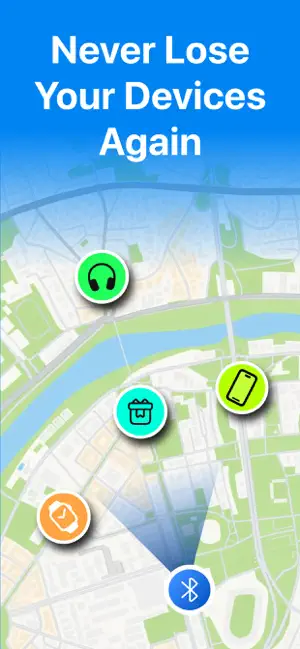
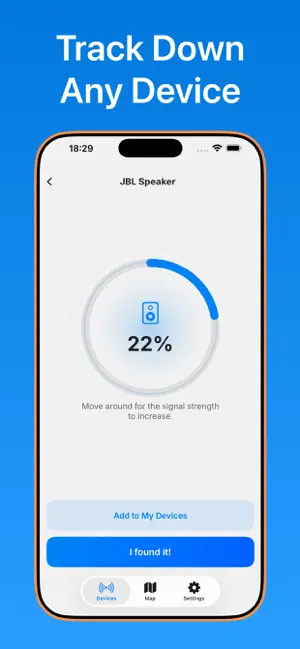
Lost your device? Don't worry — Whether it's your phone, tablet, watch, earbuds, or any other Bluetooth device, our app helps you locate it within seconds. ► DEVICE RADAR Scan with the device radar to detect all nearby devices sending a Bluetooth signal. ► DISTANCE SCORE Move around and track the distance score to zero in on your lost device. ► LOCATE ON THE MAP Once you find your device, save it to your device list. You'll then be able to see its last-seen location on the map. ► COMPATIBLE DEVICES Find My Devices supports a wide range of devices, including: - Apple devices - Wireless Headphones & Earbuds - Tablets & Laptops - Bluetooth Speakers - All other Bluetooth-enabled devices As long as your device emits a Bluetooth signal, our app can help you locate it! HOW IT WORKS 1. Open the app and select the device you're looking for from the list. 2. Move around slowly — the distance score on screen will change as you get closer or farther away. 3. As the score increases, you're getting closer to your lost device. 4. Once you're near enough, you'll find it! DISCLAIMER Find My Devices is not affiliated with, endorsed by, or sponsored by Apple Inc. We developed and tested our app independently. All trademarks belong to their respective owners. AirPods, AirTag, iPad, MacBook Pro, MacBook Air, Apple Pencil, and Apple Watch are trademarks of Apple Inc., registered in the U.S. and other countries. A Premium subscription is required to unlock: viewing all discovered devices, the live device map, last-seen locations, sharing a device’s location, and saving devices to My Devices. Subscriptions renew automatically unless you disable auto-renew at least 24 hours before the current billing period ends. Your Apple ID will be charged the renewal price within 24 hours before the period ends unless you update your subscription settings in Account Settings. If you cancel, you keep access until the current billing period ends. Need help? Contact us anytime at [email protected] Privacy Policy: https://www.teamvgames.com/lost-device-finder/privacy Terms of Use: https://www.teamvgames.com/lost-device-finder/terms EULA: https://www.apple.com/legal/internet-services/itunes/dev/stdeula/
Alternatives to Find Lost Devices・Phone Finder
Looking for apps like Find Lost Devices・Phone Finder? Here are 6 similar apps on the App Store. The highest rated is Find My Headphones + (5.0/5), and all 6 are free to download.
-
 RideMesh by Autopilot India
-
 AirFind: Find Lost Earbuds
-
 Find My Headphones +
5.0
-
 Bluetooth Device Finder Pro
5.0
-
 VoiceYWY
-
 Find My Bluetooth Devices +
5.0
| App | Rating | Price | Last updated | Compare |
|---|---|---|---|---|
| Find Lost Devices・Phone Finder | – | Free | August 19, 2026 | |
| RideMesh by Autopilot India | – | Free | Oct 17, 2026 | Compare |
| AirFind: Find Lost Earbuds | – | Free | Jul 31, 2026 | Compare |
| Find My Headphones + | 5.0 / 5 (1) | Free | Aug 4, 2026 | Compare |
| Bluetooth Device Finder Pro | 5.0 / 5 (1) | Free | Nov 23, 2025 | Compare |
| VoiceYWY | – | Free | Oct 7, 2026 | Compare |
| Find My Bluetooth Devices + | 5.0 / 5 (4) | Free | Oct 19, 2026 | Compare |