

Sermon Sidekick - Bible Study
Christopher Judge Reference iPhoneiPadiPod touch
Sermon Sidekick - Bible Study is a free Reference app for iPhone and iPad by Christopher Judge. Rated 5.0/5 from 1 ratings. Requires iOS 18.0.
- Rating
- 5.0
- 1 ratings
- Price
- Free
- on the App Store
- Size
- 202 MB
- Age 4+
- Updated
- Oct 28
- 2026 · v2.3.1
Screenshots
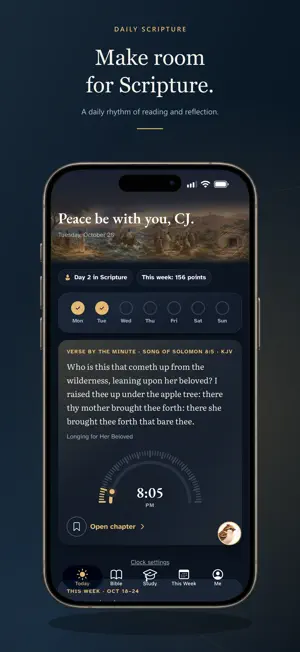

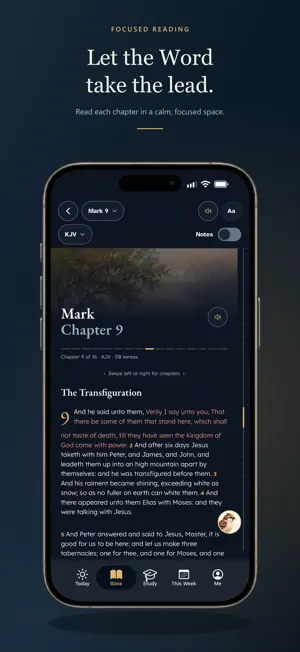

About Sermon Sidekick - Bible Study
Sermon Sidekick brings Bible reading, study and your church's weekly message into one place. Read all 66 books in a calm, focused reader. Return to your place, type a reference like "Romans 8:28" to go straight there, and listen with Read Aloud. Tap a verse to highlight it, save it or add a personal note. On iPad, turn sideways to read across two pages. Study a passage a step at a time. Most lessons have five parts: Read, What it says, What it means, Your response and Remember. Practice recalling the verses you want to keep, play Find the verse to discover answers in the passage itself, and explore the places behind the passages on the study map. Genesis, Mark and Psalms are free in full, and the first lessons of every other book are free too. Carry Sunday into your week. This Week gives you the passage to read, understand and practice, with a private page for your service notes. Enter your church's code to read its message. Your Journal keeps your writing and saved passages together, and syncs to your account when you sign in. "Summarize my notes" is an optional AI feature, five a month, that reads back only the entries you choose, after you agree. Silas, your study companion, opens passages, walks you through a passage, compares BSB and KJV and starts Read Aloud, all on your device. With Sidekick Plus you can also ask Silas about the passage you're reading. After you agree, your question and the passage are sent to an AI service (Anthropic) to write an answer, which is labeled as AI-assisted and can be wrong. Group Study, with Sidekick Plus, lets you read a passage with a small group you lead or join, with shared notes and discussion. What you post is visible to that group's members. You can report a post or block a member, leaders can remove posts, and you must be at least 13 years old. Bible reading, notes, highlights, your Journal and reading progress stay free. Optional Sidekick Plus opens complete studies for every book, Ask the Passage (AI-assisted answers about the passage you're reading), online answers from Silas, Group Study and five more themes. If Plus ends, nothing you wrote is deleted. Sidekick Plus is a monthly or yearly auto-renewing subscription. Prices, any free trial and renewal terms are shown in the app and by the App Store before you buy. Payment is charged to your Apple Account at confirmation, and the subscription renews automatically unless you cancel it at least 24 hours before the end of the current period. Manage or cancel it in your App Store account settings. Deleting the app or your Sermon Sidekick account does not cancel a store subscription. Support: https://sermon-sidekick.web.app/support.html Privacy: https://sermon-sidekick.web.app/privacy.html Terms of Use: https://sermon-sidekick.web.app/terms.html
What’s new
Version 2.3.1 · Updated October 28, 2026
A new Sermon Sidekick, redesigned from top to bottom. • A calmer home for every day: Today, Bible, Study, This Week and Me. • Today brings a daily Scripture to read and reflect on. • This Week helps you read, understand and practice Sunday's passage, with a private page for your service notes. • Guided lessons walk through a passage a step at a time: Read, What it says, What it means, Your response and Remember. • Practice recalling the verses you want to keep, and play Find the verse to read a passage closely. • Explore the places behind the passages on the study map. • Highlight, save and add a personal note to any verse. Your Journal keeps your writing and saved passages together. • Group Study, with Sidekick Plus: read a passage together with a small group you lead or join. • Ask Silas, with Sidekick Plus: questions about the passage you're reading, answered online. Answers are AI-assisted, need a connection, and ask your permission first. • On iPad, turn sideways to read across two pages. • Share a verse as a picture card.
App privacy
The developer, Christopher Judge, reported these privacy practices to Apple.
Data Linked to You
The following data, which may be collected and linked to your identity, may be used for the following purposes:
- Purchases: Purchase History
- Identifiers: User ID
- Contact Info: Email Address, Name
- User Content: Other User Content
- Usage Data: Product Interaction
Used for: Analytics, App Functionality
Alternatives to Sermon Sidekick - Bible Study
Looking for apps like Sermon Sidekick - Bible Study? Here are 6 similar apps on the App Store. The highest rated is VerseCue (5.0/5), and all 6 are free to download.
-
 Bethesda Apostolic Church
-
 Bible Verse Widget: Grace
-
 VerseCue
5.0
VerseCue
5.0
-
 BibleGraph
5.0
BibleGraph
5.0
-
 Truckstop Ministries, Inc.
5.0
Truckstop Ministries, Inc.
5.0
-
 Scroll: Daily Bible Study
5.0
Scroll: Daily Bible Study
5.0
| App | Rating | Price | Last updated | Compare |
|---|---|---|---|---|
| Sermon Sidekick - Bible Study | 5.0 / 5 (1 rating) | Free | October 28, 2026 | |
| Bethesda Apostolic Church | – | Free | Dec 16, 2025 | Compare |
| Bible Verse Widget: Grace | – | Free | Oct 15, 2026 | Compare |
| VerseCue | 5.0 / 5 (1) | Free | Oct 9, 2026 | Compare |
| BibleGraph | 5.0 / 5 (1) | Free | Aug 20, 2026 | Compare |
| Truckstop Ministries, Inc. | 5.0 / 5 (2) | Free | Mar 11, 2026 | Compare |
| Scroll: Daily Bible Study | 5.0 / 5 (1) | Free | Aug 14, 2026 | Compare |