

WindLimit
Personal Wings, Inc. Weather iPhoneiPadiPod touch
WindLimit is a free Weather app for iPhone and iPad by Personal Wings, Inc. Rated 5.0/5 from 1 ratings. Requires iOS 16.4. Updated August 15, 2026.
- Rating
- 5.0
- 1 ratings
- Price
- Free
- on the App Store
- Size
- 46 MB
- Age 4+
- Updated
- Aug 15
- 2026 · v1.0.8
Screenshots



About WindLimit
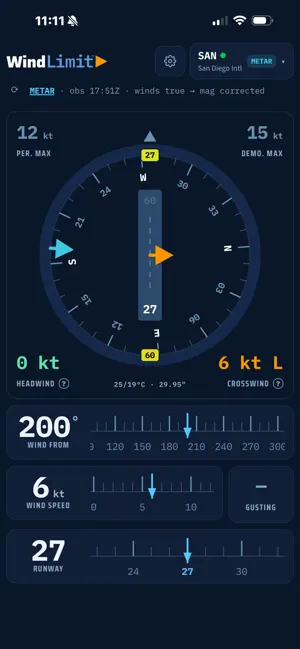
WindLimit gives pilots a fast, clear answer to one question before every takeoff and landing: is this wind within limits? Enter your runway, wind direction, and speed, or pull live METAR for any of 12,700+ U.S. airports, and WindLimit instantly computes your headwind and crosswind components, checks them against your aircraft's limits, and flags an exceedance the moment you're outside them. FEATURES • Live METAR for public, private, and military airports nationwide, with automatic magnetic variation correction • Every runway end's crosswind and head/tailwind side by side, with the best end badged • Manual and ATIS entry when no live weather feed is available • Runway-aware exceedance alerts, keyed to the runway you actually pick • Set your own max demonstrated crosswind and personal minimums per aircraft • Clean, glanceable compass display with drag-to-set wind input • Light and dark themes WindLimit is a free, ad-supported informational tool. A one-time in-app purchase removes ads and unlocks: • Multiple saved aircraft profiles • Nearby airports with live wind, best runway, crosswind, and a within-limits read for each • Favorite and recently used airports IMPORTANT WindLimit is an informational aid only. It is not a source of official weather, performance, or limitation data, and must not be used as the sole basis for any operational decision. Always verify winds, runway conditions, and crosswind limitations against official sources: current ATIS/METAR, NOTAMs, and your aircraft manufacturer's or operator's current manuals and limitations. The pilot in command remains solely responsible for every operational decision. Designed by pilots.
What’s new
Version 1.0.8 · Updated August 15, 2026
24-HOUR ACCESS, NO PURCHASE • Watch one ad to unlock nearby airports and the rest of the paid features for 24 hours. • You see what you are unlocking and for how long before the ad plays, and a confirmation with the expiry when it lands. • This gives you the features, not an ad-free app. Ads keep running, because they are what pay for the access. The one-time purchase is still what removes them, permanently. • Settings shows how long the access has left while it is running. NEARBY AIRPORTS • Rows are rebuilt into two columns: wind on the left under the field name, runway and its components on the right under the distance. The numbers now line up down the list instead of running together. • Crosswind and head/tailwind are both bold. They are the two numbers the row exists to give. • Crosswind reads in normal text color when it is inside your limit, and turns amber then red as it climbs, so the figure you are scanning for is not the quietest thing on the row. WEATHER REPORT • Airports Near is one row now instead of two full-width buttons: pick the field you looked up, or your own position. • The selected one is outlined, so the results underneath are clearly attached to the origin that produced them. FIXES • A cold launch no longer reports live weather unavailable when the connection is simply slow to wake. It retries before it gives up. • The crosswind alert fires again after you acknowledge it. Previously, moving the wind back over your limit could leave it silent for the rest of the session. • Larger text sizes no longer overflow the exceedance alert. It grows, wraps and scrolls instead, and the runway sits on its own line. • Settings now shows the version and build number, and both ride along in the support email. ADS AND PRIVACY • The free version now asks whether you will allow tracking, so ads can be relevant rather than generic. Declining changes nothing else in the app, and nothing you enter here is part of it: not your airports, weather, aircraft or personal minimums. • You can change that answer any time in iOS Settings, under Privacy and Security, then Tracking.
App privacy
The developer, Personal Wings, Inc., reported these privacy practices to Apple.
Data Used to Track You
The following data may be used to track you across apps and websites owned by other companies:
- Location: Coarse Location
- Identifiers: Device ID
- Usage Data: Product Interaction, Advertising Data
Data Linked to You
The following data, which may be collected and linked to your identity, may be used for the following purposes:
- Location: Coarse Location
- Identifiers: Device ID
- Usage Data: Product Interaction, Advertising Data
Used for: Third-Party Advertising, Analytics, App Functionality
Data Not Linked to You
The following data, which may be collected but is not linked to your identity, may be used for the following purposes:
- Usage Data: Advertising Data
- Diagnostics: Crash Data, Performance Data
Used for: Analytics, App Functionality
Alternatives to WindLimit
Looking for apps like WindLimit? Here are 6 similar apps on the App Store. The highest rated is Visibility Tool (5.0/5), and 4 of the 6 are free to download.
-
 Visibility Tool
5.0
Visibility Tool
5.0
-
 SkewT Aero
5.0
SkewT Aero
5.0
-
 Wind & Runways
4.0
Wind & Runways
4.0
-
 CloudPath
5.0
CloudPath
5.0
-
 METAR Widgets
3.8
METAR Widgets
3.8
-
 NavMonster
4.0
NavMonster
4.0
| App | Rating | Price | Last updated | Compare |
|---|---|---|---|---|
| WindLimit | 5.0 / 5 (1 rating) | Free | August 15, 2026 | |
| Visibility Tool | 5.0 / 5 (1) | 9.99 USD | Jun 25, 2026 | Compare |
| SkewT Aero | 5.0 / 5 (1) | Free | Oct 14, 2026 | Compare |
| Wind & Runways | 4.0 / 5 (2) | Free | Sep 28, 2026 | Compare |
| CloudPath | 5.0 / 5 (3) | Free | Sep 16, 2026 | Compare |
| METAR Widgets | 3.8 / 5 (48) | 2.99 USD | Sep 28, 2025 | Compare |
| NavMonster | 4.0 / 5 (37) | Free | Oct 3, 2026 | Compare |
Compare WindLimit with the top alternatives: ratings, updates, ASO score and keyword gaps →