

Slip: App Blocker
Thiago Nogueira Utilities iPhoneiPadiPod touch
Slip: App Blocker is a free Utilities app for iPhone and iPad by Thiago Nogueira. Requires iOS 18.0. Updated August 19, 2026.
- Price
- Free
- on the App Store
- Size
- 4 MB
- Age 4+
- Updated
- Aug 19
- 2026 · v1.1
Screenshots


About Slip: App Blocker
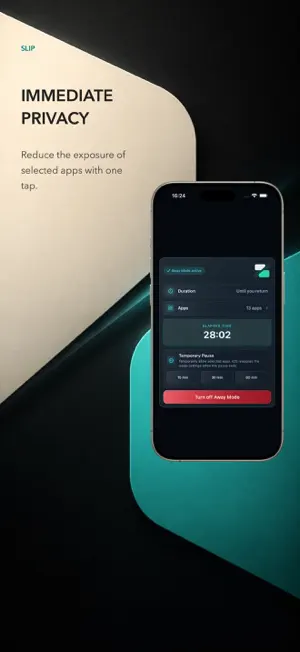
Slip helps reduce the exposure of selected apps when you use your iPhone in public places. Choose apps with Apple's Screen Time picker, then start Away Mode or Manual Mode. Each profile has its own name, icon, and app selection, so you can prepare different sets for work, travel, events, or everyday routines. Key features: - Away Mode can start when you are outside all saved Trusted Locations and pause when you return to one. - Manual Mode stays active until you end it. - Profiles organize different sets of selected apps. - iOS shows the Screen Time restriction screen when you open a selected app. - Take a 15, 30, or 60-minute Temporary Pause when needed. - Use Face ID, Touch ID, or your device passcode to confirm when you pause or end a mode. - Optionally show a discreet Pause Notice on the Lock Screen and Dynamic Island. Slip Pro: Start with a 3-day trial. After the trial, an annual Slip Pro subscription is required to use the modes. Purchase and restore options are available in the app. Privacy: - No Slip account. - No tracking. - No servers operated by Slip and no cloud sync. - Your profiles, app selections, and Trusted Locations stay on your iPhone. - Trusted Locations are optional; location data is not sent to Slip or third parties. Slip uses iOS permissions that you control. App selection and mode settings require Screen Time authorization. Trusted Locations require Location permission. Slip does not lock the entire iPhone, recover a device, change system settings, or replace the iPhone passcode, Face ID, Find My, Stolen Device Protection, or official services. Terms of Use (EULA): https://www.apple.com/legal/internet-services/itunes/dev/stdeula/
What’s new
Version 1.1 · Updated August 19, 2026
Slip is now available in English. This update also refines the wording across Away Mode, Manual Mode, profiles, Trusted Locations, and the Slip Pro subscription flow.
App privacy
The developer, Thiago Nogueira, reported these privacy practices to Apple.
Data Not Collected
The developer does not collect any data from this app.
Alternatives to Slip: App Blocker
Looking for apps like Slip: App Blocker? Here are 6 similar apps on the App Store.
-
 AppAware: Privacy Scanner
-
 Panoptes -- App Privacy
-
 PhoneScreen - AI Call Screener
-
 JiaChain Trace
-
 CayzBox - App Finder
-
 QuietCheck Privacy Scanner
| App | Rating | Price | Last updated | Compare |
|---|---|---|---|---|
| Slip: App Blocker | – | Free | August 19, 2026 | |
| AppAware: Privacy Scanner | – | Free | Sep 20, 2026 | Compare |
| Panoptes -- App Privacy | – | Free | Sep 3, 2026 | Compare |
| PhoneScreen - AI Call Screener | – | Free | Oct 5, 2026 | Compare |
| JiaChain Trace | – | Free | Aug 19, 2026 | Compare |
| CayzBox - App Finder | – | Free | Aug 11, 2026 | Compare |
| QuietCheck Privacy Scanner | – | Free | Oct 1, 2026 | Compare |
Compare Slip: App Blocker with the top alternatives: ratings, updates, ASO score and keyword gaps →