

Tripwick: Trip Planner
JOEL BACKLUND Travel iPhoneiPadiPod touch
Tripwick: Trip Planner is a free Travel app for iPhone and iPad by JOEL BACKLUND. Requires iOS 17.0. Updated August 17, 2026.
- Price
- Free
- on the App Store
- Size
- 7 MB
- Age 4+
- Updated
- Aug 17
- 2026 · v1.0.4
Screenshots


About Tripwick: Trip Planner
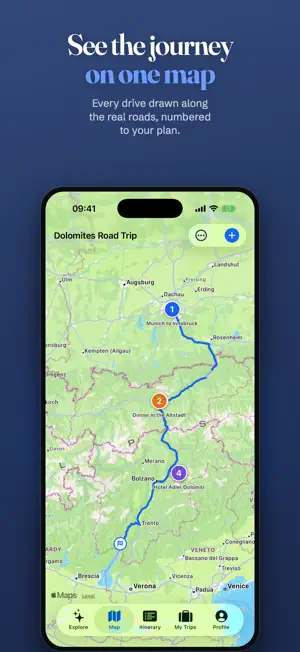
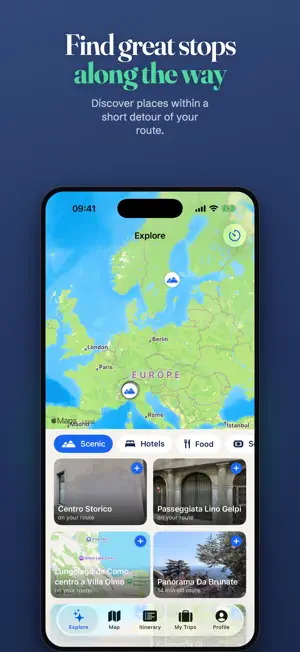
Plan your whole trip — flights, drives, ferries, hotels, dinners and everything in between — as one beautiful day-by-day itinerary and journey map. PLAN WITHOUT THE BUSYWORK • Type a flight number and the flight fills itself in: airline, airports, times, terminals • Search any restaurant, hotel or sight and add it with one tap — with photos, opening hours, ratings and reviews from Apple Maps • Explore places along your route, or free-search any area on the map, and add them in a tap • See the travel time and distance between stops — walking, driving or transit • Drag items between days, swipe to remove (with undo), edit everything in place ONE TRIP, TWO VIEWS • A clean timeline that groups your plans by day and highlights what's next • A map where every numbered pin matches your timeline — see your whole trip at a glance TRAVEL WITH CONFIDENCE • Works offline: your itinerary is always on your device • Reminders before things start — flights get extra warning • Flight status refresh when your trip is about to begin • Export to your calendar (.ics) or a printable PDF PLAN TOGETHER • Invite travel companions with a link • Everyone sees the same live itinerary; editors can add and change plans Tripwick Premium (auto-renewing subscription) unlocks unlimited trips, unlimited transport legs and unlimited attachments. The free plan includes one full trip with up to four transport legs — everything else included. Terms of Use: https://tripwick.app/terms Privacy Policy: https://tripwick.app/privacy
What’s new
Version 1.0.4 · Updated August 17, 2026
• Rearrange your trip with drag & drop: move events between days, or drag one up or down within its day to set the start time — a floating time bubble shows exactly the time you'll get. • Drag an event onto “Not scheduled yet” to decide its time later. • Times you enter now stay on the destination's clock, even when you're in a different timezone. • Flights added by flight number now always get coordinates, distance and their route on the journey map. • Fixed: deleting an item on one device now removes it on all your devices. • Plus smaller fixes and polish throughout.
App privacy
The developer, JOEL BACKLUND, reported these privacy practices to Apple.
Data Not Linked to You
The following data, which may be collected but is not linked to your identity, may be used for the following purposes:
- Diagnostics: Crash Data, Performance Data, Other Diagnostic Data
- Contact Info: Email Address
Used for: Analytics, App Functionality
Alternatives to Tripwick: Trip Planner
Looking for apps like Tripwick: Trip Planner? Here are 6 similar apps on the App Store.
-
 Volo: AI Trip Planner
-
 Phileas: Auto Trip Planner
-
 Trippers: AI Travel Planner
-
 Trail: Travel Planner
-
 Travel Buddy – Trip Planner
-
 Meridian Passport
| App | Rating | Price | Last updated | Compare |
|---|---|---|---|---|
| Tripwick: Trip Planner | – | Free | August 17, 2026 | |
| Volo: AI Trip Planner | – | Free | Jul 28, 2026 | Compare |
| Phileas: Auto Trip Planner | – | Free | Jul 12, 2026 | Compare |
| Trippers: AI Travel Planner | – | Free | Oct 18, 2026 | Compare |
| Trail: Travel Planner | – | Free | Sep 21, 2026 | Compare |
| Travel Buddy – Trip Planner | – | Free | Sep 8, 2026 | Compare |
| Meridian Passport | – | Free | Oct 18, 2026 | Compare |