

PressNote: AI Voice Recorder
Rodrigo Andrade Education iPadMac
PressNote: AI Voice Recorder is a free Education app for iPad and Mac by Rodrigo Andrade. Requires iOS 26.0. Updated September 9, 2026.
- Price
- Free
- on the App Store
- Size
- 11 MB
- Age 4+
- Updated
- Sep 9
- 2026 · v1.3.0
Screenshots
Save to Pinterest

About PressNote: AI Voice Recorder
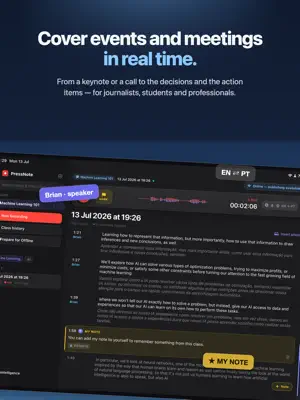
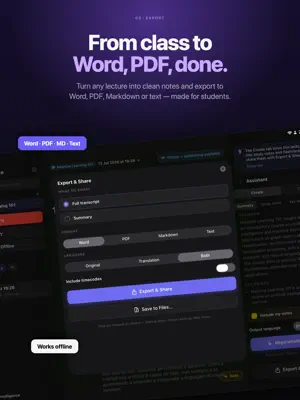
From live audio to a finished document, entirely on your device. PressNote records what you hear, transcribes it as it happens, and turns the transcript into summaries, action items, study material, and blog drafts, with on-device Apple Intelligence. Nothing is sent to a server: transcription, translation, summarization, and OCR all run locally, and everything keeps working offline. BUILT FOR THREE KINDS OF LISTENERS Journalists: capture keynotes and press conferences on iPad with the directional microphone, mark key moments, add timestamped notes, and leave with a summary or a blog draft already written. Students: record online classes on your Mac. System Audio capture grabs the stream digitally, with none of the room noise. Then turn the transcript into study notes, key terms, and flashcards. Professionals: record a call or a room and leave with the decisions and the action items written down. No bot joins the call: capture runs on your own Mac or iPad, with nothing to add to the invite. On a Mac, capture both sides at once: the other participants and your own voice, labelled separately. Meeting audio is deleted automatically once it has been transcribed. CAPTURE • Crash-resilient recording that streams to disk and recovers interrupted sessions • iPad: directional microphone tuned toward the stage, the lecturer, or the meeting room • Mac: System Audio for streams, online classes, and calls on Zoom, Teams, or Meet, plus menu-bar instant record • Mac: System Audio + Microphone captures both sides of a call at once, labelled separately; System Audio alone captures only the other participants, and in person the microphone captures the room • Mac: a compact companion window that sits beside your meeting app, with the controls, the live transcript, and the live summary • Import photos of slides, text is extracted with on-device OCR and placed on the timeline UNDERSTAND • Live on-device transcription with timestamps • Live or after-the-fact translation between English, Portuguese (Brazil), Spanish, German, French and Italian • Speaker tagging, pre-filled with the people you expect: your team, your teachers, the speakers on stage • On-device summaries, key points, and study formats in your choice of content language • Action items with an owner and a due date whenever the meeting actually named one • Follow-up questions: what to ask a source next, or what a call left unresolved • A live summary with decisions and action items while a meeting runs, plus a question worth asking right now • Correct a misheard line in place, and let PressNote propose repairs for the words it likely got wrong • Mark part of a transcript as beside the point and the AI skips it; it stays in the transcript and in exports • Play an event or a class back with the transcript following along; tap a timestamp to jump there SHARE & EXPORT • Export transcripts, summaries, and generated outputs as Word, PDF, Markdown, or plain text • Save to Files, AirDrop, or mail a finished document, all in airplane mode • Journalists: publish to WordPress, Ghost, or Micropub blogs with an offline-first outbox • Your own notes publish directly; AI-generated drafts always pass a review step first PRIVATE BY DESIGN • 100% on-device AI, audio never leaves your device • No bot joins your calls: capture runs on your own Mac or iPad, not a notetaker service • Meeting audio is erased after transcription; the transcript, your notes, and everything you generated are kept • A reminder to tell participants you are transcribing — deleting the audio does not replace their consent • Notes marked private are never included in AI processing, exports, or publishing • No accounts, no analytics, no third-party services • Optional iCloud sync, local-only is the default REQUIREMENTS PressNote requires an Apple Intelligence–capable iPad or Mac running iPadOS 26 / macOS 26 or later. Language packs download on demand and then work offline. Terms of Use: https://pressnote.app/terms
What’s new
Version 1.3.0 · Updated September 9, 2026
PressNote is now free to download. New installs get a 7-day free trial on the Monthly or Yearly plan, or a one-time Lifetime purchase, pick whatever fits. Already own PressNote? Nothing changes for you, you keep full access, free, forever, automatically recognized from your original purchase. No action needed.
App privacy
The developer, Rodrigo Andrade, reported these privacy practices to Apple.
Data Not Collected
The developer does not collect any data from this app.
Alternatives to PressNote: AI Voice Recorder
Looking for apps like PressNote: AI Voice Recorder? Here are 6 similar apps on the App Store. The highest rated is SwiftHub: Learn, Build & Hire (5.0/5), and all 6 are free to download.
-
 AI Transcriber App
-
 Kwezr: Study Planner & Quiz
-
 French Vocabulary- Plume
3.5
-
 SwiftHub: Learn, Build & Hire
5.0
-
 Kinderland Kids Learning Games
4.4
-
 Studingo: Your AI Study Buddy
5.0
| App | Rating | Price | Last updated | Compare |
|---|---|---|---|---|
| PressNote: AI Voice Recorder | – | Free | September 9, 2026 | |
| AI Transcriber App | – | Free | Aug 19, 2026 | Compare |
| Kwezr: Study Planner & Quiz | – | Free | Oct 24, 2026 | Compare |
| French Vocabulary- Plume | 3.5 / 5 (2) | Free | Mar 9, 2026 | Compare |
| SwiftHub: Learn, Build & Hire | 5.0 / 5 (1) | Free | May 27, 2025 | Compare |
| Kinderland Kids Learning Games | 4.4 / 5 (101) | Free | Nov 27, 2026 | Compare |
| Studingo: Your AI Study Buddy | 5.0 / 5 (3) | Free | Nov 5, 2026 | Compare |