

Brink — Stop Doomscrolling
Evatech Innovations,TOO Productivity iPhoneiPadiPod touch
Brink — Stop Doomscrolling is a free Productivity app for iPhone and iPad by Evatech Innovations,TOO. Requires iOS 17.0. Updated October 18, 2026.
- Price
- Free
- on the App Store
- Size
- 12 MB
- Age 4+
- Updated
- Oct 18
- 2026 · v1.0.1
Screenshots
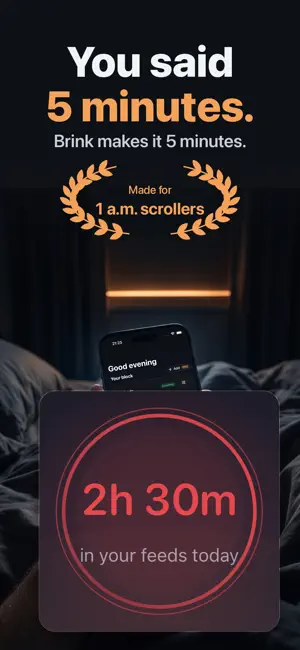


About Brink — Stop Doomscrolling
Give yourself a time limit on the apps that eat your evenings. When it runs out, an alarm goes off and they disappear for a while. Brink is an anti-doomscroll timer with two numbers and one button. Pick the feeds that steal your time, set how long you're allowed in them and how long they go away afterward, and press Start. HOW IT WORKS • Pick the apps: short videos, Reels, Shorts, the news feed, whatever it is for you • Set your allowance, say 20 minutes, and the cooldown, say 30 • Press Start. A countdown runs on the main screen, the Lock Screen and the Dynamic Island • When it hits zero, an alarm goes off (with a different line every time) and the apps are blocked • When the cooldown ends, they come back on their own ONLY WHAT YOU PICKED Brink blocks the apps you choose and nothing else. Never your whole phone, never a whole category, never your messages. SEE THE HABIT CHANGE Today's screen time in those apps sits on the main screen, in five colors from "clear as morning light" to "lights out". FREE, FOR REAL One block, both timers, the alarm, daily open limits, the widget and today's counter are free, with no time limit and no trial clock. BRINK PRO • Strict Mode: no early exit from anywhere, and no deleting apps to get around it • Schedules: your block starts itself every day, or when Sleep or Work Focus turns on • More than one block, for evenings, mornings and work • Trends, streaks and a Sunday recap: proof the habit is changing • One emergency unlock a week, for the night it really matters Yearly with a free trial, or pay once for lifetime. No weekly subscription. PRIVATE BY DESIGN No account. Apps are chosen in Apple's own Screen Time picker, so Brink never learns which apps you picked or what you do in them. Your screen time is drawn by Apple and never leaves your phone. HONEST ABOUT IT A determined you can get around any blocker, this one included. Brink is built to break the autopilot reach for your phone, not to be a jail. Terms of Use: https://www.apple.com/legal/internet-services/itunes/dev/stdeula/ Privacy Policy: https://brink.evatech.app/privacy
What’s new
Version 1.0.1 · Updated October 18, 2026
Fixed: when you reopened Brink, it could ask for Screen Time access again even though you'd already allowed it. Now it only asks if access has really been turned off.
App privacy
The developer, Evatech Innovations,TOO, reported these privacy practices to Apple.
Data Not Linked to You
The following data, which may be collected but is not linked to your identity, may be used for the following purposes:
- Identifiers: Device ID
- Usage Data: Product Interaction
Used for: Analytics, App Functionality
Alternatives to Brink — Stop Doomscrolling
Looking for apps like Brink — Stop Doomscrolling? Here are 6 similar apps on the App Store. The highest rated is Cohestry: Second Brain (5.0/5), and all 6 are free to download.
-
 Deepnook: Study Pomodoro Timer
-
 BringThis: Potluck Sign Up
-
 Cohestry: Second Brain
5.0
Cohestry: Second Brain
5.0
-
 Study Quest: Tasks & Vibes
-
 NEXUS - Personal Growth
2.5
NEXUS - Personal Growth
2.5
-
 Re:mindr - Quick Reminders
5.0
Re:mindr - Quick Reminders
5.0
| App | Rating | Price | Last updated | Compare |
|---|---|---|---|---|
| Brink — Stop Doomscrolling | – | Free | October 18, 2026 | |
| Deepnook: Study Pomodoro Timer | – | Free | Oct 24, 2026 | Compare |
| BringThis: Potluck Sign Up | – | Free | Oct 14, 2026 | Compare |
| Cohestry: Second Brain | 5.0 / 5 (1) | Free | Oct 22, 2026 | Compare |
| Study Quest: Tasks & Vibes | – | Free | Oct 7, 2026 | Compare |
| NEXUS - Personal Growth | 2.5 / 5 (2) | Free | Oct 27, 2026 | Compare |
| Re:mindr - Quick Reminders | 5.0 / 5 (6) | Free | Mar 6, 2026 | Compare |