

WaveTone Studio
Kurenz Music GbR Utilities iPhoneiPadiPod touch
WaveTone Studio is a free Utilities app for iPhone and iPad by Kurenz Music GbR. Requires iOS 18.0. Updated September 29, 2026.
- Price
- Free
- on the App Store
- Size
- 4 MB
- Age 4+
- Updated
- Sep 29
- 2026 · v1.4
Screenshots
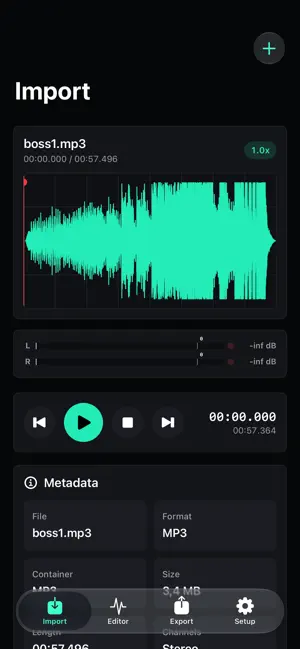


About WaveTone Studio
WaveTone Studio is a powerful mobile audio studio for iPhone and iPad. Import audio and video files, record directly with the microphone, edit waveforms precisely, and export results for music, clips, podcasts, ringtones, or quick audio ideas. Import MP3, WAV, M4A/AAC, AIFF, CAF, OGG, OGA, and Opus. You can also select compatible MOV, MP4, and M4V videos from Files or Photos. WaveTone Studio automatically extracts the audio track and loads it into the editor. Your audio is displayed as a clear waveform with zooming, scrolling, and a playhead. Pinch-to-zoom stays centered between your fingers. Place the playhead anywhere and start playback from that exact position. Selections show their start, end, and duration directly in the waveform, and both selection handles can be dragged for precise adjustment. A compact mini waveform remains visible while you scroll through the editor. Select ranges, select all, delete, trim, copy, paste, fade in or out, and adjust gain. VU meters with clipping indicators help you monitor levels. Silence Trim, Noise Reduction, and De-Click help clean up unwanted passages. Creative and technical tools include Pitch, Speed, Crossfade, EQ, Reverb, Delay, Normalize, Limiter, and generators for silence and noise. Export in common audio formats with options for bitrate, sample rate, and channels. Ringtone ranges can be selected, moved, previewed, and exported directly in the editor. Share or save finished files through the iOS share sheet. WaveTone Studio is made for musicians, content creators, podcasters, DJs, editors, and anyone who wants to edit audio quickly and precisely on a mobile device. Free features: - Audio and video import - Audio extraction from videos - OGG, OGA, and Opus import - Microphone recording - Waveform with zoom, scrolling, and position-accurate playback - Draggable selection handles with time labels - Delete, copy, paste, trim, fades, and gain - Standard export - Ringtone export up to 10 seconds Included with Pro: - MP3, WAV, CAF, and ALAC export - Ringtone export up to 30 seconds - Pitch, Speed, and Crossfade - Reverb, Delay, and EQ with presets - Normalize and Limiter - Silence Trim, Noise Reduction, and De-Click - Insert silence and generate noise
What’s new
Version 1.4 · Updated September 29, 2026
- Draggable start and end markers directly in the waveform - Start, end, and selection duration shown at a glance - Precise pinch-to-zoom centered between your fingers - Playback starts from the selected position - Improved MP3, OGG, OGA, and Opus imports - Redesigned equalizer controls - Additional stability improvements
App privacy
The developer, Kurenz Music GbR, reported these privacy practices to Apple.
Data Not Collected
The developer does not collect any data from this app.
Alternatives to WaveTone Studio
Looking for apps like WaveTone Studio? Here are 6 similar apps on the App Store. The highest rated is X.POSE (5.0/5), and all 6 are free to download.
-
 Audio Studio: Sound&MP3 Editor
-
 音频剪辑 – 手机铃声制作&mp3多格式音乐剪辑音乐创作提取
-
 FNam FFT Spectrogram Analyzer
-
 Seller Profit Calc
-
 Purixa: AI Phone Cleaner
-
 X.POSE
5.0
X.POSE
5.0
| App | Rating | Price | Last updated | Compare |
|---|---|---|---|---|
| WaveTone Studio | – | Free | September 29, 2026 | |
| Audio Studio: Sound&MP3 Editor | – | Free | Aug 20, 2026 | Compare |
| 音频剪辑 – 手机铃声制作&mp3多格式音乐剪辑音乐创作提取 | – | Free | Dec 10, 2025 | Compare |
| FNam FFT Spectrogram Analyzer | – | Free | Oct 10, 2026 | Compare |
| Seller Profit Calc | – | Free | Oct 14, 2026 | Compare |
| Purixa: AI Phone Cleaner | – | Free | Aug 8, 2026 | Compare |
| X.POSE | 5.0 / 5 (1) | Free | Jun 10, 2026 | Compare |
Compare WaveTone Studio with the top alternatives: ratings, updates, ASO score and keyword gaps →