

Slova Lingua
Oleksandr Sobchuk Education iPhoneiPadiPod touch
Slova Lingua is a free Education app for iPhone and iPad by Oleksandr Sobchuk. Requires iOS 15.1. Updated October 12, 2026.
- Price
- Free
- on the App Store
- Size
- 69 MB
- Age 12+
- Updated
- Oct 12
- 2026 · v1.0.33
Screenshots


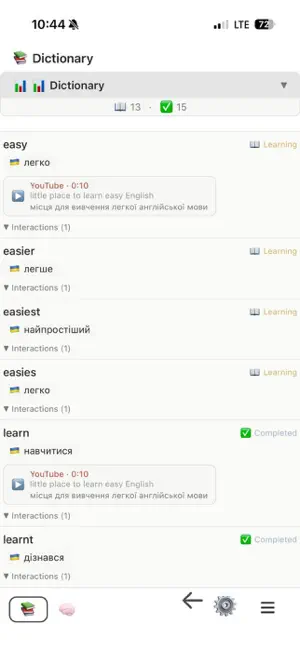
About Slova Lingua
Turn the videos you already love into your personal language classroom. Slova Lingua shows dual subtitles for online videos: the original language on top and your target language below. You always understand what is being said while staying immersed in the original audio. INSTANT WORD LOOKUP Tap any word in the subtitles to see its translation and hear its pronunciation using your device's built-in text-to-speech. No need to switch apps or break your flow. SMART PERSONAL DICTIONARY Save any word to your dictionary with a single tap. Tag words as "Learning" or "Learned" to track your progress. Saved words are automatically highlighted in subtitles across all your videos, so you always know which words you are working on. WORD REVIEW SLIDER A flashcard-style review page lets you go through your saved words one by one, hear their pronunciation, and update their learning status at any time. VIDEO WORD EXPLORER Browse every unique word that appears in a video's subtitles. Great for previewing vocabulary before watching or doing a deep dive afterwards. LEARNING STATISTICS Track your vocabulary growth over time. See how many words you have saved, how many are marked as learned, and how many are still in progress. DICTIONARY OVERVIEW View all your saved words in one place with a full summary: total words, learned count, and words currently in progress. FLEXIBLE SETTINGS Choose your interface language, subtitle original language, and translation language from the home screen. Customize your learning experience to match your goals. HOW IT WORKS 1. Open the app and choose your native and target languages. 2. In your video app, open any video that has captions. 3. Tap Share and choose Slova Lingua. 4. Watch with dual subtitles. Tap any word to see its translation and hear it pronounced. 5. Save words to your personal dictionary and tag them as you learn. 6. Review your saved words anytime with the built-in flashcard slider. 7. Track your progress and watch your vocabulary grow. Dual subtitles are available for videos that provide captions. Slova Lingua is an independent app. Videos are played in the video provider's own official player, and playback is never modified. Start turning your screen time into learning time, one word at a time.
What’s new
Version 1.0.33 · Updated October 12, 2026
Fix translation subtitle segments, rewrite youtube to oficial video player
App privacy
The developer, Oleksandr Sobchuk, reported these privacy practices to Apple.
Data Not Collected
The developer does not collect any data from this app.
Alternatives to Slova Lingua
Looking for apps like Slova Lingua? Here are 6 similar apps on the App Store.
-
 Vocabolo
-
 东京留学物语
-
 Saylo: AI Voice Translator
-
 Swipio: Language Flashcards
-
 EchoPod
-
 Immersea: Learn Languages
| App | Rating | Price | Last updated | Compare |
|---|---|---|---|---|
| Slova Lingua | – | Free | October 12, 2026 | |
| Vocabolo | – | Free | Sep 30, 2026 | Compare |
| 东京留学物语 | – | Free | Aug 8, 2026 | Compare |
| Saylo: AI Voice Translator | – | Free | Aug 12, 2026 | Compare |
| Swipio: Language Flashcards | – | Free | Oct 19, 2026 | Compare |
| EchoPod | – | Free | Oct 18, 2026 | Compare |
| Immersea: Learn Languages | – | Free | Jun 27, 2026 | Compare |
Compare Slova Lingua with the top alternatives: ratings, updates, ASO score and keyword gaps →