

Vitreo: Audiobook Player
Danil Kashin Book iPhoneiPadiPod touch
Vitreo: Audiobook Player is a free Book app for iPhone and iPad by Danil Kashin. Requires iOS 26.0. Updated October 19, 2026.
- Price
- Free
- on the App Store
- Size
- 77 MB
- Age 4+
- Updated
- Oct 19
- 2026 · v1.2
Screenshots
About Vitreo: Audiobook Player
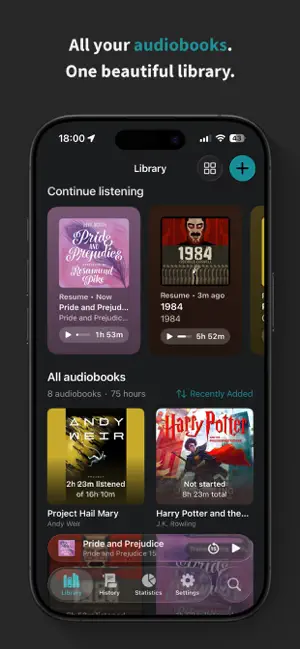
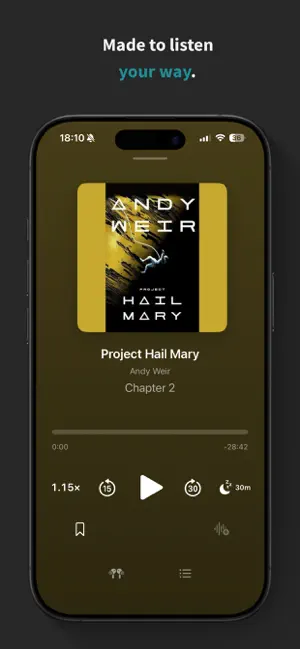
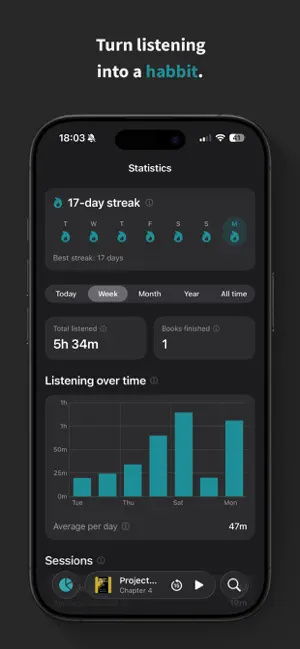
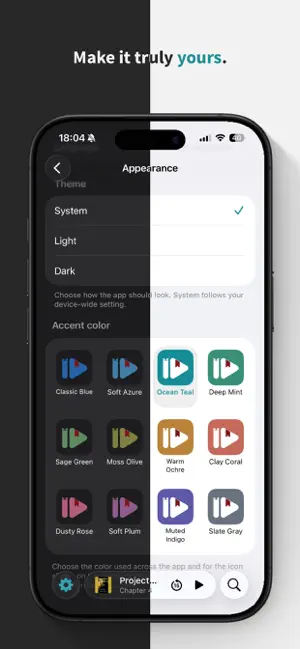
Bring your own audiobooks and turn them into a beautiful, private listening experience. Audiobook Player is a native iOS 26 player for the books you already own — import your files and enjoy them with gorgeous design, deep listening stats, and thoughtful controls that help you never lose your place. No accounts. No store. No cloud. Please note: Audiobook Player does not include or sell any audiobooks. It's a player for audio files you already own (MP3, M4A, and M4B). Designed for iOS 26 A native interface built on Apple's latest design, with cover-tinted Now Playing surfaces and a floating mini player that follows you across the app. Nothing is faked — every surface uses Apple's own materials, and it looks right in both light and dark. Bring your own audiobooks • Import from the Files app, or pick a folder or loose audio files • Upload wirelessly over Wi-Fi from any device with a web browser — Mac, Windows, or Linux — no cable or extra software needed • Automatic chapters, cover art, and organization from embedded tags • Supports MP3, M4A, and M4B Understand your listening • Current and best streaks, plus a last-7-days strip • Time listened by day, week, month, year, or all time • Books finished, session lengths, and your typical session • Habits like your peak listening hour and most-active day • Every metric explains, in plain language, exactly how it's measured Never lose your place • Auto-Rewind gently steps you back after a break, so you never lose the thread • Your position is saved continuously and restored the instant you return to a book Fall asleep without losing your spot • A sleep timer that fades out smoothly at a set time or the end of the chapter • Shake your phone to add more time — no need to unlock Play it your way • Adjustable speed from 0.5× to 3×, tuned to keep voices natural • Volume boost for quiet recordings • Bookmarks with your own notes • Chapter navigation and customizable skip buttons • Full control from the Lock Screen, Control Center, and AirPods • AirPlay and Bluetooth support • Background playback that keeps going with the screen locked Make the app your own • 12 accent colors that re-tint the whole app — and swap the Home Screen icon to match • Follow the system appearance, or lock light or dark • Set your own in-app language Your history, always actionable A day-by-day feed of everything you've listened to, where every row is a shortcut back into the audio. Continue where a session ended, start a book over, play from a bookmark, or undo a skip — all in a single tap. Search every word As a bonus, you can transcribe your books on-device and search your whole library by what's actually said. Tap any result to jump straight to that moment. Private by design Your library never leaves your device. No accounts, no tracking, no servers — playback, statistics, and transcription all happen on-device. The optional Wi-Fi transfer works only on your local network and is protected by a one-time passcode. Free to start Play up to 3 books free, forever, with basic playback. Go Premium Unlock your full library and every Premium feature — statistics, bookmarks, sleep timer, auto-rewind, volume boost, speed control, and transcription — with a 14-day free trial. Continue with a monthly or yearly subscription, or pay once with Lifetime. Terms of Use (EULA): https://www.apple.com/legal/internet-services/itunes/dev/stdeula/
What’s new
Version 1.2 · Updated October 19, 2026
New • Folders. Organize books into folders in Files or Finder and Vitreo shows them in your library, each with its own page, book count and total listening time. Rename, inspect or delete a folder from its context menu. • Drag and drop. Drag books and folders onto other folders. Rest on one and it springs open, just like in Files. Moved books keep their progress and bookmarks. • Open folders in place. In list view, a folder's arrow reveals its contents right below it. • Chapter numbers on the Lock Screen. Choose a style that puts the chapter in the title or the author line, with a live preview as you pick. • Chapter progress on the Lock Screen. The progress bar can follow the current chapter instead of the whole book. • Volume boost per book. Settings holds your default; changing the boost in the player applies it to that book only. • Per-book transcription. Turn transcription off for any book in its Edit sheet. Whatever is already transcribed stays searchable. • A Transcripts page in Transcription settings lists each book's transcript size and lets you delete them one by one. Improved • On iOS 27, search and tab headers follow the new system design. • The Library's layout button is now an options menu: Grid or List, three sizes (Large, Medium, Compact) and sorting, all in one place. • Tap the selected sort again to reverse it. A new Kind sort puts folders or books first. • Auto-rewind can start after just 10 seconds away and rewind by as little as 1 second. • Shake to Reset sensitivity is now a slider that shows your shake live, so you can test each level right there. Three new levels are more sensitive than before. • Book Info shows where the book is stored. • Wi-Fi upload: drop files anywhere on the page, or use the new Choose Files and Choose Folder buttons. The passcode submits by itself after the 6th digit. • Bookmarks glide into place when you change their sort. • The Book Detail play button stands out better on dark covers. Fixed • The player could show a different chapter length than the Lock Screen. Both now agree. • If a chapter failed to load, the next one could play under its name and overwrite your place. Vitreo now retries, then stops and keeps your place. • Picking a chapter while muted could later rewind you into the previous chapter. • Transcript sizes stayed inflated after deleting books. • Transcription progress didn't update when a rescan added or removed chapters. • Three-digit chapter numbers no longer wrap onto two lines.
App privacy
The developer, Danil Kashin, reported these privacy practices to Apple.
Data Not Collected
The developer does not collect any data from this app.
Alternatives to Vitreo: Audiobook Player
Looking for apps like Vitreo: Audiobook Player? Here are 6 similar apps on the App Store.
-
 LocalPlay: Audiobooks
-
 QUXA Book Player
-
 Audiobook Player - Offline
-
 Murmur: Audiobook Player
-
 Sonata Story: Audiobooks
-
 Ream: AI Text to Speech
| App | Rating | Price | Last updated | Compare |
|---|---|---|---|---|
| Vitreo: Audiobook Player | – | Free | October 19, 2026 | |
| LocalPlay: Audiobooks | – | Free | Jul 30, 2026 | Compare |
| QUXA Book Player | – | Free | Apr 13, 2026 | Compare |
| Audiobook Player - Offline | – | Free | Oct 19, 2026 | Compare |
| Murmur: Audiobook Player | – | Free | Jun 30, 2026 | Compare |
| Sonata Story: Audiobooks | – | Free | May 18, 2025 | Compare |
| Ream: AI Text to Speech | – | Free | Jun 15, 2026 | Compare |