

Newmonth: Zero-Based Budgeting
Bogdan-Florin Vlad Finance iPhoneiPadiPod touch
Newmonth: Zero-Based Budgeting is a free Finance app for iPhone and iPad by Bogdan-Florin Vlad. Rated 5.0/5 from 1 ratings. Requires iOS 26.0.
- Rating
- 5.0
- 1 ratings
- Price
- Free
- on the App Store
- Size
- 10 MB
- Age 4+
- Updated
- Oct 21
- 2026 · v0.12.0
Screenshots


About Newmonth: Zero-Based Budgeting
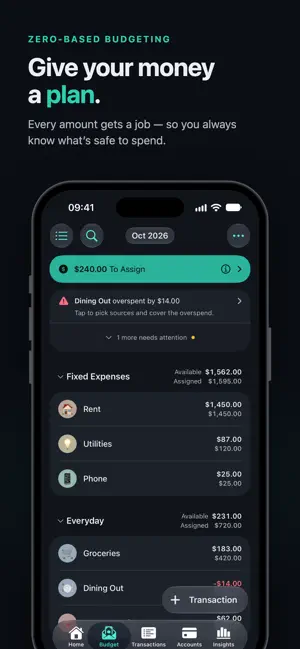
How much can you spend today? Not your balance — what's actually free after rent, November's insurance, and the trip you're saving for. newmonth answers that with one number, and keeps it honest when plans change. KNOW WHAT'S SAFE TO SPEND Zero-based budgeting in one sentence: every amount gets a job before you spend it. Assign your income to categories until To Assign reads zero. From then on, each category's Available is the honest answer to "can I afford this?". YOUR MONEY NEVER LEAVES YOUR ICLOUD No account to create. No bank logins. No servers — because there are none. Your budget lives on your iPhone and iPad and syncs through your own iCloud — nobody else can read it. Bring your budget over from a YNAB export or any CSV, import statements as CSV, OFX, or CAMT, and export everything whenever you like. No lock-in. PRICING newmonth is free today. Paid plans arrive with a future update, for less than a coffee a month — and if you're here before then, you get 3 months free. Pick a yearly or monthly subscription, or a one-time purchase that's yours for good; without one, the app keeps working read-only, and exporting your data always stays free. Details: newmonth.app/pricing BUDGET TOGETHER, WITHOUT THE "WHO BOUGHT THIS?" Share your plan with a partner through iCloud — you both see the same numbers, live, on your own devices. Give each account an owner, and every device opens new transactions on the right account and remembers payees per person. Every transaction shows who entered it, and Home shows what your partner added. ADD A PURCHASE BEFORE YOU LEAVE THE SHOP • Under five taps: type the amount, pick the payee, and the category and account fill in from last time • Paid with Apple Pay? A one-time Shortcuts automation drops every tap into your budget, category included • Does your bank email or text you about payments? A Shortcuts automation forwards those alerts to newmonth and they become transactions — no bank login needed • Bills that repeat post themselves on schedule — you only enter what's new OPEN THE APP, SEE WHAT'S LEFT TO DO Home is a worklist, not a dashboard: what's still to assign, what needs attention (overspending, underfunded goals, a statement ready to pay, transactions to review), and what's due this month. SAVE AT YOUR OWN PACE Five kinds of goals — monthly, weekly, yearly, a savings balance, or needed by a date — each one shows how far along you are. OVERSPENT? FIX IT WHERE YOU SEE IT The moment a category goes over, the fix is right there: cover it from another category or from To Assign, one tap. Assigning works the same way: tap Assign Money, pick a category, type (a calculator is built in), and watch To Assign count down; nothing is saved until you finish. Or apply a rule — Underfunded, last month, your twelve-month average — each previews its total. Over-assigned? One tap takes back what sits beyond your goals. CREDIT CARDS WITHOUT THE HEADACHE A credit card is just another account: spend from the category, pay the card with a transfer. No phantom payment category, no money moving behind your back — if your categories are positive, the cash for the bill is already there. Carrying a balance? Budget toward it monthly; the app tells you when the statement is ready to pay. Loans, cash, savings, investments with their gains, and net-worth tracking accounts live alongside. SEE WHERE YOU STAND Spending trends, category breakdowns, how many months ahead you live — and the odd fact your budget has been quietly collecting about you. POWERFUL UNDERNEATH, SIMPLE ON TOP Under the calm surface is the whole method: splits, transfers, scheduled transactions, flags, reconciliation against your real statements. On iPad, it spreads into columns and sidebars. Most of the effort went into making sure you rarely notice — simple enough for the person in your household who'd rather not budget, complete enough to trust with your financial data.
What’s new
Version 0.12.0 · Updated October 21, 2026
The biggest update yet. NEWMONTH ON IPAD newmonth is now a real iPad app. On an iPad, an open iPhone Duo, or an iPhone Plus or Pro Max held sideways, it uses every inch: Budget lines up Assigned, Spent and Available in columns with the category's details right beside the list, Transactions and Accounts get sidebars, and Home and Insights spread into two columns. A FRESH LOOK FOR BUDGET • A bold To Assign card, green when you're on track, coral when you've assigned too much • Alerts now live right in the list, and the + and month buttons are Liquid Glass • Figures roll to their new value when you assign, cover overspending or fund a goal • Smoother everywhere: lists, groups and charts animate instead of jumping NEW • Add up a receipt as you type it: + − × ÷ right above the number pad • Track what your investments are worth with Update Value, and see in Net Worth what you saved and what your investments earned • Category Trends gives every category its own page: average spending, how often you shop, and who got the money • Settings → iCloud Sync shows whether your changes reach iCloud, and says plainly when your iCloud storage is full Plus a pile of fixes and improvements. Thanks for budgeting with newmonth!
App privacy
The developer, Bogdan-Florin Vlad, reported these privacy practices to Apple.
Data Not Collected
The developer does not collect any data from this app.
Alternatives to Newmonth: Zero-Based Budgeting
Looking for apps like Newmonth: Zero-Based Budgeting? Here are 6 similar apps on the App Store. The highest rated is Scout: Family Budget (5.0/5), and all 6 are free to download.
-
 Scout: Family Budget
5.0
Scout: Family Budget
5.0
-
 Budget Envelope Planner: Pla
-
 BFF: Your Budget Companion
5.0
BFF: Your Budget Companion
5.0
-
 CashMap — Envelope Budget
-
 DayLedger - Simple Budget
5.0
DayLedger - Simple Budget
5.0
-
 Envelope Budget - Fundwise
5.0
Envelope Budget - Fundwise
5.0
| App | Rating | Price | Last updated | Compare |
|---|---|---|---|---|
| Newmonth: Zero-Based Budgeting | 5.0 / 5 (1 rating) | Free | October 21, 2026 | |
| Scout: Family Budget | 5.0 / 5 (3) | Free | Oct 20, 2026 | Compare |
| Budget Envelope Planner: Pla | – | Free | Jul 9, 2026 | Compare |
| BFF: Your Budget Companion | 5.0 / 5 (3) | Free | Aug 27, 2026 | Compare |
| CashMap — Envelope Budget | – | Free | Oct 19, 2026 | Compare |
| DayLedger - Simple Budget | 5.0 / 5 (1) | Free | Oct 16, 2026 | Compare |
| Envelope Budget - Fundwise | 5.0 / 5 (1) | Free | Sep 13, 2026 | Compare |