

Tailwind: Running Plans
Jacob Suchorabski Health & Fitness iPhoneiPadiPod touchApple Watch
Tailwind: Running Plans is a free Health & Fitness app for iPhone and iPad by Jacob Suchorabski. Requires iOS 17.0. Updated October 30, 2026.
- Price
- Free
- on the App Store
- Size
- 14 MB
- Age 4+
- Updated
- Oct 30
- 2026 · v2026.11
Screenshots


About Tailwind: Running Plans
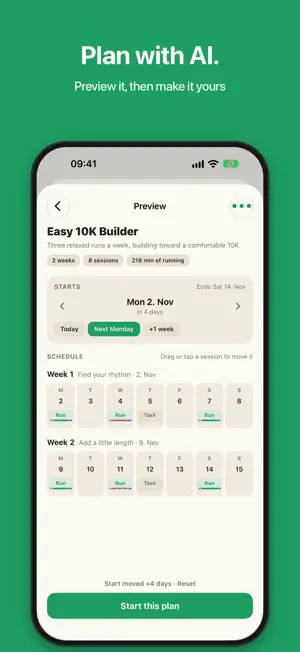
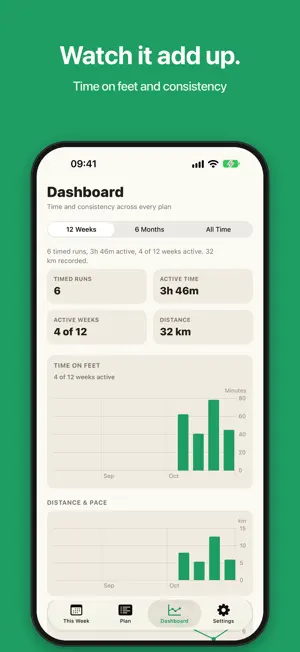
Effort and time first. Not pace. Not distance. Tailwind is a weekly running plan for beginners and casual runners. Follow a simple plan, run by feel with spoken interval cues, and let the weeks stack up. Start with Couch to 5K, come back after a break, or build your own plan with AI. THIS WEEK Monday through Sunday on one strip. Swipe a workout to mark it done, skip it with no penalty, or move it to another day. Already ran without the timer? Tap the icon and check it off. THE RUN A full-screen interval timer with a large countdown, phase colors, and spoken cues. Cues duck your music or podcast, then hand it back. They keep working with the screen locked. Longer intervals get a quiet check-in every couple of minutes. Auto-pause is on by default. The timer stops when you stop, and starts again once you are actually moving. Brief shuffles while you stand still do not count. Need a week off? Pause the whole plan. When you come back, everything still ahead shifts forward by the time you were away. You pick up where you left off. Never behind. Already mid-plan? Set the day you actually started. The schedule slides so today lands in the right week. Then check off what you have already done. PLANS Four starters ship with the app: • 8-Week Running Plan for general fitness • Couch to 5K, a run/walk build toward a continuous run • Return to Running after a break • Busy Runner Maintenance for short weeks Or plan with AI. Describe what you want, choose the length and runs per week, and Tailwind writes the prompt for your favorite AI chat. Paste the reply and it is checked on the spot. Preview the schedule on real dates, move the start day, and drag single sessions to other days before you commit. You can also import a plan file, add checkbox tasks like yoga or pilates on any day, and lengthen or shorten a plan from Settings. HANDS-FREE Ask Siri to start today's run, start a free run, or tell you what your week looks like. Pause, resume, or end a run by voice on iPhone or Apple Watch. Every action works in Shortcuts and on the Action button. AFTER THE RUN GPS routes, maps, distance, and Apple Health are optional and off by default. They are for looking back at a finished run, not for coaching you while you are out. A dashboard tracks time on feet and how consistently you showed up. Recorded distance, pace, heart rate, and energy appear only when you choose to collect them. ALSO • Apple Watch app for guided and free runs • Layouts made for iPhone Duo, open or closed • Today widget on the Home Screen • Live Activity on the Lock Screen • Optional reminder on workout days • Optional iCloud sync for plans and completed runs WHAT TAILWIND LEAVES OUT No pace targets while you run. No social feed. No streak that punishes a skipped day. Skip is a real option. The log stays honest. No account and no ads. Your plans and runs stay on your devices, plus your private iCloud if you turn on sync. Crash reports never include health data, routes, or location. Tailwind is not medical advice. Privacy Policy: https://suchorab.ski/projects/tailwind/privacy/ Support: https://suchorab.ski/projects/tailwind/support/
What’s new
Version 2026.11 · Updated October 30, 2026
PLAN WITH AI, THEN MAKE IT YOURS Describe the plan you want and Tailwind writes the prompt for your favorite AI chat. Paste the reply and Tailwind checks it right away, with a fix-it prompt if something is off. Then preview the whole schedule on real dates: move the start day, snap it to next Monday, or drag a single session to another day. Nothing is saved until you start the plan. SIRI, SHORTCUTS AND THE ACTION BUTTON Say "Start today's run in Tailwind", "Start a free run" or "What's my week". Pause, resume or end a run on your iPhone or Apple Watch without touching the screen. Every action is in Shortcuts and Spotlight, and you can put one on the Action button. MADE FOR IPHONE DUO Unfold it and the run player, This Week and the dashboard spread across both halves, with nothing sitting on the fold. ALSO NEW - A run's details now open with your total time up top and a bar showing how the run split into its phases. - Finished runs are saved before the player closes. If a save fails, you can retry without logging the run twice. - Distance from Apple Health saved by older versions now stays out of iCloud too. - Live Health recording starts reliably when you begin a run right after discarding one.
App privacy
The developer, Jacob Suchorabski, reported these privacy practices to Apple.
Data Not Linked to You
The following data, which may be collected but is not linked to your identity, may be used for the following purposes:
- Health & Fitness: Health, Fitness
- Location: Precise Location
- Diagnostics: Crash Data, Performance Data, Other Diagnostic Data
Used for: App Functionality
Alternatives to Tailwind: Running Plans
Looking for apps like Tailwind: Running Plans? Here are 6 similar apps on the App Store. The highest rated is Drivn: Calisthenics Workouts (5.0/5), and all 6 are free to download.
-
 Drivn: Calisthenics Workouts
5.0
-
 Scrambled Brain - Health Diary
5.0
-
 Reformed Pilates Sweden
-
 The Mood Meter!
5.0
-
 Training Calendar
5.0
-
 Run Planner - Workout Builder
| App | Rating | Price | Last updated | Compare |
|---|---|---|---|---|
| Tailwind: Running Plans | – | Free | October 30, 2026 | |
| Drivn: Calisthenics Workouts | 5.0 / 5 (2) | Free | Oct 28, 2026 | Compare |
| Scrambled Brain - Health Diary | 5.0 / 5 (1) | Free | Aug 18, 2026 | Compare |
| Reformed Pilates Sweden | – | Free | Aug 13, 2026 | Compare |
| The Mood Meter! | 5.0 / 5 (1) | Free | Sep 18, 2026 | Compare |
| Training Calendar | 5.0 / 5 (2) | Free | Jul 9, 2026 | Compare |
| Run Planner - Workout Builder | – | Free | Oct 10, 2026 | Compare |