

ToteTracker: Home Inventory
ARTIFICERS ANVIL LLC Productivity iPhoneiPadiPod touch
ToteTracker: Home Inventory is a free Productivity app for iPhone and iPad by ARTIFICERS ANVIL LLC. Rated 4.4/5 from 5 ratings. Requires iOS 15.0.
- Rating
- 4.4
- 5 ratings
- Price
- Free
- on the App Store
- Size
- 25 MB
- Age 4+
- Updated
- Oct 5
- 2026 · v2026.9.30
Screenshots


About ToteTracker: Home Inventory
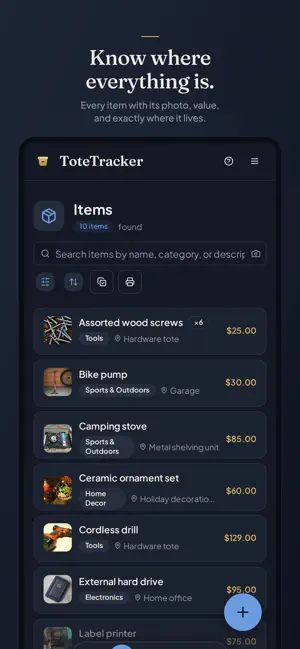
Know where everything is. ToteTracker keeps a searchable inventory of your whole home — names, categories, values, and locations, all in one place. Catalog a room in minutes, and when you need something later it's a search, not an excavation. Adding things • Smart Photo Scan — photograph an item and review what the scan found: name, category, and an estimated value. Confirm it or correct it. • Smart Multi-Item Scan — one photo of a full shelf, each item cataloged on its own. • Import Receipt — photograph a paper receipt, or pick a screenshot or PDF of an order confirmation, and each product line becomes a draft you review. Groceries and other consumables are skipped and listed, so you can still include one if you want it. • Barcode lookup — point the camera at a product barcode and pull details from a database of millions of products. • Product Lookup — scan any barcode for product details on the spot, without adding it to your inventory. • Iris, the voice assistant — tell Iris what you're putting away and keep your hands free. Finding things again • Smart Search matches meaning, not exact words. Search "winter gear" and find the jacket and the gloves, even if you never typed those words. • Search with the camera, too — snap a photo and Smart Search finds the items that look like it. • Organize items into nested containers (rooms, shelves, totes, boxes) so every item has a place — and mark an item as in use when it leaves its spot. • Container labels — print QR labels for your containers, or blank labels you claim as you pack, and stick them on. Scanning one with ToteTracker or any camera app opens that box's contents. Labels your boxes already carry can be linked and scanned the same way. • Duplicate detection checks your inventory daily, flags items that look logged twice, and merges the ones you confirm. Scan a barcode you already logged and ToteTracker offers to open that item instead of adding it again. Made for iPhone and iPad • App lock — switch it on and ToteTracker asks for Face ID, Touch ID, or your passcode before it opens. • Push notifications — an alert when you're invited to a shared inventory, when someone joins yours, or when your trial is about to end. • Sign in with Apple — sign up or sign in with your Apple Account. Share with your household Invite your partner, family, or roommates by email and everyone sees and edits the same inventory. Sharing is part of Plus: the owner needs Plus, and the people they invite can be on any plan. On every device, online or off Your inventory syncs across your devices and stays readable offline, so you can look things up in a basement or a storage unit with no signal. Encrypted in transit and at rest. Row-level security means only you and the people you invite to a shared inventory can read it. Export your data anytime. Getting started Every new account starts with a 7-day free trial of Plus, no credit card required. After the trial your account moves to the Free plan with everything still there: up to 50 items and 10 containers in one inventory, and 10 Smart Actions a month for photo scans, receipt import, and Iris. Plus, billed monthly or annually, adds Smart Search, barcode lookup, sharing, duplicate detection, room for the whole house, and 100 Smart Actions a month that roll over. One-time Smart Action packs are available on either plan. A ToteTracker account is required. Subscription details ToteTracker Plus is an auto-renewable subscription, available as Plus Monthly (1 month) and Plus Annual (1 year). Payment is charged to your Apple Account at confirmation of purchase. The subscription renews automatically unless auto-renew is turned off at least 24 hours before the end of the current period. Manage or cancel your subscription in your App Store account settings after purchase. Privacy policy: https://www.totetracker.app/privacy Terms of Use (EULA): https://www.apple.com/legal/internet-services/itunes/dev/stdeula/
Ratings & reviews
4.4
5 ratings
What’s new
Version 2026.9.30 · Updated October 5, 2026
A Free plan, a Moving Pass, and a simpler start. • Free plan — when your trial ends, your account stays open with everything in place: up to 50 items and 10 containers, and 10 Smart Actions a month for photo scans, receipt import, and Iris. • Plus — new monthly and annual prices. Plus adds Smart Search, barcode lookup, sharing, duplicate detection, room for the whole house, and 100 Smart Actions a month that roll over. • Moving Pass — 90 days of Plus and 500 Smart Actions in one purchase, with no subscription. Made for a move, an estate, or a big cataloging project. • Export your inventory anytime, up to 20 times a week. • Container labels print with a larger QR code that scans from farther away. • Iris answers faster and keeps long lists of results tidy. • New accounts open on a welcome screen and the free trial starts on its own.
App privacy
The developer, ARTIFICERS ANVIL LLC, reported these privacy practices to Apple.
Data Linked to You
The following data, which may be collected and linked to your identity, may be used for the following purposes:
- Contact Info: Email Address, Name
- Search History: Search History
- Identifiers: User ID, Device ID
- Usage Data: Product Interaction
- Diagnostics: Crash Data, Performance Data
- Purchases: Purchase History
- User Content: Photos or Videos, Other User Content
Used for: Analytics, App Functionality
Alternatives to ToteTracker: Home Inventory
Looking for apps like ToteTracker: Home Inventory? Here are 6 similar apps on the App Store. The highest rated is KeepSpot (5.0/5), and all 6 are free to download.
-
 Timely: Countdowns & Alarms
-
 KeepSpot
5.0
KeepSpot
5.0
-
 Task Compass for Reminders
-
 My Nest : Daily Planner App
5.0
My Nest : Daily Planner App
5.0
-
 Stacks: Routine & Habits
4.0
Stacks: Routine & Habits
4.0
-
 Widgetminder
4.8
Widgetminder
4.8
| App | Rating | Price | Last updated | Compare |
|---|---|---|---|---|
| ToteTracker: Home Inventory | 4.4 / 5 (5 ratings) | Free | October 5, 2026 | |
| Timely: Countdowns & Alarms | – | Free | Oct 16, 2026 | Compare |
| KeepSpot | 5.0 / 5 (1) | Free | Sep 25, 2026 | Compare |
| Task Compass for Reminders | – | Free | Oct 14, 2026 | Compare |
| My Nest : Daily Planner App | 5.0 / 5 (4) | Free | May 27, 2026 | Compare |
| Stacks: Routine & Habits | 4.0 / 5 (2) | Free | Jan 12, 2025 | Compare |
| Widgetminder | 4.8 / 5 (4) | Free | Mar 1, 2026 | Compare |