

Courtside AI
Charles Kindig Sports iPhoneiPadiPod touch
Courtside AI is a free Sports app for iPhone and iPad by Charles Kindig. Rated 5.0/5 from 3 ratings. Requires iOS 14.0. Updated July 20, 2026.
- Rating
- 5.0
- 3 ratings
- Price
- Free
- on the App Store
- Size
- 16 MB
- Age 4+
- Updated
- Jul 20
- 2026 · v1.1.1
Screenshots


About Courtside AI
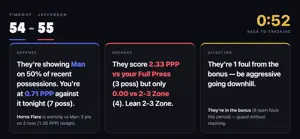
Courtside AI is the assistant coach on your bench iPad. It turns what you tap into what to call — during the game, not on the bus ride home. Most stat apps hand you a box score after it's over. Courtside AI is built for the timeout: it reads tonight's possessions and gives you the three calls that matter, in type you can read from three feet away. TWO-TAP TRACKING Tag their defense once — it sticks until they change it. Tap where the shot went up, tap made or missed. That's a possession, for both teams. TIMEOUT MODE Call a timeout and the screen becomes a 10-second read: the offensive call, the defensive call, and the situation — with the numbers as fine print, not the headline. THE LIVE ADVISOR The end-game decision chart, running in real time. Up 3 with 10 seconds? Down 5 with 40? It already knows the play — and it names the foul target. EVERY PLAY VS EVERY COVERAGE A live points-per-possession matrix: which sets are working against man, which die against the 2-3 — tonight and across the season. FULLY OFFLINE No signal in the gym? Nothing changes. Courtside AI runs entirely on your iPad — no login, no loading spinner at the worst possible moment. PRIVATE BY DESIGN Your roster is a list of minors' names. It never leaves your device. No accounts, no tracking, nothing sold. Ever. FREE SCOREBOOK. PRO ASSISTANT COACH. The scorebook is free forever — track a game, see the box score, share it. Courtside AI Pro adds the judgment layer: timeout decision cards, the live end-game advisor, play-by-coverage analytics, full season history and player pages, an opponent scouting book, and cloud backup with a live mirror on a second device. Pro is $9.99/month or $49.99/year, with a 7-day free trial. Cancel anytime, and your data always stays on your device. Built by a coach, for the bench. Terms of Use (EULA): https://www.apple.com/legal/internet-services/itunes/dev/stdeula/
What’s new
Version 1.1.1 · Updated July 20, 2026
Paste your roster straight in from Hudl, MaxPreps, or any spreadsheet — one tap and your team's ready. Nothing leaves your iPad.
App privacy
The developer, Charles Kindig, reported these privacy practices to Apple.
Data Linked to You
The following data, which may be collected and linked to your identity, may be used for the following purposes:
- Contact Info: Email Address
Used for: Developer’s Advertising or Marketing
Data Not Linked to You
The following data, which may be collected but is not linked to your identity, may be used for the following purposes:
- Purchases: Purchase History
- User Content: Other User Content
- Identifiers: User ID
Used for: App Functionality