

WorkTimer|ManageMultiStepTimer
Ryota Yamamoto Utilities iPhoneiPadiPod touch
WorkTimer|ManageMultiStepTimer is a free Utilities app for iPhone and iPad by Ryota Yamamoto. Requires iOS 15.0. Updated September 11, 2026.
- Price
- Free
- on the App Store
- Size
- 32 MB
- Age 4+
- Updated
- Sep 11
- 2026 · v1.1.1
Screenshots


About WorkTimer|ManageMultiStepTimer
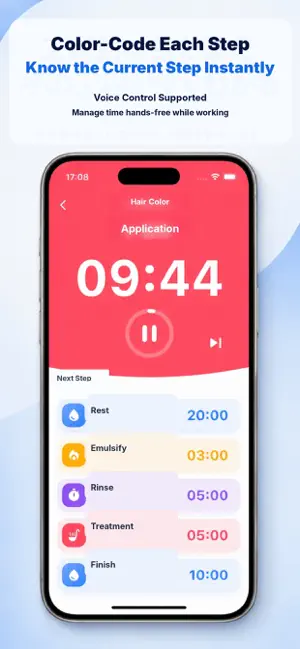
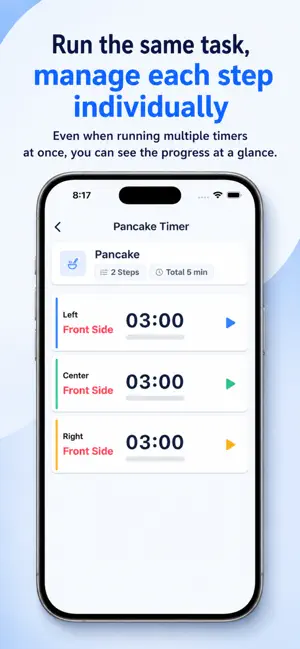
Work Timer keeps the steps and timing of repeatable work together in one place. Create a routine for tasks with a set order and duration, such as cooking, prep work, cleaning, inspection, training, or study. While a timer is running, you can see the current step, remaining time, and next step at a glance. Main Features • Manage multiple steps as one routine • Set a duration, color, and icon for each step • Advance manually or automatically • Create routines from templates • Repeat an entire routine • Run multiple timers at the same time • Receive step-finished notifications in the background • Restore an interrupted timer session • Follow timers on the Lock Screen and Dynamic Island with Live Activities • Record work logs and view graphs by period • Control timers and receive feedback by voice • Export CSV files • Back up data as JSON and share routines • Keep the screen awake while a timer is running Recommended For • Cooking, prep work, and plating • Cleaning and opening checklists • Inspection, research, experiments, and timed measurements • Strength training, HIIT, and stretching • Pomodoro focus and break cycles • Daily routines Premium Premium is a one-time purchase that removes routine and multi-timer limits, unlocks CSV export, and removes ads. You can try CSV export once before purchasing Premium. Keep repeatable work clear, smooth, and easy to follow with Work Timer.
What’s new
Version 1.1.1 · Updated September 11, 2026
Work Timer is now more useful for repeatable tasks. • Create routines from templates • Repeat an entire routine a set number of times • Receive step-finished notifications in the background • Restore an interrupted timer session • Follow timers on the Lock Screen and Dynamic Island with Live Activities • Use the redesigned Premium screen • Try CSV export once without Premium • Improved CSV compatibility and reliability • Improved timer and work-log displays and behavior
App privacy
The developer, Ryota Yamamoto, reported these privacy practices to Apple.
Data Used to Track You
The following data may be used to track you across apps and websites owned by other companies:
- Identifiers: Device ID
Data Linked to You
The following data, which may be collected and linked to your identity, may be used for the following purposes:
- Usage Data: Product Interaction, Advertising Data, Other Usage Data
- Identifiers: Device ID
- Purchases: Purchase History
Used for: Third-Party Advertising, Developer’s Advertising or Marketing, Analytics, App Functionality
Data Not Linked to You
The following data, which may be collected but is not linked to your identity, may be used for the following purposes:
- Location: Coarse Location
- Diagnostics: Performance Data, Crash Data
- Other Data: Other Data Types
Used for: Third-Party Advertising, Developer’s Advertising or Marketing, Analytics, App Functionality
Alternatives to WorkTimer|ManageMultiStepTimer
Looking for apps like WorkTimer|ManageMultiStepTimer? Here are 6 similar apps on the App Store. The highest rated is Pounds to Kilograms Converter (1.9/5), and all 6 are free to download.
-
 Fuuuga: Multi Interval Tracker
-
 IntVtimer
-
 TimeSpots
-
 Pounds to Kilograms Converter
1.9
-
 Multistage Timers
-
 Simple OneTap Timer
| App | Rating | Price | Last updated | Compare |
|---|---|---|---|---|
| WorkTimer|ManageMultiStepTimer | – | Free | September 11, 2026 | |
| Fuuuga: Multi Interval Tracker | – | Free | Oct 23, 2026 | Compare |
| IntVtimer | – | Free | Aug 6, 2025 | Compare |
| TimeSpots | – | Free | Apr 9, 2025 | Compare |
| Pounds to Kilograms Converter | 1.9 / 5 (17) | Free | Aug 15, 2026 | Compare |
| Multistage Timers | – | Free | Jul 17, 2025 | Compare |
| Simple OneTap Timer | – | Free | Jan 27, 2026 | Compare |