

BelliedMonkey Translator
ZHAO ZHANG Utilities iPhoneiPadiPod touchMac
BelliedMonkey Translator is a free Utilities app for iPhone and iPad by ZHAO ZHANG. Rated 5.0/5 from 1 ratings. Requires iOS 16.4.
- Rating
- 5.0
- 1 ratings
- Price
- Free
- on the App Store
- Size
- 48 MB
- Age 4+
- Updated
- Sep 29
- 2026 · v1.18.0
Screenshots


About BelliedMonkey Translator
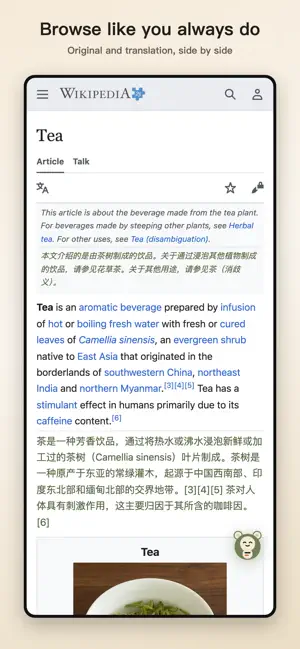
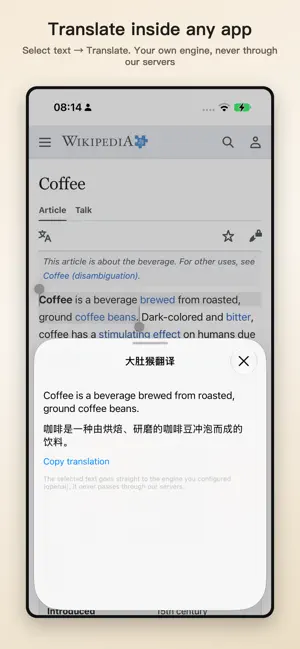
BelliedMonkey Translator puts two languages on screen wherever you read, watch or talk — and the sentences you actually read come back as review cards. LIVE SUBTITLES (APP) Bilingual subtitles for whatever your device is playing. On Mac, the app listens to system audio and shows a floating subtitle bar that stays on top of any app, even full-screen video (macOS 26 or later). On iPhone, play a video or podcast out loud in any app, and a picture-in-picture window scrolls the original and the translation, sentence by sentence. Recognition happens on the device; Live Subtitles need iOS 26 / macOS 26. CONVERSATION · LIVE INTERPRETER (APP) Talk across a language gap. Both sides speak freely; each sentence is transcribed, translated and can be read aloud. Speech is recognised on the device, so the audio never leaves it. Requires iOS 26 / macOS 26. SYSTEM TRANSLATION (IPHONE) Select text in any app and tap Translate — BelliedMonkey answers with the engine you configured, in a small sheet, without leaving the app. Choose BelliedMonkey once in Settings › Apps › Translate › Default Translate App. Sentences you translate this way can go straight into your review deck. Requires iOS 18.4 or later. WEB PAGES, SIDE BY SIDE The Safari extension (also on Chrome and Firefox) keeps every paragraph's original text with the translation right below it. No switching tabs, no losing your place. VIDEO DUAL SUBTITLES YouTube, podcasts and web video get sentence-matched dual subtitles. No captions? Turn on AI transcript subtitles. DOCUMENT TRANSLATION Open a PDF, Word file or image and read it page by page, original and translation side by side. LEARN AS YOU READ Sentences you actually read can become review cards on a forgetting curve — read, listen and write practice, sentence notes and read-aloud. Optional sync lets your phone review what you read on your computer. YOUR ENGINE, YOUR CHOICE Bring your own AI service key, or any compatible endpoint. PRIVACY, SPELLED OUT Your keys and settings stay on your device. With your own key, text goes straight to the provider you chose and is not stored. Live Subtitles and on-device transcription never record audio. We send anonymous usage events (which features are used, never page content), and you can turn them off in Settings. No ads. The whole app is open source and free to download.
What’s new
Version 1.18.0 · Updated September 29, 2026
· Browser extension · Fixed: When a YouTube transcript can't be fetched, the extension no longer retries the same request over and over — repeated requests are exactly what triggers YouTube's transcript blocking, which takes down even the native captions that still worked. At most 3 requests per video now, with a clear "subtitles unavailable" instead of a broken pipeline. · App & browser extension · Fixed: When the network keeps timing out, translation stops by itself after 5 consecutive timeouts instead of retrying forever — tap "Retry" to resume. No more endless spinning. · App (iPhone / iPad / Mac) · New: The first screen asks what you came for — "read web pages", "listen", or "both" — and picks the path to match; if you only want listening, it no longer pushes you toward the extension. · App (iPhone / iPad) · Fixed: The "open the extension in Safari" banner no longer keeps coming back — one tap counts as asked; and an extension you already set up is no longer treated as missing just because it hasn't captured sentences yet. · App & browser extension · Improved: Review opens without signing in; finishing a session ends more clearly (one graded card completes it); the hardly-used "check page" link is gone. · App & browser extension · Internal: The entire UI layer now runs on React — same behavior, same look — so future interface work moves faster.
App privacy
The developer, ZHAO ZHANG, reported these privacy practices to Apple.
Data Linked to You
The following data, which may be collected and linked to your identity, may be used for the following purposes:
- Contact Info: Email Address
- User Content: Other User Content
- Browsing History: Browsing History
- Other Data: Other Data Types
Used for: App Functionality
Data Not Linked to You
The following data, which may be collected but is not linked to your identity, may be used for the following purposes:
- Usage Data: Product Interaction
Used for: Analytics, App Functionality
Alternatives to BelliedMonkey Translator
Looking for apps like BelliedMonkey Translator? Here are 6 similar apps on the App Store. The highest rated is PocketAdmin – IT Toolkit (5.0/5), and 5 of the 6 are free to download.
-
 PocketAdmin – IT Toolkit
5.0
PocketAdmin – IT Toolkit
5.0
-
 Liberation - OCD Recovery
-
 Margin: Reclaim your space
5.0
Margin: Reclaim your space
5.0
-
 TriTab Calc: Multi Calculator
3.7
TriTab Calc: Multi Calculator
3.7
-
 Text Scanner AI: OCR & Scan
5.0
Text Scanner AI: OCR & Scan
5.0
-
 WhiteGlove: No Fingerprinting
5.0
WhiteGlove: No Fingerprinting
5.0
| App | Rating | Price | Last updated | Compare |
|---|---|---|---|---|
| BelliedMonkey Translator | 5.0 / 5 (1 rating) | Free | September 29, 2026 | |
| PocketAdmin – IT Toolkit | 5.0 / 5 (1) | Free | Oct 19, 2026 | Compare |
| Liberation - OCD Recovery | – | Free | Oct 5, 2026 | Compare |
| Margin: Reclaim your space | 5.0 / 5 (1) | Free | Aug 28, 2026 | Compare |
| TriTab Calc: Multi Calculator | 3.7 / 5 (3) | 2.99 USD | Oct 10, 2026 | Compare |
| Text Scanner AI: OCR & Scan | 5.0 / 5 (2) | Free | Oct 7, 2026 | Compare |
| WhiteGlove: No Fingerprinting | 5.0 / 5 (1) | Free | Oct 7, 2026 | Compare |